18
9.エラー表示
●センサーエラー
●下限設定温度エラー
例:
350
°
C (400
°
C – 50
°
C)
下限設定温度
設定温度
OR
650
°
F (750
°
F – 100
°
F)
下限設定温度
設定温度
●ヒーター端子短絡エラー
●はんだこてエラー
●ディテクションエラー
センサー/ヒーター切れ(センサー回路を含
む)の可能性がある場合、
が表示され、
電源が遮断されます。
注記:
こて先が正しく挿入されていない場合にもセンサー
エラーとなります。
グリップを接続したときに、一瞬
が表示さ
れる事がありますが、故障ではありません。
センサー検出温度が設定温度と下限設定温度
との差以上に大きくなった場合に、
が表
示され、警報ブザーが鳴ります。こて先温度が
設定温度範囲内に上昇すれば、ブザーは鳴り止
みます。
例:
設定温度が 400℃/750℉で、下限設定温度が
50℃ /100 ℉のとき、ヒーターは通電されているに
もかかわらず、温度が降下し続け、最終的に左に示
す値より低下した場合、表示される値が点滅してこ
て先温度が低下していることを示します。
こて先が間違った方向に挿入されたり、こ
の商品では使えないこて先が挿入されたり、
コネクタとの接続部に異物が混入したりし
ていると、
が点滅表示され、警報ブザー
が連続して鳴ります。
こて接続コードがステーションに接続され
ていないか、間違ったはんだこてが接続さ
れると、
が表示されます。
こて先温度が高温になっているモデル
FM-2022/2023 を接続して電源を ON にし
た場合、表示部に が表示されますが、
故障ではありません。
そのまま、正常に動作するまで約 10 秒程度
お待ちください。
65
●
Setting/changing the
temperature
Temperature setting range
ºC ................. 200 to 450ºC
ºF ................. 400 to 840ºF
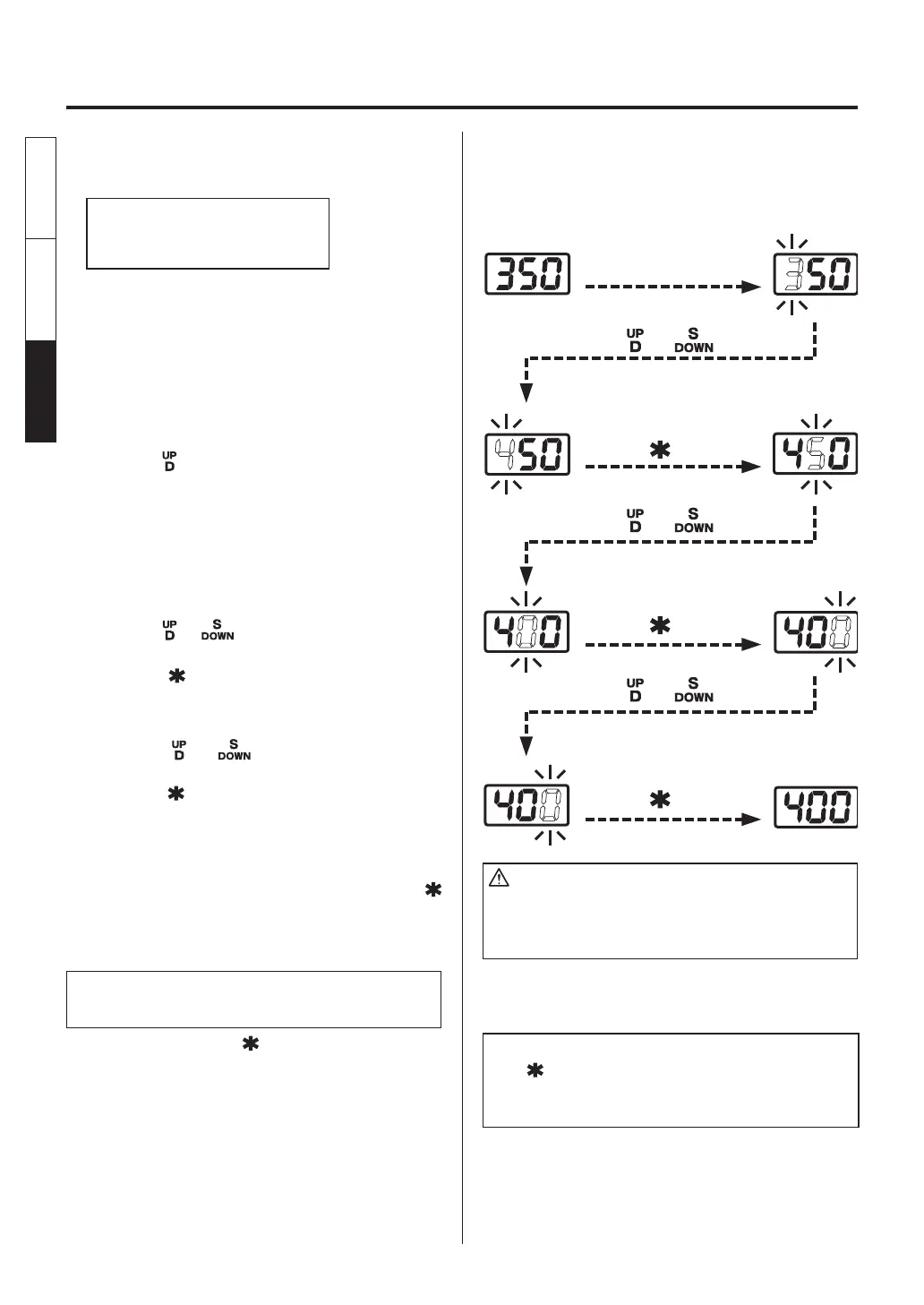
Example: Changing the temperature for
channel D from 350ºC to 400ºC
1. Check that the current temperature
display is set to channel D.
See “Channel operation” (preceding
pages).
●
If the temperature for channel S is displayed,
press the button to change the channel.
2. Insert the control card into the station.
●
The hundreds digit of the display begins to
fl ash. This indicates that the unit has entered
the temperature setting mode and data may
be entered.
3. Enter the hundreds digit.
●
Press the
or button to set the hundreds
digit. When the desired figure is displayed,
press the button. The tens digit begins to
fl ash.
4. Enter the tens digit.
●
Press the or button to set the tens
digit. When the desired figure is displayed,
press the button.The units digit begins to
fl ash.
5. Enter the units digit.
●
Set the desired units digit in the same way
as for the tens digit, and then press the
button. The temperature is recorded to the
internal memory, and heater control begins
after the new set temperature is displayed.
To change the set temperature with
the control card in the station:
●
Press and hold the
button for at least one
second.
The current temperature setting is displayed,
and then the hundreds digit begins to flash
one second later. This indicates that the
station has entered the temperature setting
mode. Follow steps 3-5 above to set the
temperature.
CAUTION
If the power is turned off without completing the
temperature setting, the new set temperature will not
be recorded.
NOTE:
If the button is not pressed and held for at least one
second, the current set temperature is displayed, and then
the tip temperature is displayed.
Insert the card.
Press the or button.
Press the or button.
Press the or button.
Press the button once.
Press the button once.
Press the button once.
English
中文 日本文
日本文 中文
English















 To Next Page