16
M.A.R.V.E.L. Installation Operation & Maintenance Manual
MARVELIO&M/022009/rev1/EN
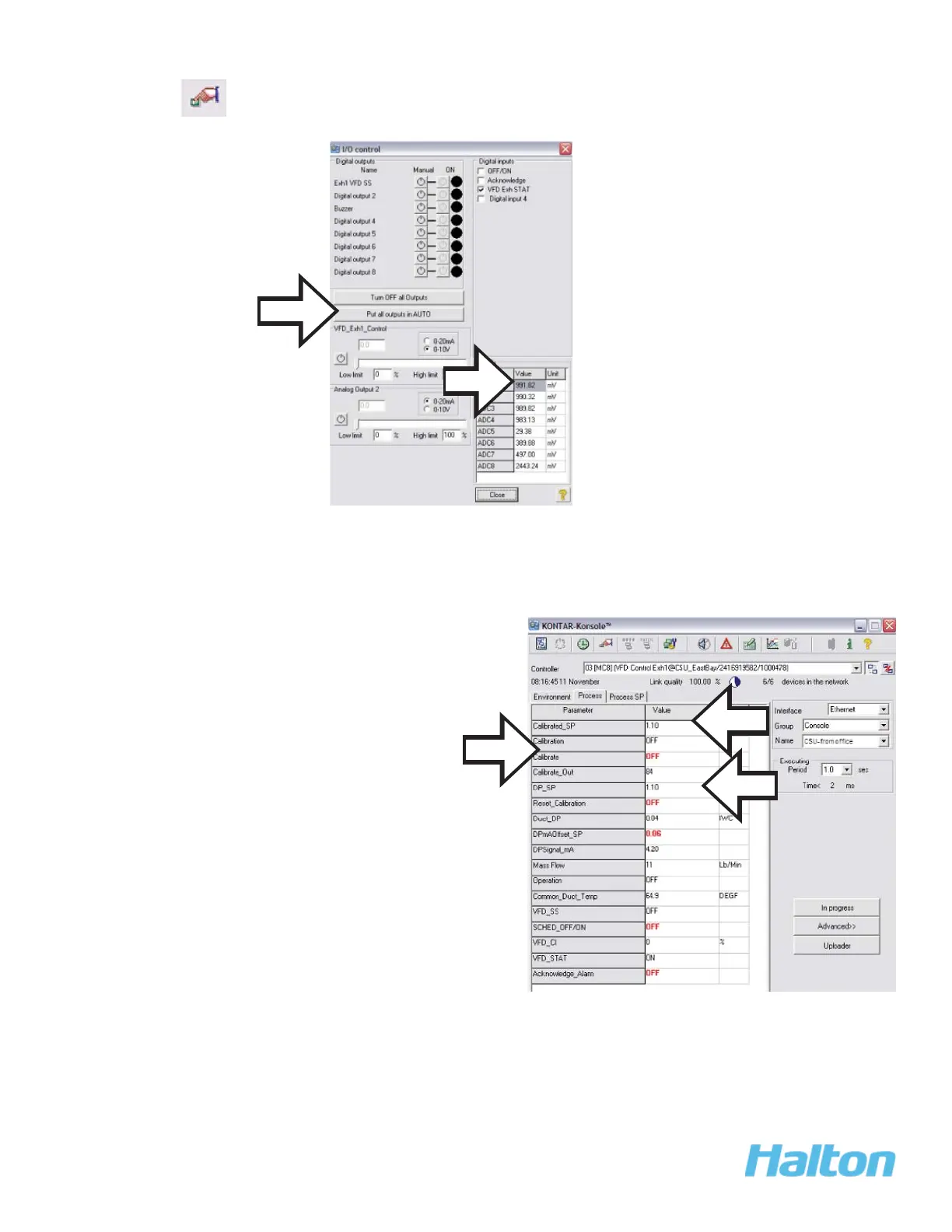
2. Open the Controller (using the dropdown list) and open the I/O screen using the icon
from the toolbar. Click Put all outputs in AUTO.
3. Repeat for all controllers
4. When the system is in automatic mode, select the VFD controller screen. Select the
Process tab.
5. When the calibration is completed, confi rm that there is a value > 0 in the Calibrated_
SP fi eld.
NOTE:
If calibration must be aborted, select the Reset_Calibration fi eld. When
ready to re-run the calibration process, return to step 4a.
2.
a.
NOTE:
a. Click Calibrate.
This turns on the calibrate
function and the calibration
process beings. During the
calibration process, leave
ALL settings along.
b. Monitor the Calibrate_Out
fi eld. It starts at 100%
and counts down until
calibration complete (e.g.,
>0%)
5.
4a.
4.



 To Next Page