19
M.A.R.V.E.L. Installation Operation & Maintenance Manual
MARVELIO&M/022009/rev1/EN
IRIS™ Sensor Removal/Replacement
To remove the IRIS™ Sensor, follow these steps:
Disconnect the IRIS™ sensor from the terminal block located in the Capture Jet
1.
®
hood. Refer to the terminal block diagram on the Halton-supplied wiring diagram for
the correct terminations points.
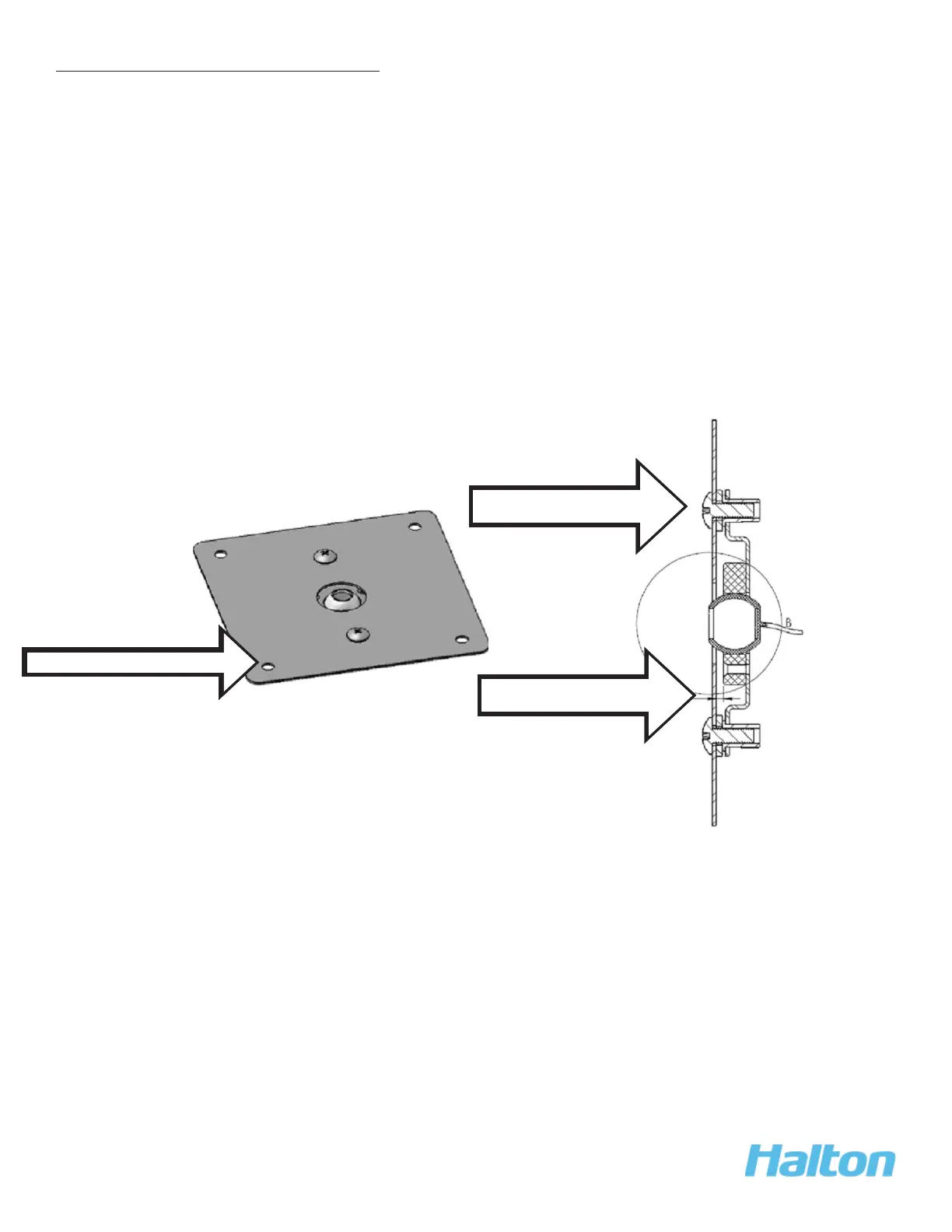
Remove the face plate of the sensor by removing the 4 face plate screws.
2.
Lift out the face plate and sensor and gently pull out the sensor wires.
3.
Remove the sensor bracket from the face plate by removing the 2 screws on the
4.
faceplate.
Remove the sensor from the sensor bracket by removing the 3 screws.
5.
Reverse the steps when replacing the IRIS™ sensor (Halton Part # 18037).
6.
2. Remove 4 faceplate screws
4. Remove 2 screws from
faceplate
4. Remove 3 screws from
mounting bracket



 To Next Page