15
M.A.R.V.E.L. Installation Operation & Maintenance Manual
MARVELIO&M/022009/rev1/EN
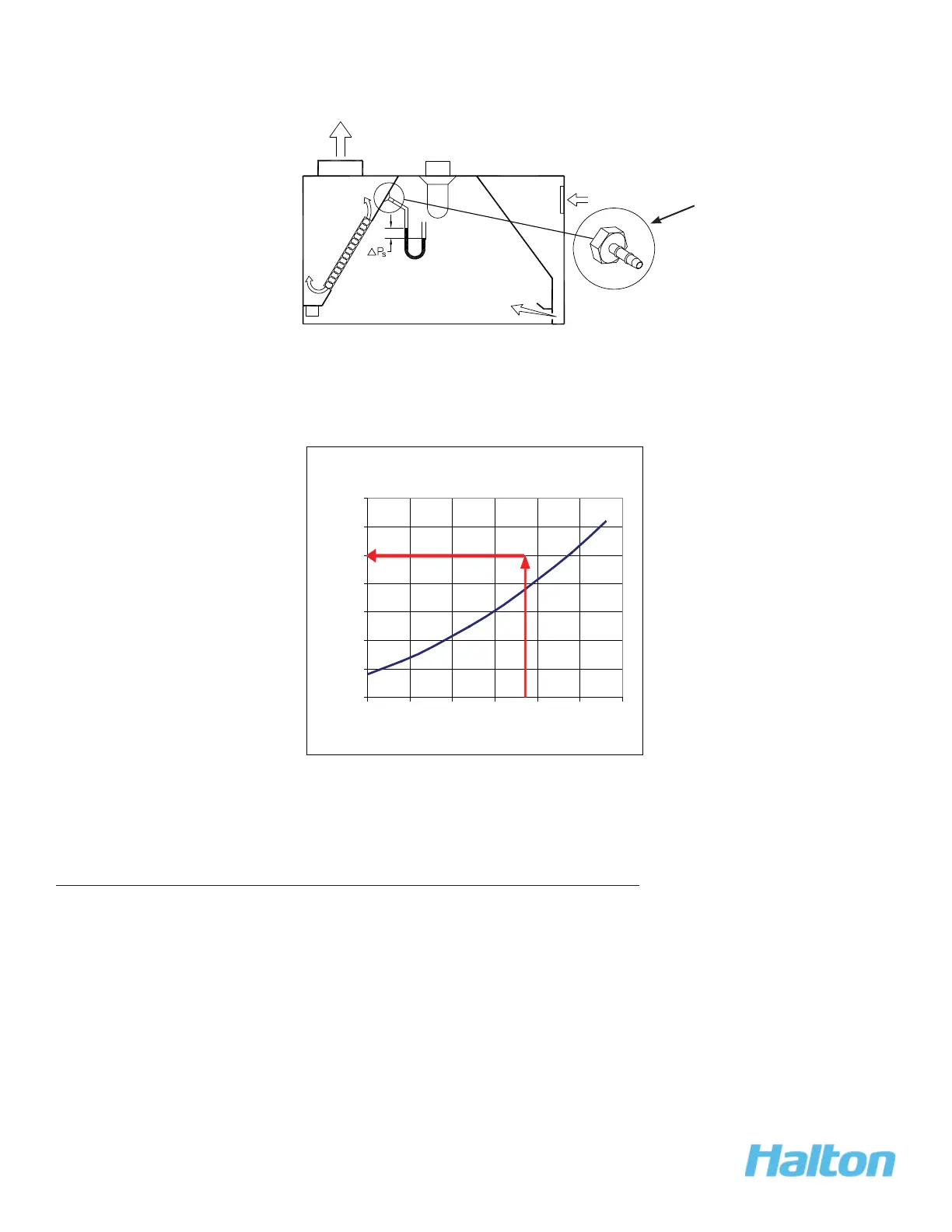
3. Using the T.A.B. Port, take a reading in IWC.
4. Using the table below, confi rm the design airfl ow (e.g., 1700 cfm), based on the T.A.B.
Reading (e.g., 0.19 IWC).
“Example Only”
10. Calibrate M.A.R.V.E.L System
(for multiple units with a single fan)
NOTE:
Make sure that the fi lters are in place prior to calibration.
To calibrate the M.A.R.V.E.L. system, follow these steps:
1. Open the Konsole™ software (see KONTAR-Konsole™
Software
, page 25 for more
details).
Close up view of
T.A.B. Port
Exhaust T.A.B. Readings vs. Airflow
0.00
0.05
0.10
0.15
0.20
0.25
0.30
0.35
800 1050 1300 1550 1800 2050 2300
Airflow (cfm)
T.A.B. Reading (In. WC)



 To Next Page