25
M.A.R.V.E.L. Installation Operation & Maintenance Manual
MARVELIO&M/022009/rev1/EN
M.A.R.V.E.L. System Monitoring and Support
Types of Monitoring
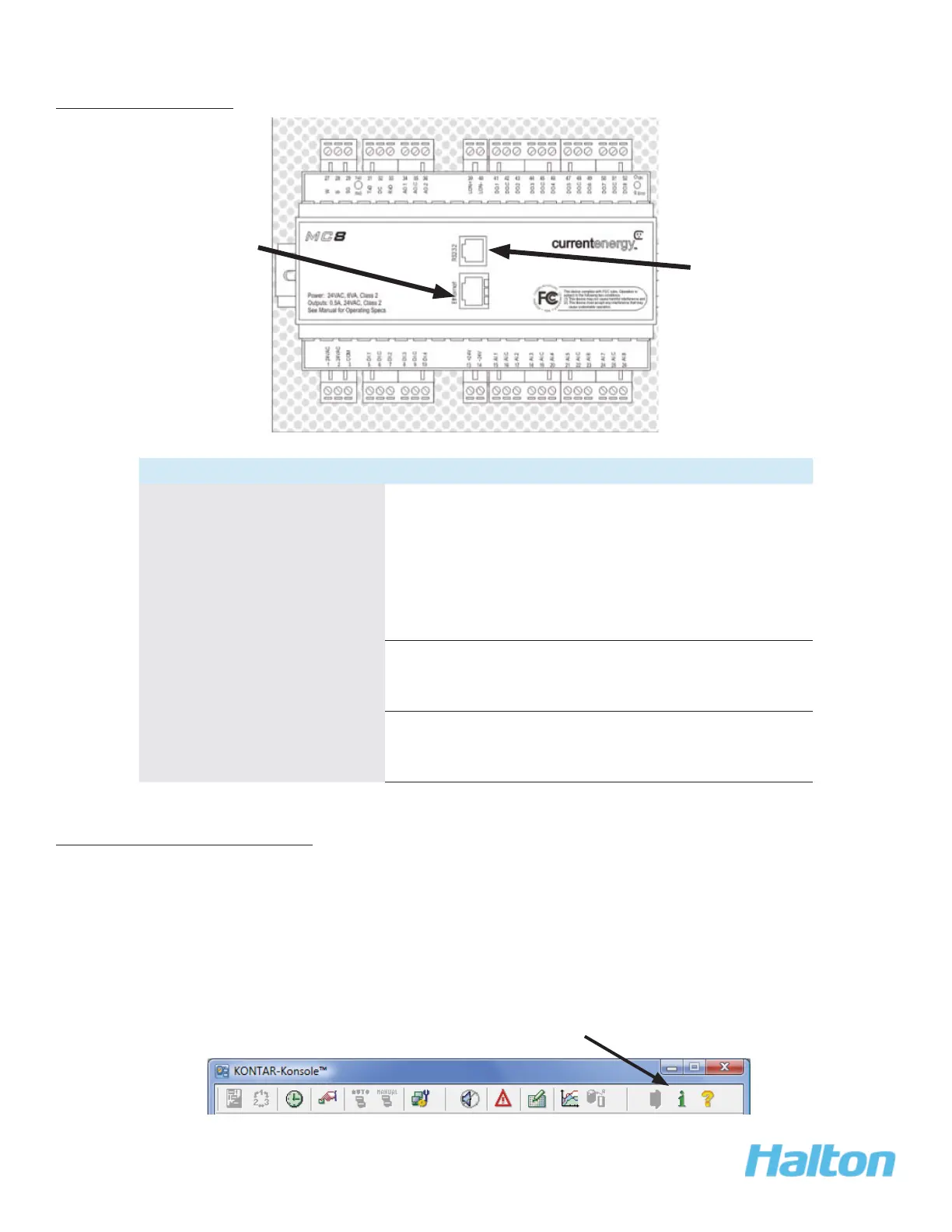
Type of Mounting Details
Permanent Ethernet-
connection for 24/7
monitoring
Optional.•
Permanent internet monitoring using SCADA •
graphical interface.
By using a unique password and ID, user can •
check system status and, depending on access
levels, change parameters and alarms.
Temporary Ethernet
connection, as required, for
support
Temporary Ethernet connection for startup/•
troubleshooting by Halton Technical Support
only
Temporary cable to laptop
connection, as required, for
support
RS232 cable connection to laptop pre loaded •
with KONSOLE™ software for diagnostic
support.
KONTAR-Konsole™ Software
The KONTAR-Konsole™ Commissioning and Diagnostic Software Interface displays set operating
parameters and actual values. When accessed and reviewed by a trained Halton technician, support
and troubleshooting can be offered.
NOTE:
Only Halton- trained technicians should access this software.
For additional details and support with KONTAR-Konsole™ software, use the on-line help from the
toolbar.
Ethernet connection
RS232 Cable
connection
Online Help



 To Next Page