Microlab
®
STAR User Manual
610766/02 Page 147 of 225
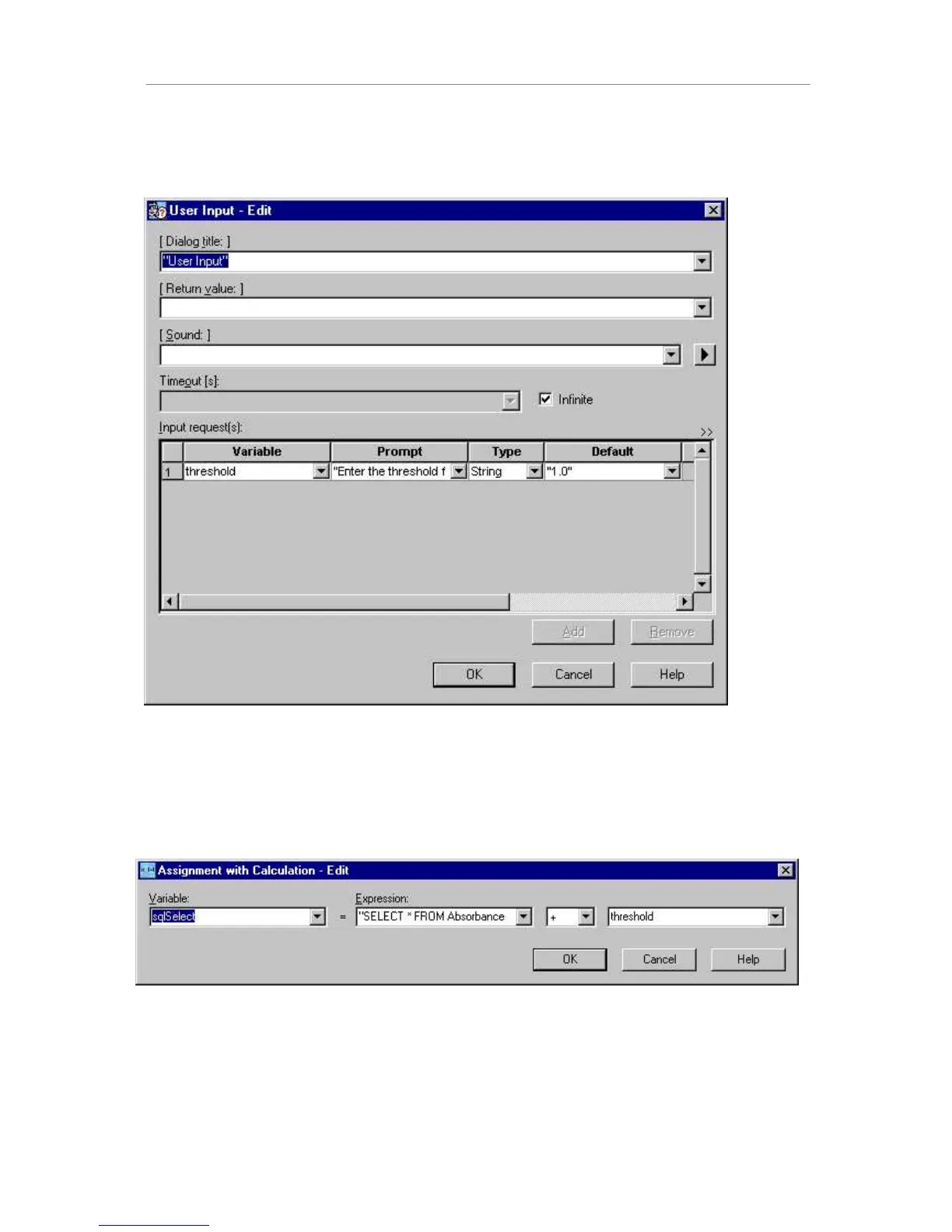
The first step in this method is to request the user to input a threshold value for the
absorption (“threshold”). This threshold – although numeric – is entered as a string. This is
because, in the next step, a valid SQL database selection statement is created.
The dialog title is the text on the blue top bar of the dialog. The variable name is “threshold”,
the text for the prompt is “Enter threshold for hits” (within quotation marks), the variable type
is string, and the default value is “1.0” (within quotation marks). All other input fields are
optional.
Within the next step, a calculation is made with the string variable read from the user input.
The variable “sqlSelect” is also a string. It is generated by adding the “sql selection
statement” and the threshold value. This statement, if applied to the data set, selects only the
records (lines) having absorbance values A>threshold.



 To Next Page