4 - System Setup
80
Tractor Installation
IntelliTrack Setup
When attaching a sprayer with IntelliTrack to the tractor, the IntelliTrack sensor needs calibration for the steering to work
properly.
1. Connect the chains for the IntelliTrack sensor to the tractor.
2. Find a flat surface where it is possible to drive at least 50 metres in a straight line.
÷
NOTE! A very uneven surface will cause angle reading to fluctuate, which results in a inaccurate calibration.
3. Unfold the boom.
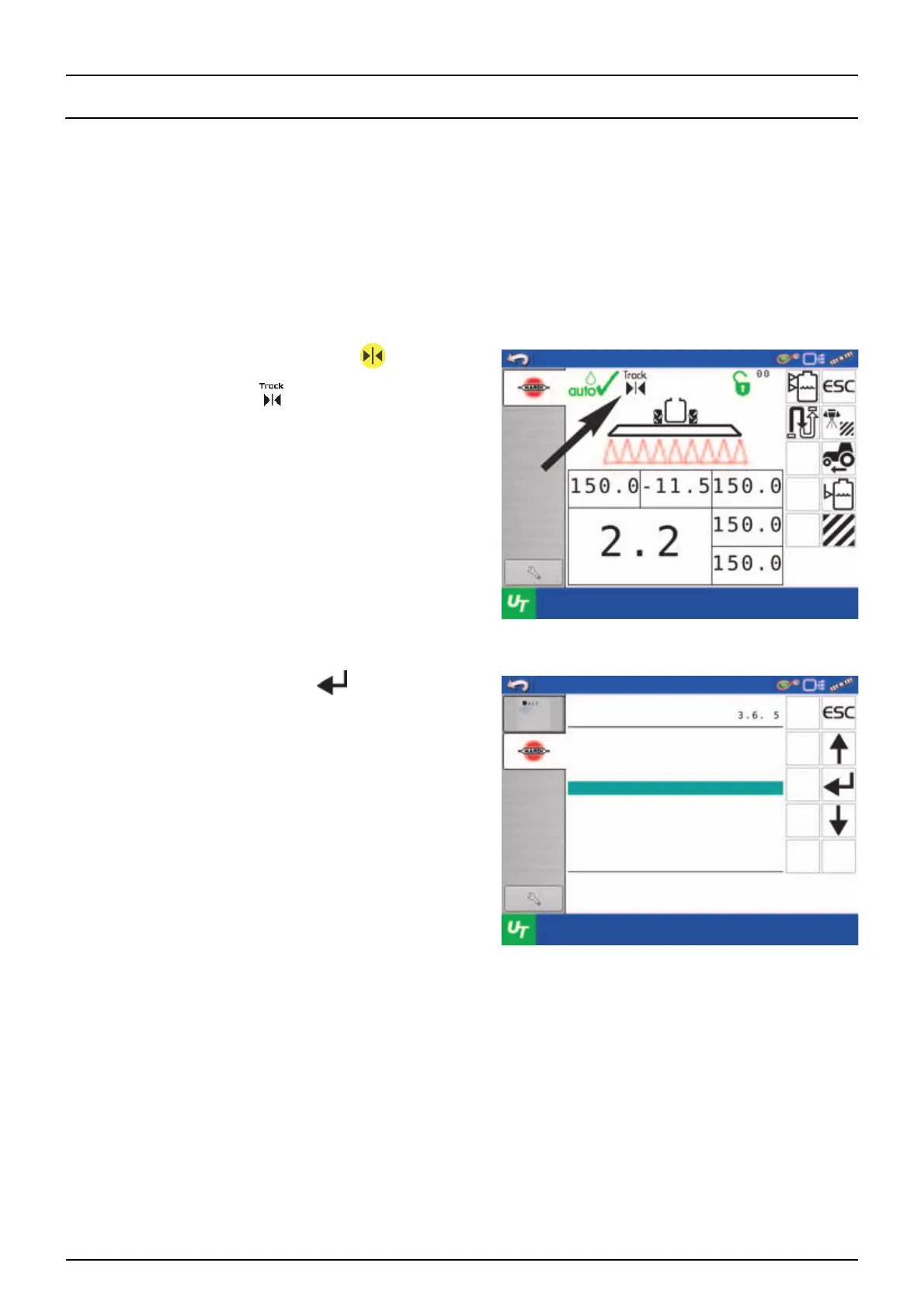
4. Align the drawbar by keep pressing the button. Keep
pressing the button until the movements stops in centre
position. Check that the symbol is shown in the display.
5. Then go to menu 3.6.5 and press .
Volume rate
Slant angle
Prog. rate
Prog. rate
Prog. rate
Boom pressure
bar
liter / ha
degree
liter / ha
liter / ha
liter / ha
Track calibration
Track width
Tractor drawbar
Dead zone for regulation
Track sensitivity
Hitch sensor calibration
Safety Factor
End-stop Calibration
Disable align while reverting
Menu



 To Next Page
 Loading...