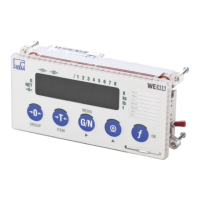
WE2111
A3983-1.0 en/de/fr 29
10 Start-up (quick start guide)
This section describes how to switch on the device and
what needs to be set in order to carry out weighing. The
example is based on a single-range balance for not legal
for trade operation without a password. A load cell with
10kg maximum capacity (1,000 divisions) is connected,
a 10kg weight is provided. Further information about the
various balance types and set up can be found in the
Operating Manual.
This section assumes that all necessary connections
have been made (load cell(s), power supply, etc.).
The buttons on the front panel are indicated here as
graphics with the button label, e.g.
for the button
G/N (MENU).
10.1 Switching on
"
Switch on the WE2111 power supply.
The WE2111 runs through various self-tests after
being switched on. The display initially shows bOOt,
then all segments of the display and all light displays
are activated, e.g. including the limit values and units.
The display then tests all digits from 0 to 9, i.e., the
display runs through all digits from 000000 to 999999.
Finally, the firmware version (e.g. P60c) and the
calibration counter (e.g. C00008) are displayed before
the actual measured value appears.


 To Next Page