GR SG9013086000000000
CP2000 Center
confidential
B.1.7
1.6 Adjusting the front lay deflection
Paper
run / Feeder
0
12345
Job
Name
–2
Cover
guide,
air adjustment
1
2
3
3
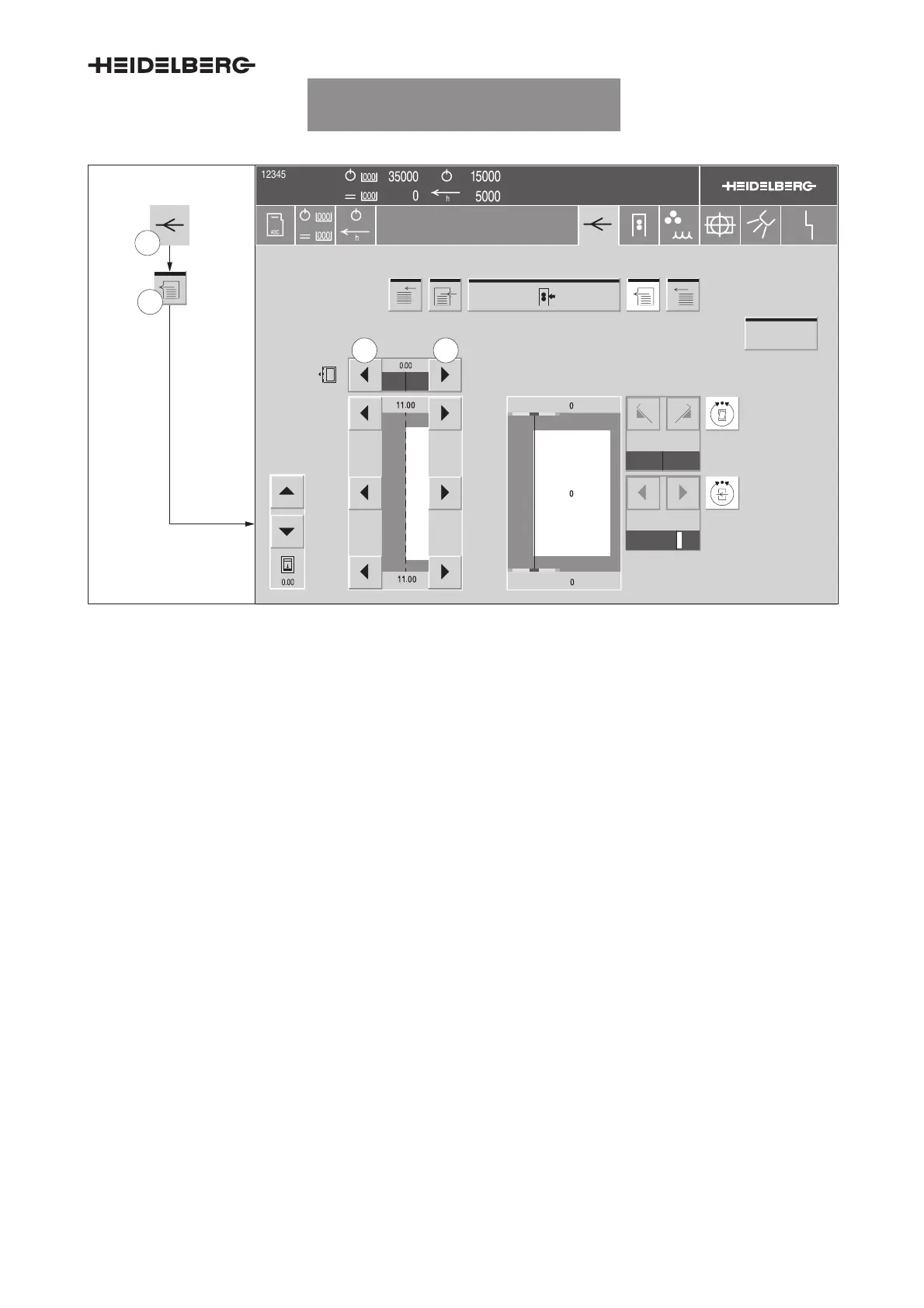
Fig. 7 Adjusting the front lay deflection
The Sheet travel/Feeder menu enables you to set
the deflection of the front lay shaft in order to adjust it
to the cut edge of the printing material.
1. Press the
Sheet travel
button (Fig. 7/1) in the
banner line. The Paper run menu appears.
2. Press the
Feeder
button (Fig. 7/2). The Paper
run/Feeder menu (Fig. 7) appears.
3. Use the arrow keys (Fig. 7/3) to adjust the front
lay deflection. The set value is displayed be-
tween the two arrow keys.
Adjustment range
D Typically: +0.5...–0.3 mm
D At a gripper bite of 11.9 mm: +0.4...–0.3 mm
D At a gripper bite of 12 mm: +0.3...–0.3 mm
UTKSG9013008000000000005



 To Next Page