GR SG9013087000000000
CP2000 Center
confidential
B.1.8
1.7 Switching automatic pull lay cleaning on/off
Basic adjustment / feeder
12345
Job
Name
Basic
adjustment
1
2
3
4
5
6
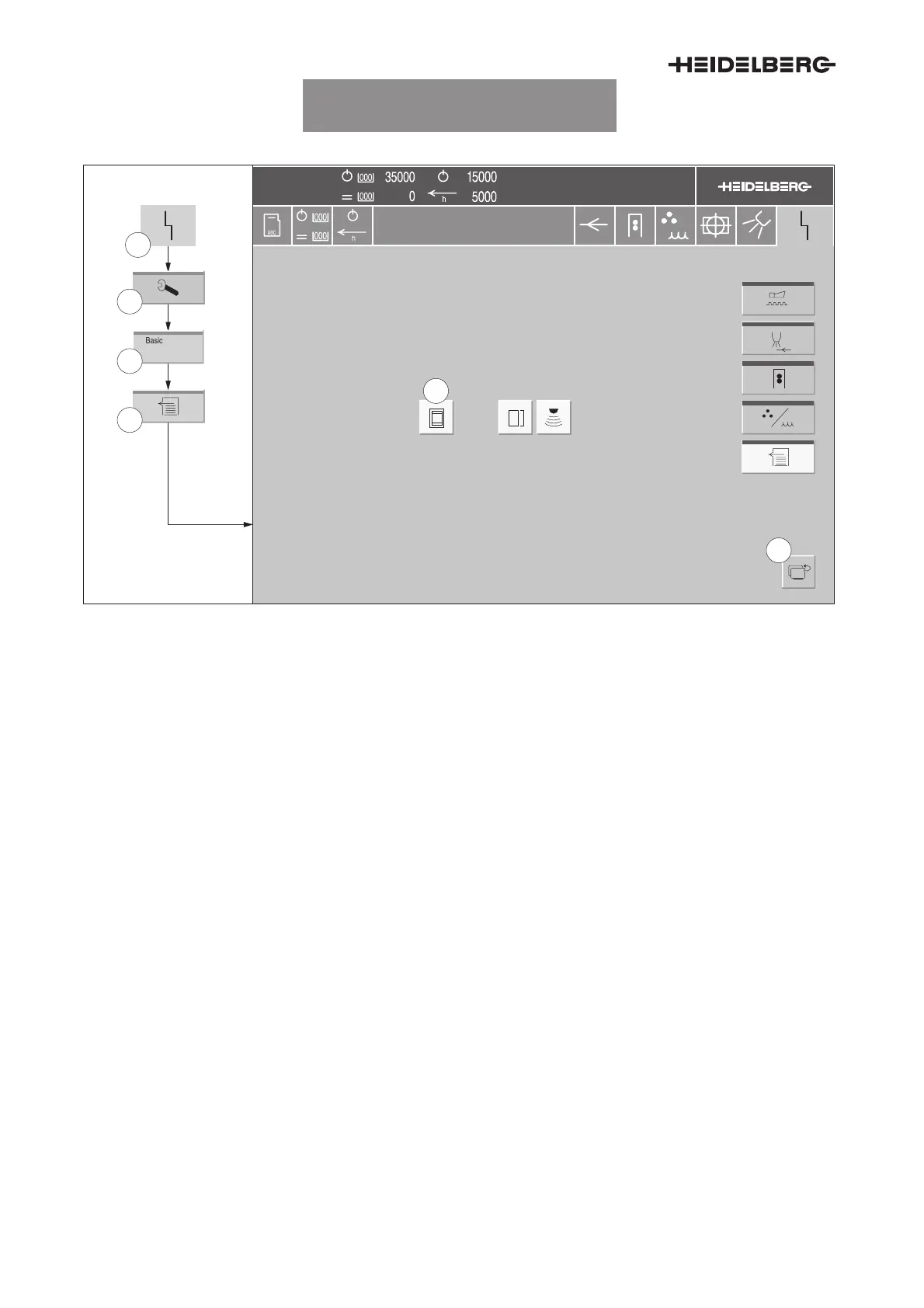
Fig. 8 Switching automatic pull lay cleaning on/off
The Basic adjustments/Feeder menu enables you
to switch on/off the automatic pull lay cleaning func-
tion. When automatic pull lay cleaning is switched
on, the pull plate is blown free after each washup of
the blanket.
1. In the header, press the button
Malfunction
(Fig. 8/1). The Malfunction menu appears.
2. Press the
Service
button (Fig. 8/2). The Ser-
vice menu appears.
3. Press the
Basic settings
button (Fig. 8/3). The
menu Basic settings/Start-up warning signal
appears.
4. Press the
Feeder
button (Fig. 8/4). The Basic
adjustments/Feeder menu (Fig. 8) appears.
5. To switch on or off automatic pull lay cleaning:
Press the button (Fig. 8/5). The button is high-
lighted when automatic pull lay cleaning is
switched on.
6. To exit the menu: Press the
Return
button
(Fig. 8/6), or a button in the banner line.
UTKSG9013008000000000006



 To Next Page