GR SG9010170000003000
Safety
confidential
A.1.2
2 Testing the Preset Plus feeder protective devices with CP2000
2.1 Testing the protective devices
Service
/ Safety
12345
Job
Name
Safety
5
2
3
4
1
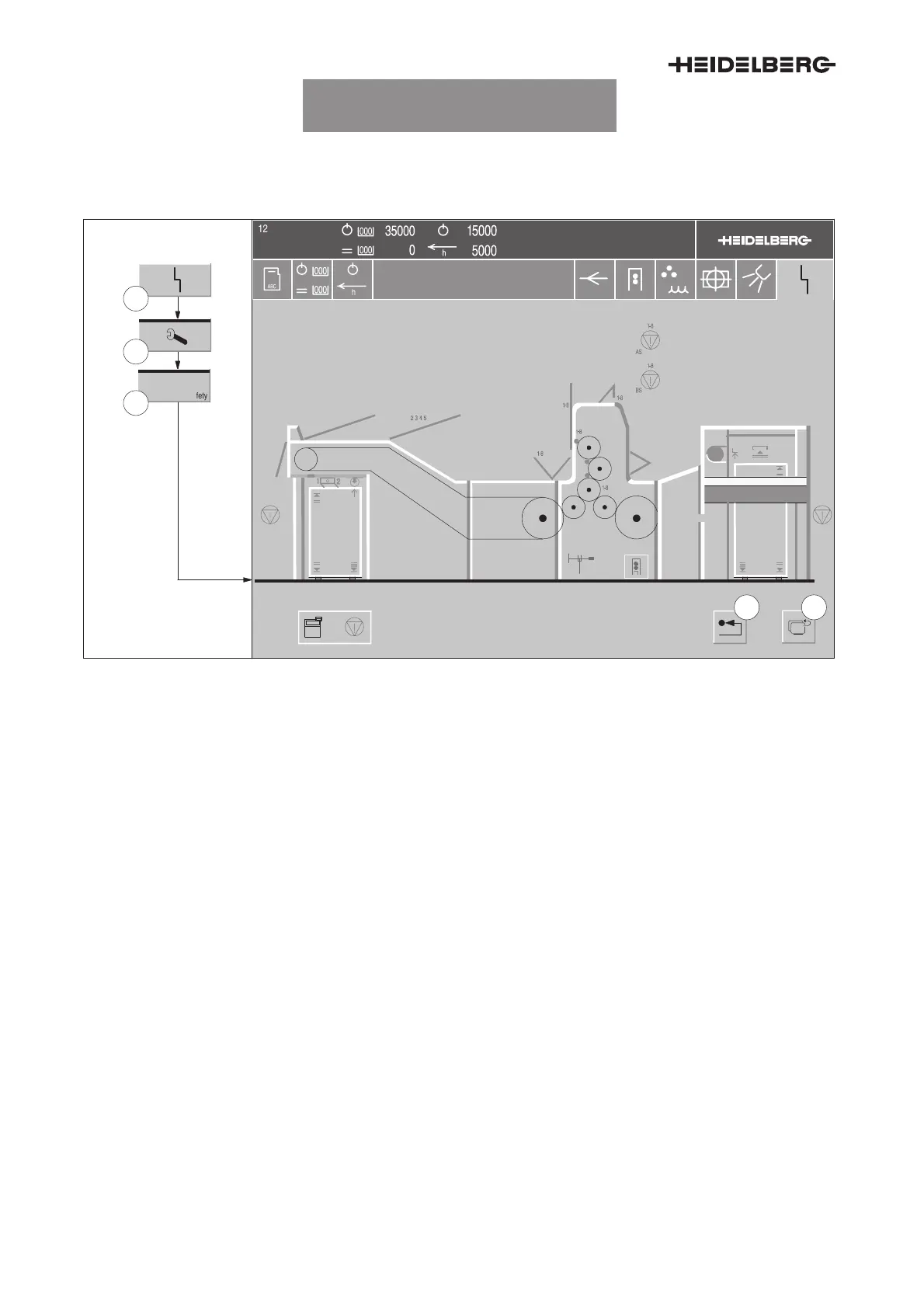
Fig. 1 Service/safety menu
The menu on the CP2000 Center shows the safety
devices of the press in a diagram. The representa-
tion may differ from the configuration of your press.
Prior to testing the protective devices, close all
guards and unlock all
emergency stop buttons
.
1. Press the
Malfunction
button (Fig. 1/1) in the
banner line. The Malfunction menu appears.
2. Press the
Service
button (Fig. 1/2). The Ser-
vice menu appears.
3. Press the
Safety
button (Fig. 1/3). The Safety
menu (Fig. 1) appears.
A picture of the press now appears on the screen in
which all the safety devices that are to be checked
are shown in red.
4. Press and unlock the
emergency stop button
.
5. Actuate the finger protecting bars.
6. One by one and in succession open and close
every guard, except for the test of the finger
protecting bars. If the respective guard is func-
tioning correctly, its symbol in the display goes
off.
UTKSG9011810000000000



 To Next Page