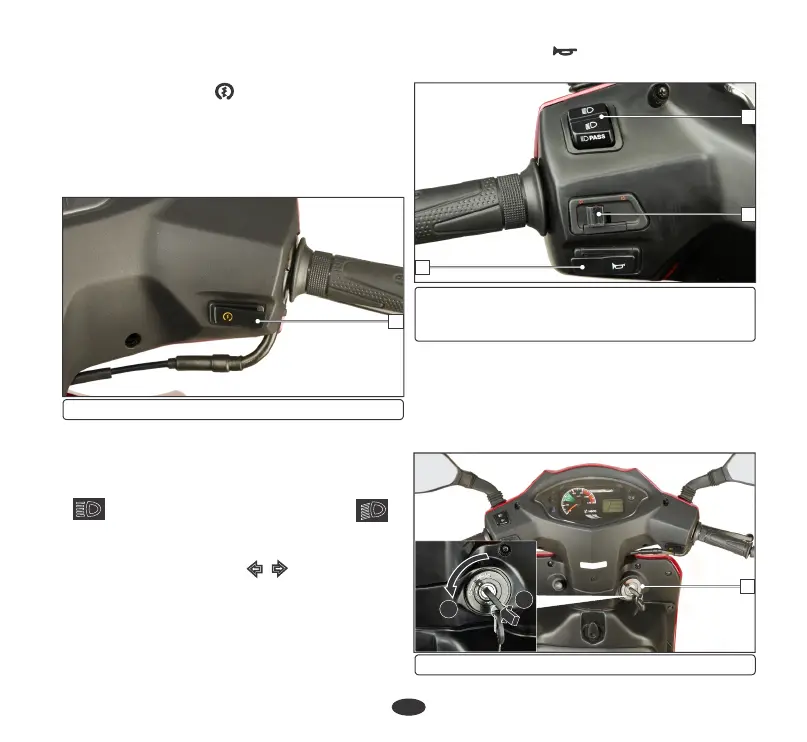
(1) Starter switch
Right handlebar controls
HANDLEBAR SWITCHES CONTROL
1. Starter switch ( )
The starter switch (2) is next to the throttle
grip.
When the starter switch is pressed, the starter
motor cranks the engine. See (page 39) for
the starting procedure.
1
model only) (2) Turn signal switch
(3) Horn switch
(1) Dimmer switch/Passing switch (For VX
1
2
3
25
“ ” and downwards for Low Beam “ ”.
2. Turn signal switch ( )
Left handlebar controls
Press the switch upwards for High Beam
Shift the turn signal switch sideways for
Right/Left indications and leave it to come
back to its normal position on its own.
IMPORTANT: To switch “OFF” the turn
signal after completing the turn, gently push
inside as directed on the switch.
Press the switch to pass lamp position to
operate the pass lamp.
1. Dimmer switch/Passing switch (For
VX model only)
3. Horn switch ( )
Press the switch to operate the horn.
Steering lock
FEATURES
To lock the steering, turn the handle bar all the
way to the left, turn the key (1) to "LOCK"
position while pushing in and remove the key.
1
(1) Ignition switch (A) Push in (B) Turn to lock
A
B


 To Next Page