11
USER’S MANUAL /
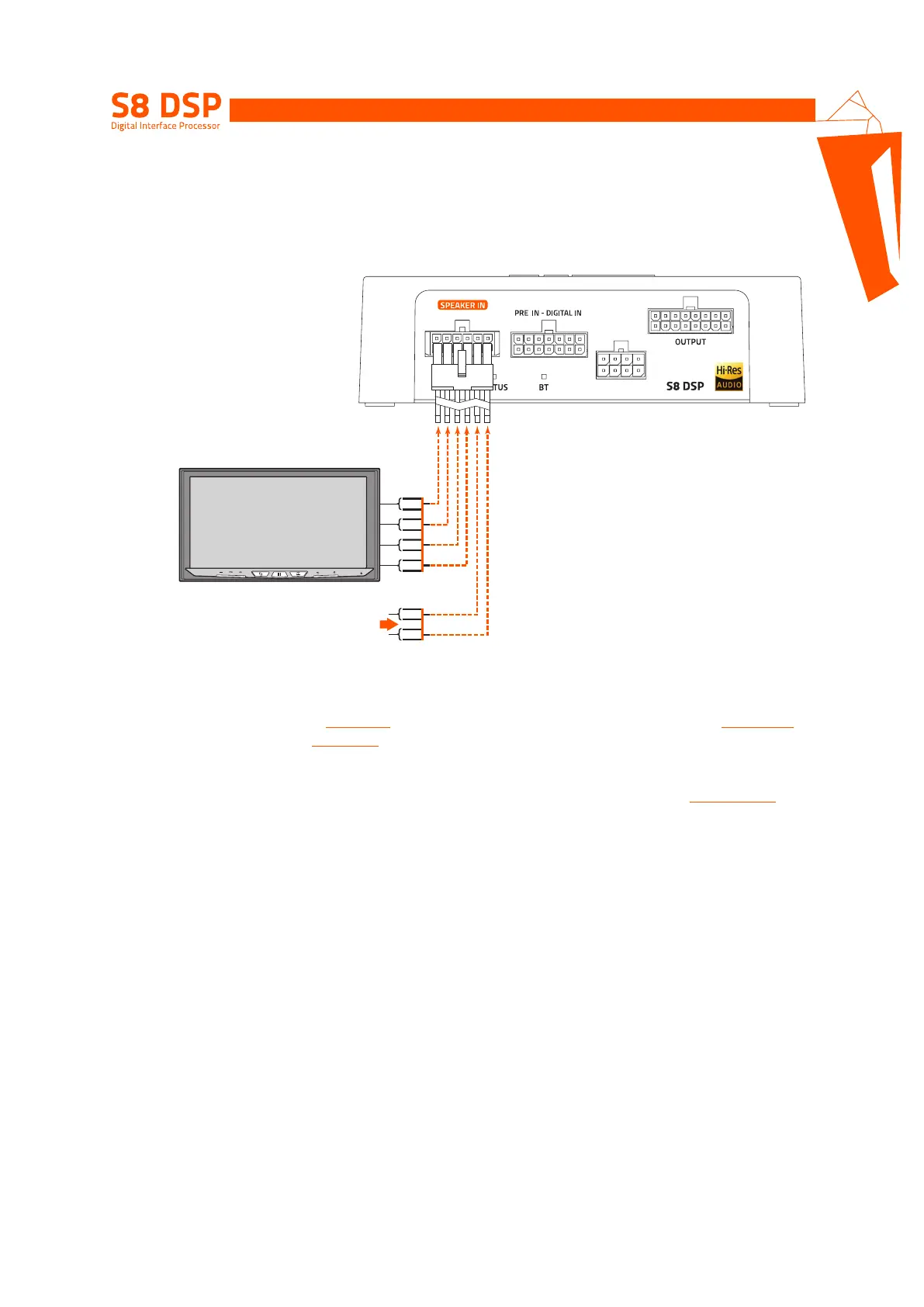
5.2.3 SPEAKER IN - CH1/CH6 (HIGH LEVEL)
123456
PWR/REM
FL
FR
RL
RR
IN 1 +
IN 1 -
IN 2 +
IN 2 -
IN 3 +
IN 3 -
IN 4 +
IN 4 -
IN 5 +
IN 5 -
IN 6 +
IN 6 -
Connect to other
HI-LEVEL OUTPUT
signal if avaiables
After market Source
ART (Automatic Remote Turn-on)
only on IN 1 (+/-) - IN 2 (+/-)
How to select the SPEAKER IN Input
1. By selecting the ANALOG input
(see section 8.9)
previously set on HIGH LEVEL via the S8 DSP software
(see section 8.2.2)
.
2. By using the IN SEL terminal
(see section. 4.4)
.
Remark: the CH1 CH2 channels feature the ART
TM
, (auto remote TURN-ON) function, automatic on/off, through
connection with the source speaker outputs (BTL). This function can be activated via software
(see section 8.2.7.2.1)
.
Remark: the Speaker IN input features USS technology that allows the processor to work with sources equipped with
the “loudspeaker load sensing” circuit.
5


 To Next Page