9
USER’S MANUAL /
5. CONNECTIONS
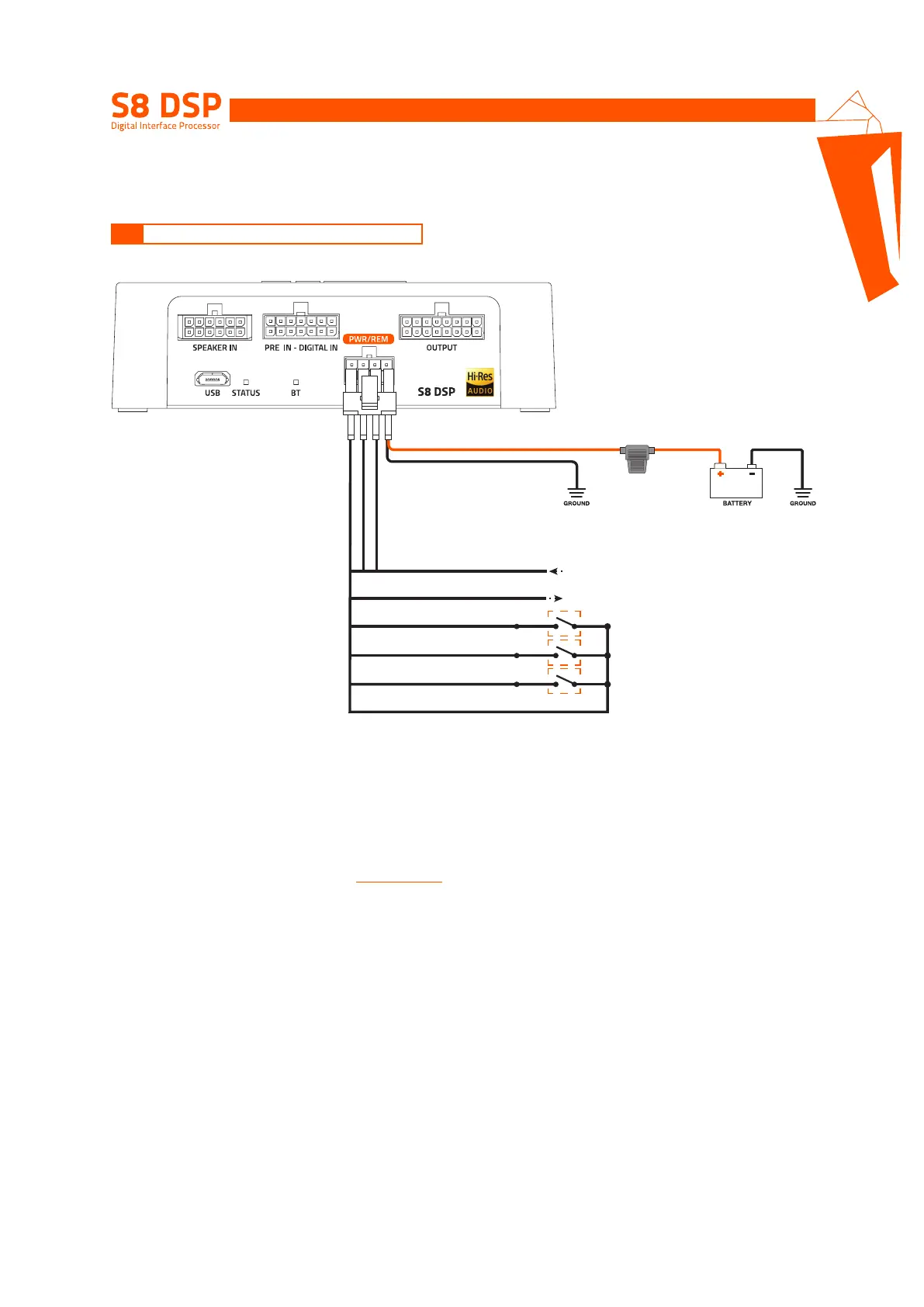
The S8 DSP is on when the logo is lit green. It can be turned on/off using the following methods:
1. By connecting the REMOTE IN terminal with a Remote Out signal coming from an after market audio source.
2. Through the Speaker IN (IN 1 - IN 2) input. The ART
TM
, (auto remote TURN-ON) function is activated by connecting
the output (BTL) of an amplified source to the SPEAKER IN 1 - IN 2 input channel. This function can be enabled/
disabled using the S8 DSP software,
(see section 8.2.7.2.1)
.
How to turn the S8 DSP on and off
YELLOW PWR/REM
BLUE REM IN
BLUE/WHITE REM OUT
PINK IN SEL
BLACK MEM GND
BLACK
FUSE
HOLDER
(1A)
from HEAD UNIT
not supplied
to Amplifier
REMOTE IN
*
*
*
WHITE MEM SEL 1
WHITE MEM SEL 2
5.1 POWER SUPPLY AND REMOTE TURN ON
5


 To Next Page