18 - 48
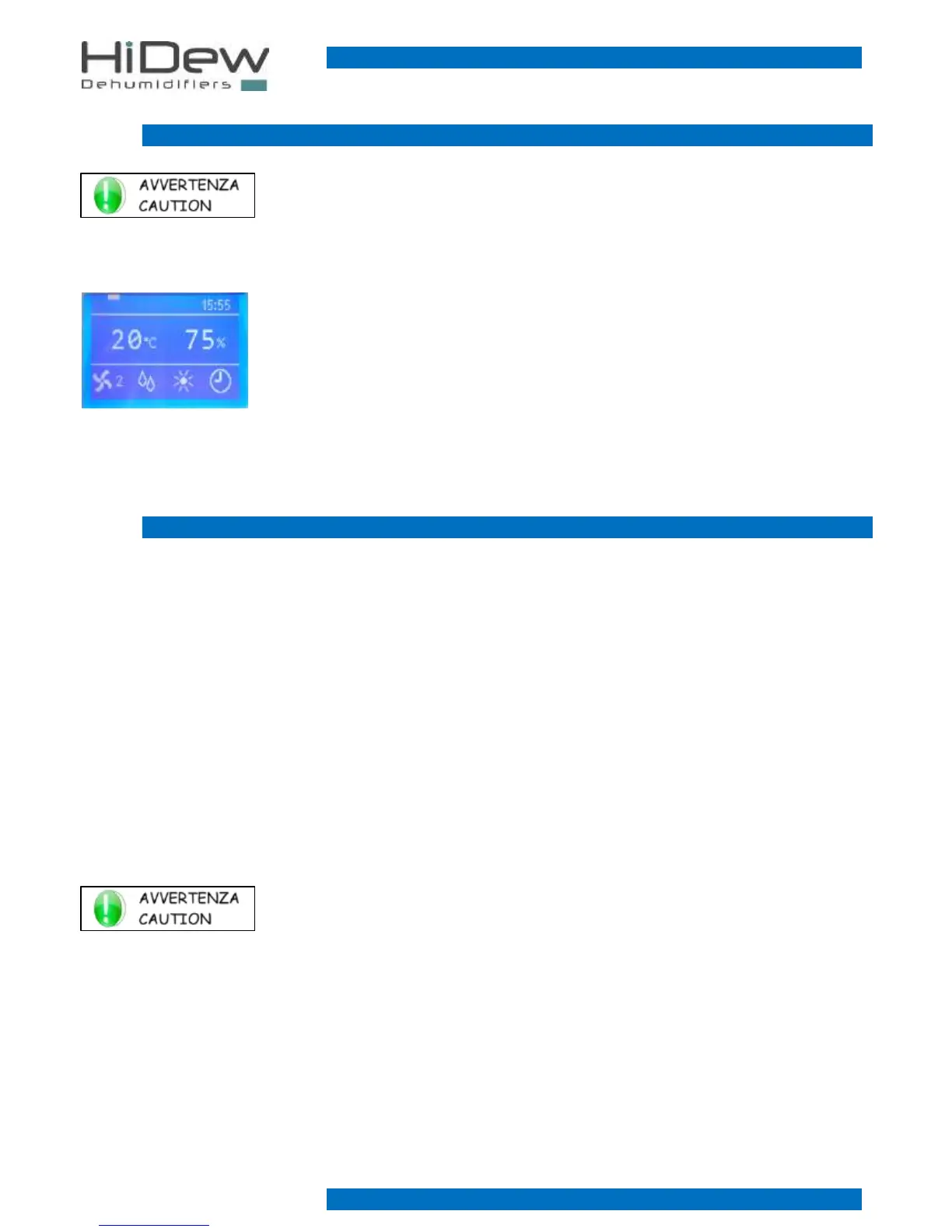
3.2 MAIN SCREEN
KEYS USE:
- With the OFF key, you turn off the unit
- Keeping pressed the EXIT key, you display the software version
- With the MENU key, you enter the user menu
- the rectangle on the left indicated the current day
- on the right is indicated the current time
- in the middle are indicated the current values of temperature and humidity
- the fan symbol on the left indicates that the fan is on and it is functioning at speed 2
- the drop symbol indicates that the compressor is on to dehumidify
- the sun symbol indicated that a heating device is active
- on the right, a clock symbol may appear if the time-bands are active or the connection symbol
may appear if the unit is ruled by a modbus
3.3 USER MENU
The user menu is composed by 9 easy-to-use screens, for the basic configurations of the unit:
1. Unit driver: manual or by time-bands *
2. Desired humidity setting *
3. Desired temperature setting *
4. Alarms managementi *
5. Time-bands programming *
6. Language setting
7. Day and time setting
8. Unit status displaying
9. Password request
* screen not always present.
Each screen has a number on the right part, in order to simplify the use.
KEYS USE:
- With UP and DOWN keys you can run through the screens (some of them are not always displayed)
- With EXIT key you exit and come back to the main screen
- With OK key you execute the function indicated on the screen



 To Next Page