24 Synclara™ Cough System, Model PSC1 User Manual (196286 REV E)
Synclara™ Therapy
Start a Therapy in Automatic Mode
NOTES:
• Before you start a therapy, make sure you have connected the
appropriate patient circuit to the system. “Connect the Synclara™
Patient Circuit” on page 17.
• Make sure the patient circuit is put into position on the patient. See
Step 4 on page 17.
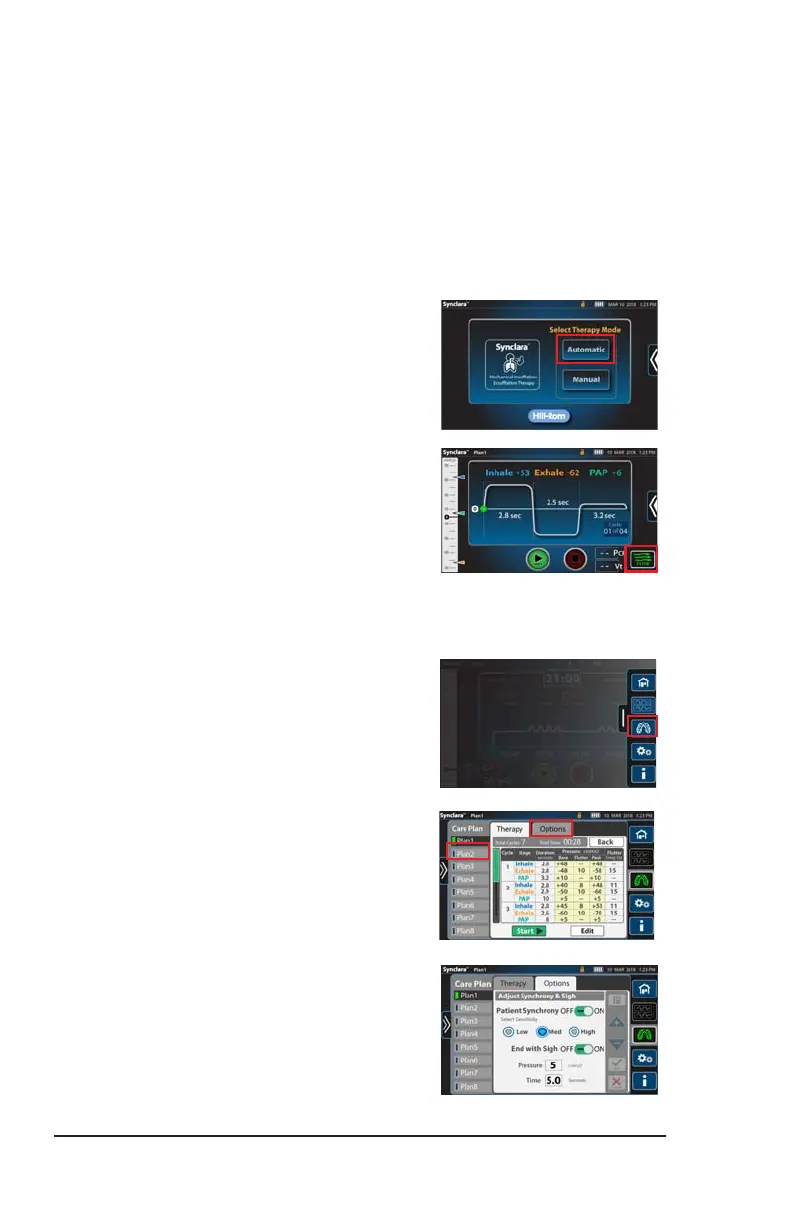
1. Press Automatic.
• If prompted, scan the patient’s ID
barcode with the paired barcode
reader. For pairing instructions, see
page 45.
The last used preset therapy is selected.
• If required, press the Flow control
to toggle between different
intensities of air movement to
deliver during the therapy.
2. To start the therapy, press Start.
• To select another preset therapy,
follow these steps:
a. Swipe the Options tab left, and
press the Care Plan menu
control.
b. Select the preferred preset
therapy plan.
c. Review the therapy settings to
make sure they match the
prescription. Select another
plan if required.
d. If required, press Options to
enable or disable, and adjust
the settings for Patient
Synchrony and End with Sigh.
See page 26.
Draft_E_2019-Apr-29_Cleaned



 To Next Page