38 Synclara™ Cough System, Model PSC1 User Manual (196286 REV E)
Synclara™ Therapy
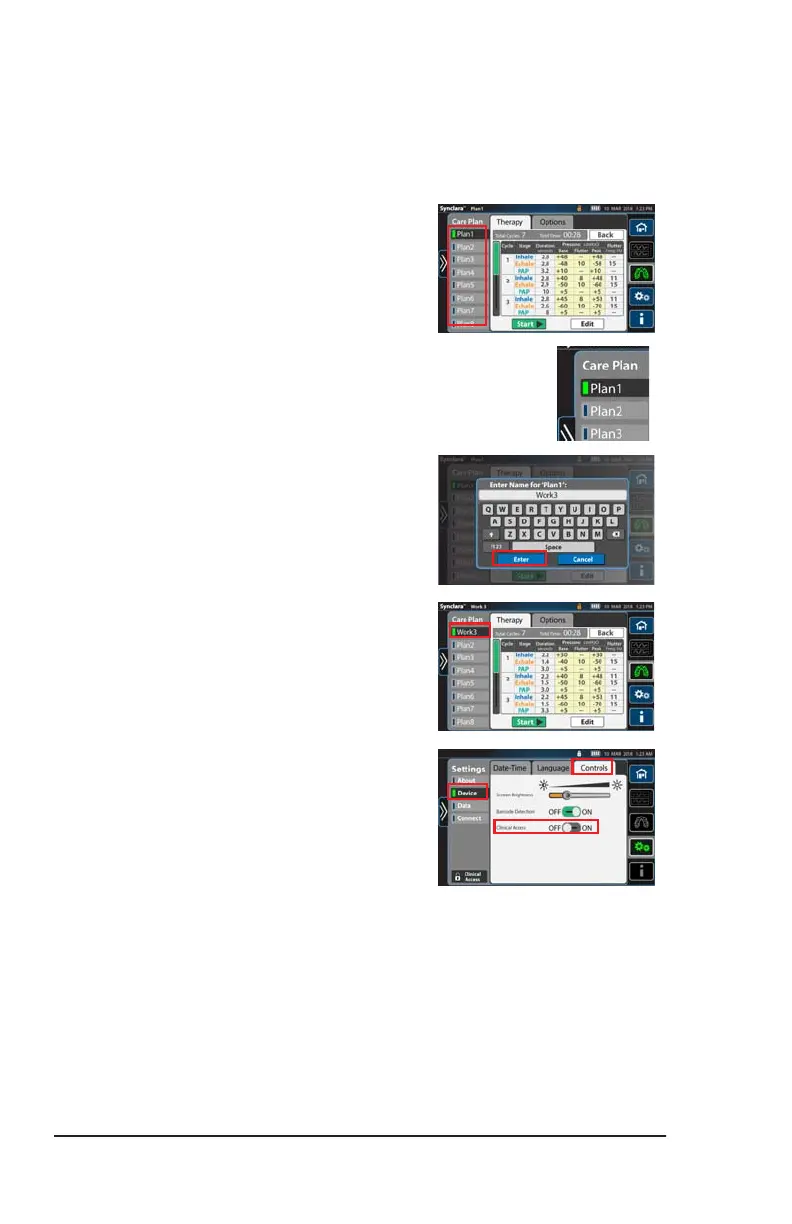
Rename a Preset Therapy Plan
NOTE:
Available only if Clinical Access is enabled. See page 42.
1. Select the plan to rename.
2. Press and hold the therapy plan until
the on-screen keyboard shows.
3. Use the on-screen keyboard to enter
any 5 alphanumeric characters, and
press Enter.
The new name is saved.
NOTE:
To prevent unauthorized persons from
adjusting the settings made, disable
Clinical Access after you have made
the settings.
Press Device, then press Control. Slide
Clinical Access to OFF.
Draft_E_2019-Apr-29_Cleaned



 To Next Page