48 Synclara™ Cough System, Model PSC1 User Manual (196286 REV E)
Device Settings
Connect to a Public Network
NOTES:
• After initial connection, the WiFi will automatically connect when
the Synclara™ Cough System is turned on and within WiFi range.
• Data will transmit automatically at the end of the therapy session,
or when the Synclara™ Cough System is powered up the next
time.
• Do not connect to a public WiFi if any log on Terms and
Conditions must be accepted to use that public WiFi.
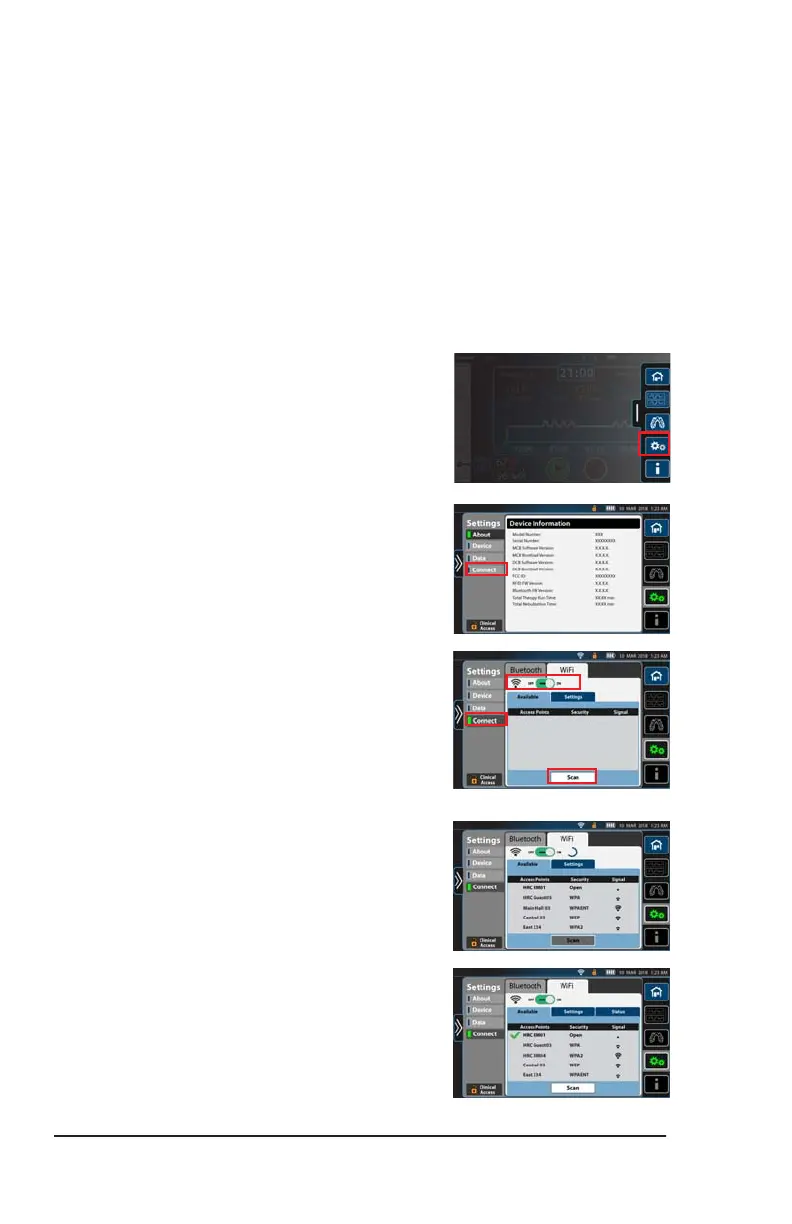
1. Swipe the Options tab left, then press
the Options menu control.
2. Press the Device Settings menu control.
3. Press Connect.
4. Press WiFi.
5. Slide the setting for WiFi to ON.
6. Press Scan to locate the wireless
networks available.
Depending on the networks available,
the scan will take a few minutes. When
complete, a list of wireless networks
shows.
7. When the connection is successful, a
green check mark shows next to the
access point name.
Draft_E_2019-Apr-29_Cleaned



 To Next Page