Synclara™ Cough System, Model PSC1 User Manual (196286 REV E) 27
Synclara™ Therapy
Access the Advanced View
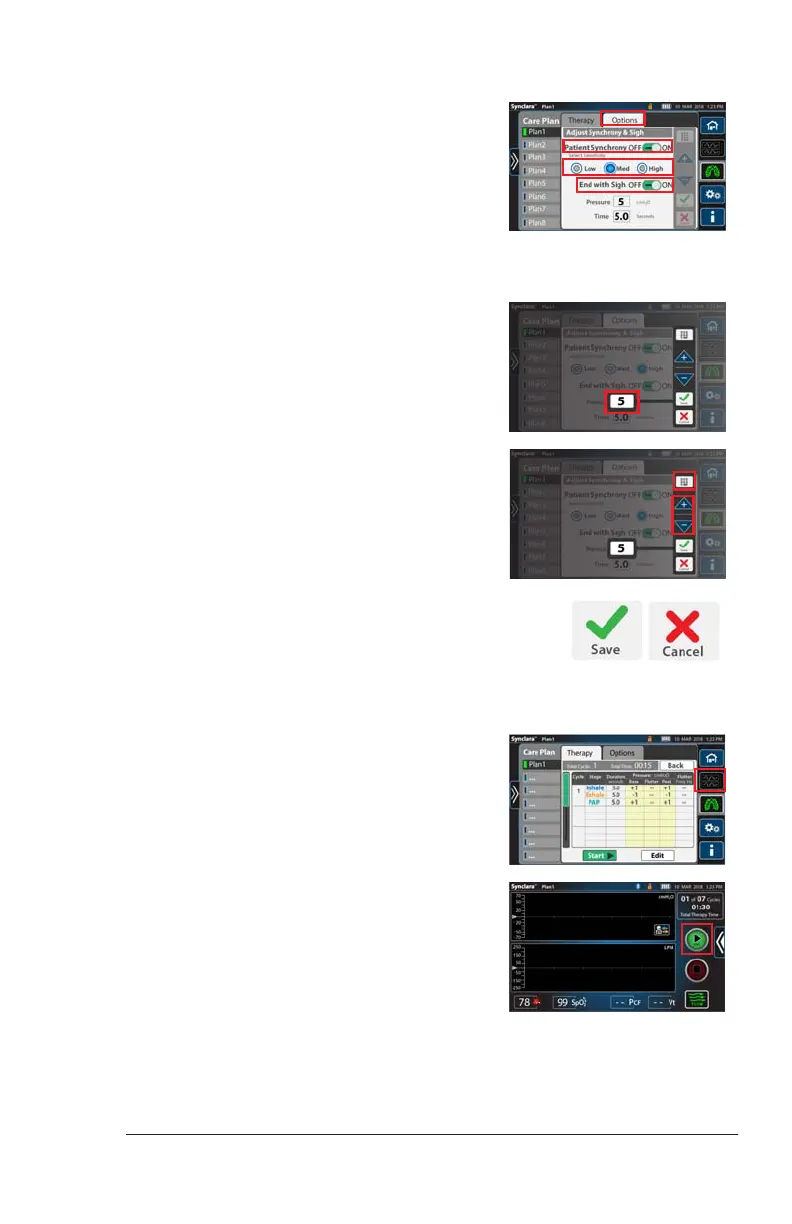
2. Press Options.
3. To enable Patient Synchrony—
a. Slide the setting to ON.
b. Select the preferred level of
sensitivity: Low, Medium or High.
4. To enable End with Sigh—
a. Slide the setting to ON.
b. Press the setting to change the
Pressure or Time.
c. Press the keypad control, and enter
the required setting, or use the + or
– controls to adjust the setting.
d. Press Save to save the changes. Or,
press Cancel.
1. Before you start the therapy, swipe the
Options tab left, and press the
Advanced View control.
The Advanced View shows.
2. Press Start to begin the therapy.
Draft_E_2019-Apr-29_Cleaned



 To Next Page