Synclara™ Cough System, Model PSC1 User Manual (196286 REV E) 63
Accessories
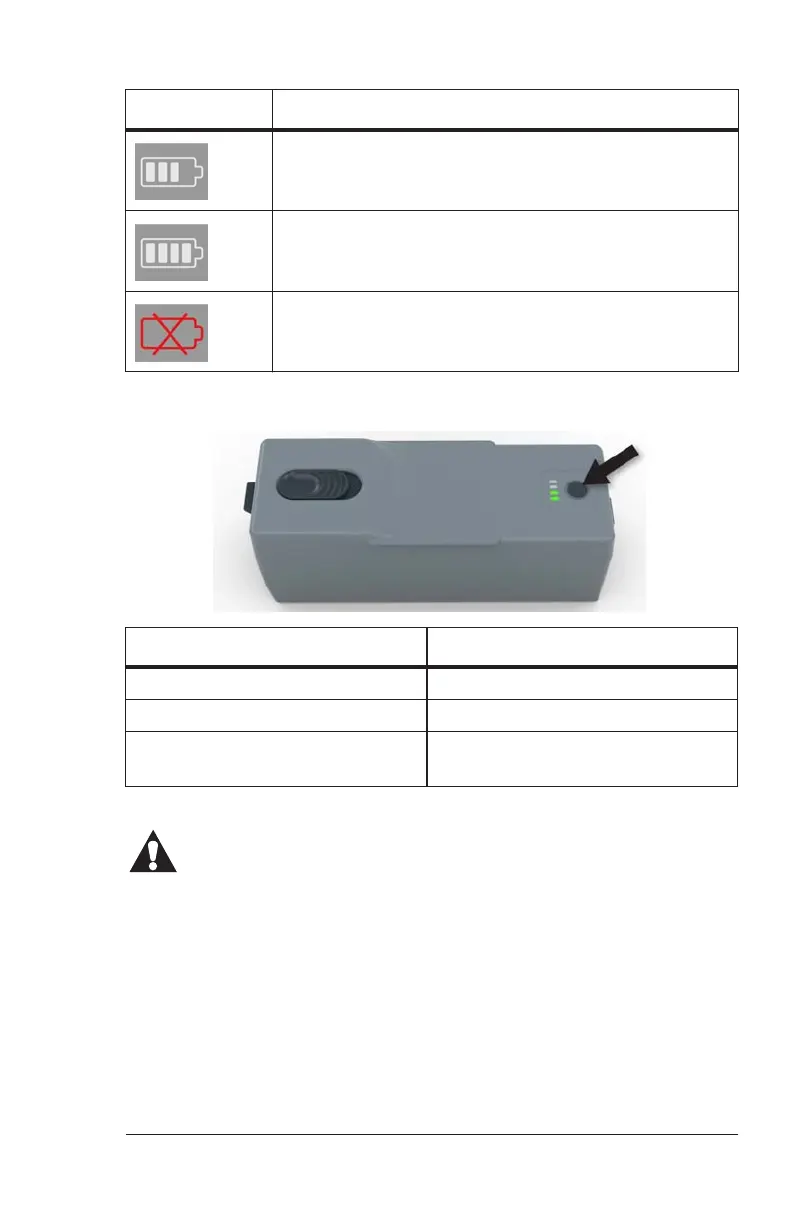
To check the battery charge, press the button beside the LED indicator on
the battery.
Charge the Battery
CAUTION:
Caution—Charge the battery only with the control unit to prevent
equipment damage.
NOTE:
The power cord supplied for your country may differ from the illustration
shown.
1. Plug the power cord into the back of the control unit.
2. Plug the other end of the power cord into the applicable power
outlet.
The battery is 75% charged.
The battery is fully charged.
The control unit has lost communication with the
battery and is not powered by the battery.
LED indicator Battery status
Four green bars The battery is fully charged.
Blinking bars The battery charge is low.
Blinking bars when the control
unit is connected to AC power.
The battery is charging.
Symbol Battery status
Draft_E_2019-Apr-29_Cleaned



 To Next Page