Synclara™ Cough System, Model PSC1 User Manual (196286 REV E) 37
Synclara™ Therapy
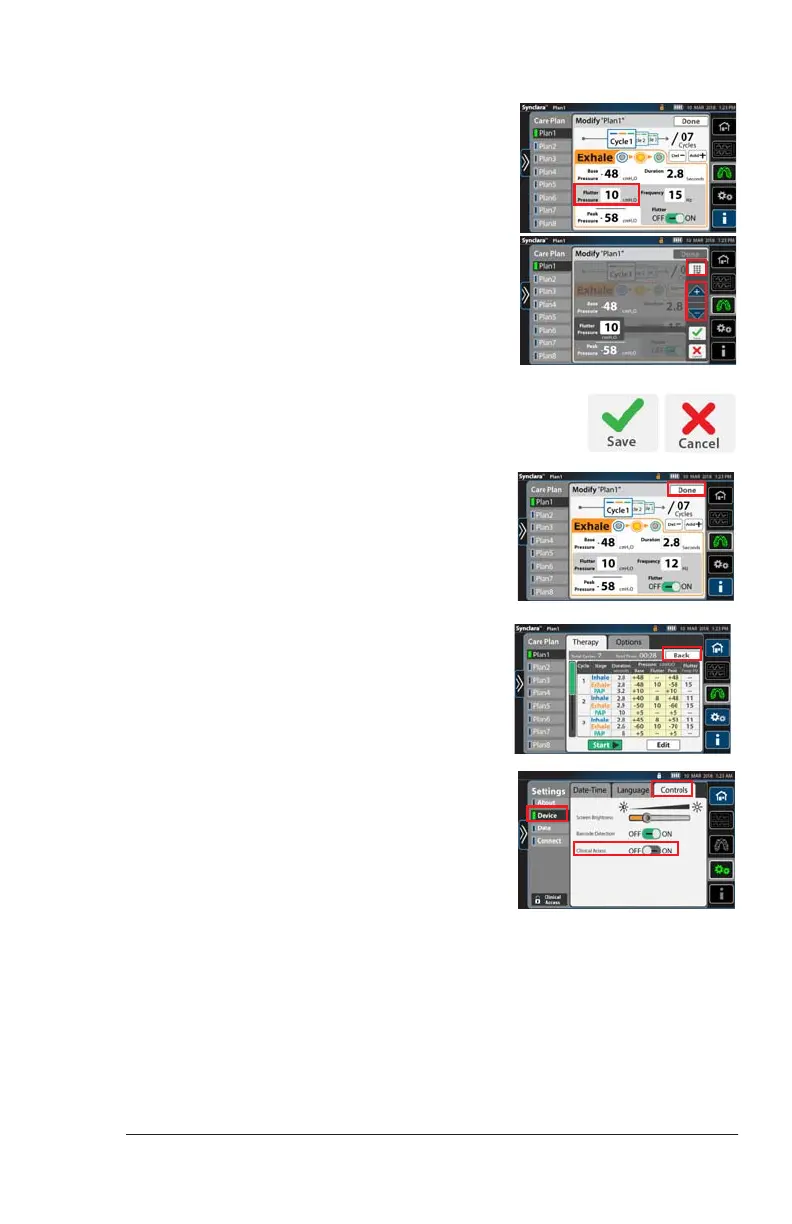
13. To adjust Flutter and Frequency, press
the setting to change it.
a. Press the keypad control and enter
the required setting, or use the + or
– control to adjust the setting.
b. Press Save to save the changes.
Or, press Cancel.
14. To confirm all settings, press Done.
15. Press Back to go to the initial therapy
screen.
NOTE:
To prevent unauthorized persons from
adjusting the settings made, disable
Clinical Access after you have made the
settings.
Press Device, then press Control. Slide
Clinical Access to OFF.
Draft_E_2019-Apr-29_Cleaned




 To Next Page