www.hi-ti.com
27
4 HIJKLMN 12345678
5 12345678 2468024680
6 HIJKLMN 2468024680
7 HIJKLMN 2468024680 0987654321
a. 1 ABCDEFRG –this format is for encoding the 1st track only – ex: 1 xxxxxxxx
b. 2 12345678 – this format is for encoding the 2nd track only – ex: 2 11111111
c. 3 2468024680 –this format is for encoding the 3rd track only – ex: 3 00000000
d. 4 HIJKLMN 12345678 - this format is for encoding both the 1st & the 2nd tracks
ex: 4 xxxxxxxx 11111111
e. 5 12345678 2468024680 - this format is for encoding both the 2nd & the 3rd
tracks, ex: 5 11111111 00000000
f. 6 HIJKLMN 2468024680 - this format is for encoding both the 1st & the 3rd
tracks, ex: 6 xxxxxxxx 00000000
g. 7 HIJKLMN 2468024680 0987654321 - this format is for encoding all of the 3
tracks, ex: 7 xxxxxxxx 111111111 00000000
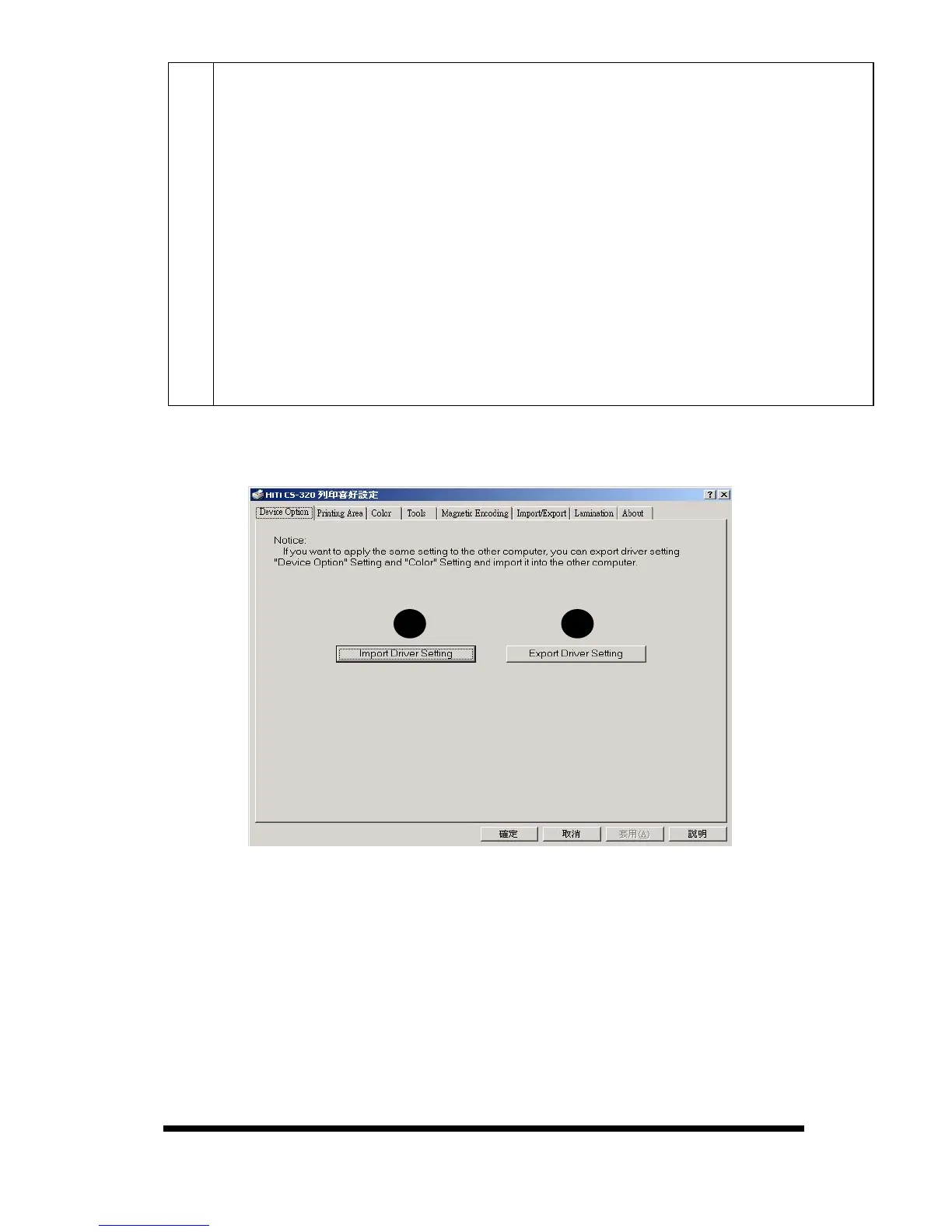
[Import/Export]
A.
Import Driver Setting: You can import [Device] and [Color] settings from
other computers to your computer.
B.
Export Driver Setting: You can export the [Device Option] and [Color]
settings from your computer to other computers.
※Notice: The Import/Export function on this page covers the settings for
[Device Option] and [Color] and excludes the parameters you set in
[Printing Area], please note. Please refer to page 22 for
importing/Exporting the settings of the [Printing Area].










 To Next Page