46
HITRON CGNV2 USER’S GUIDE
WAN/LAN
3.5 THE WAN IP SCREEN
Use this screen to:
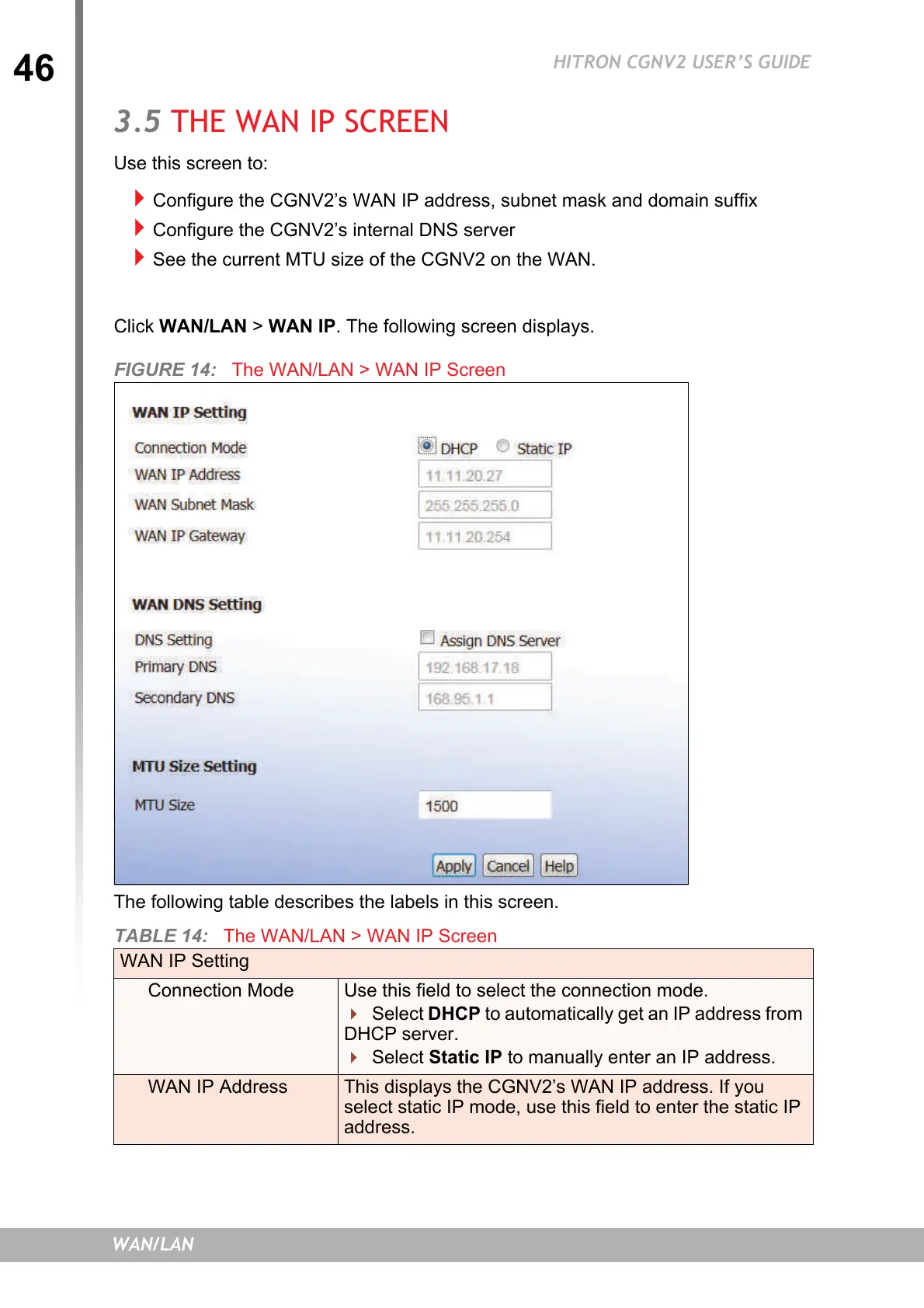
Configure the CGNV2’s WAN IP address, subnet mask and domain suffix
Configure the CGNV2’s internal DNS server
See the current MTU size of the CGNV2 on the WAN.
Click WAN/LAN > WAN IP. The following screen displays.
FIGURE 14: The WAN/LAN > WAN IP Screen
The following table describes the labels in this screen.
TABLE 14: The WAN/LAN > WAN IP Screen
WAN IP Setting
Connection Mode Use this field to select the connection mode.
Select DHCP to automatically get an IP address from
DHCP server.
Select Static IP to manually enter an IP address.
WAN IP Address This displays the CGNV2’s WAN IP address. If you
select static IP mode, use this field to enter the static IP
address.


 To Next Page