Appendix A: Access to the Ewon Cosy+ 25 (32)
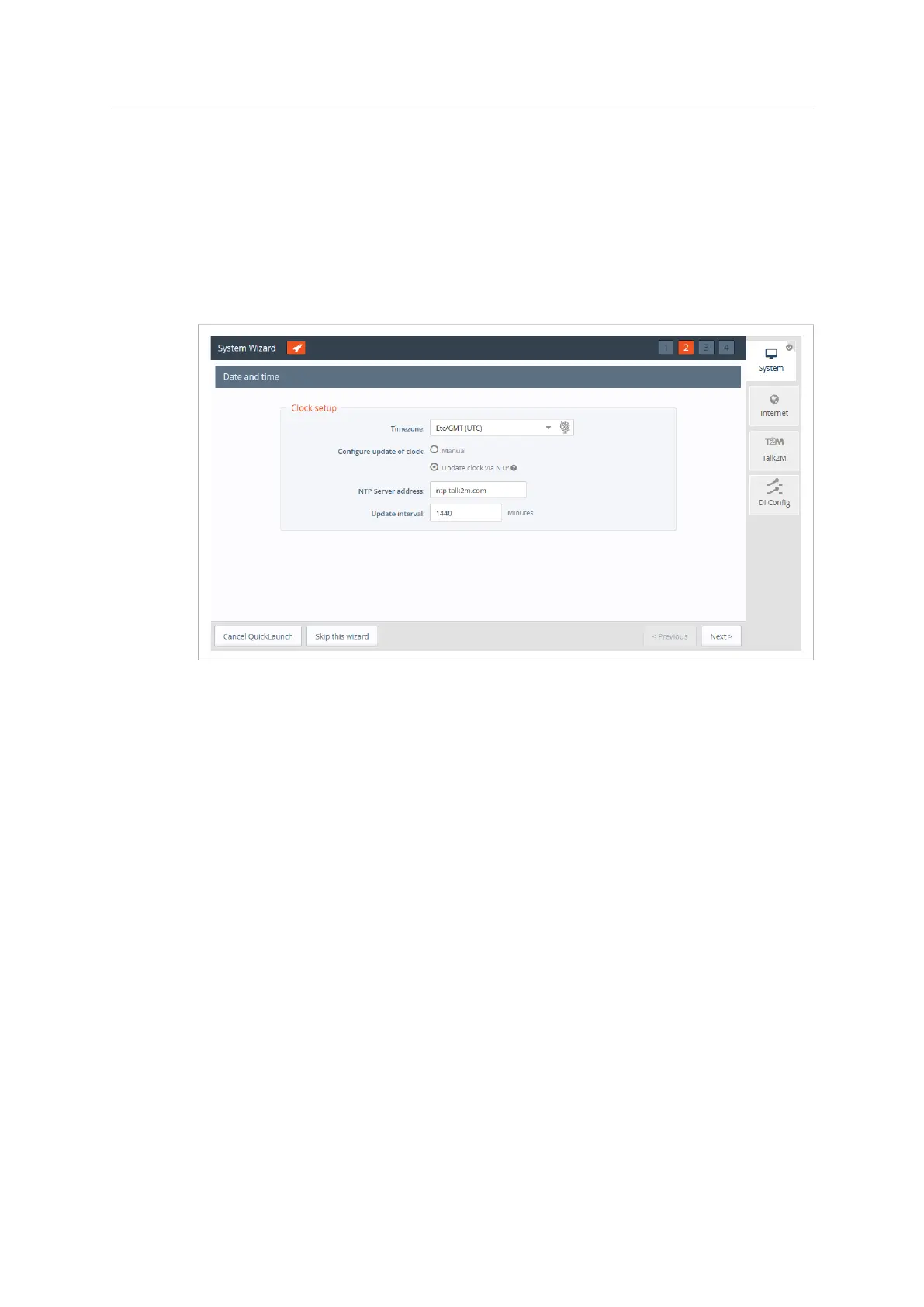
• Configure the <Timezone> settings:
► click either on the arrow or the map icon.
• By default, the field is set to ntp.talk2m.com which is the best option for Ewon Cosy+
connected to Talk2M. However, you have the possibility to set the URL of the remote <NTP
server>. This field is shown only if Update clock via NTP is selected.
• The <Time interval> used to update the clock. Default value is 1440 minutes (= 1 day). This
field is shown only if Update clock via NTP is selected.
Click Next to proceed to the next screen.
Fig. 21 System Wizard Date and Time
The third screen of the System Wizard shows the standard attribution of the four ports Ethernet
switch.
The ports #1, #2, #3, will be dedicated to LAN — local access network — interface and port #4
will be dedicated to WAN — Internet access network — interface.
The attribution of a port can be easily recognized by its LED color:
• Orange for a WAN port.
• Green for a LAN port.
Ewon Cosy+ User Manual
UM-0005-00 1.0 en-US













 To Next Page