147
MAINTENANCE
If the propeller is damaged by
striking a rock, or other obstacle,
replace the propeller as follows.
• When replacing, remove the
emergency stop switch clip to
prevent an accidental startup of
the engine.
• The propeller is thin and sharp.
To protect your hands, wear the
heavy gloves during replacement.
Replacement
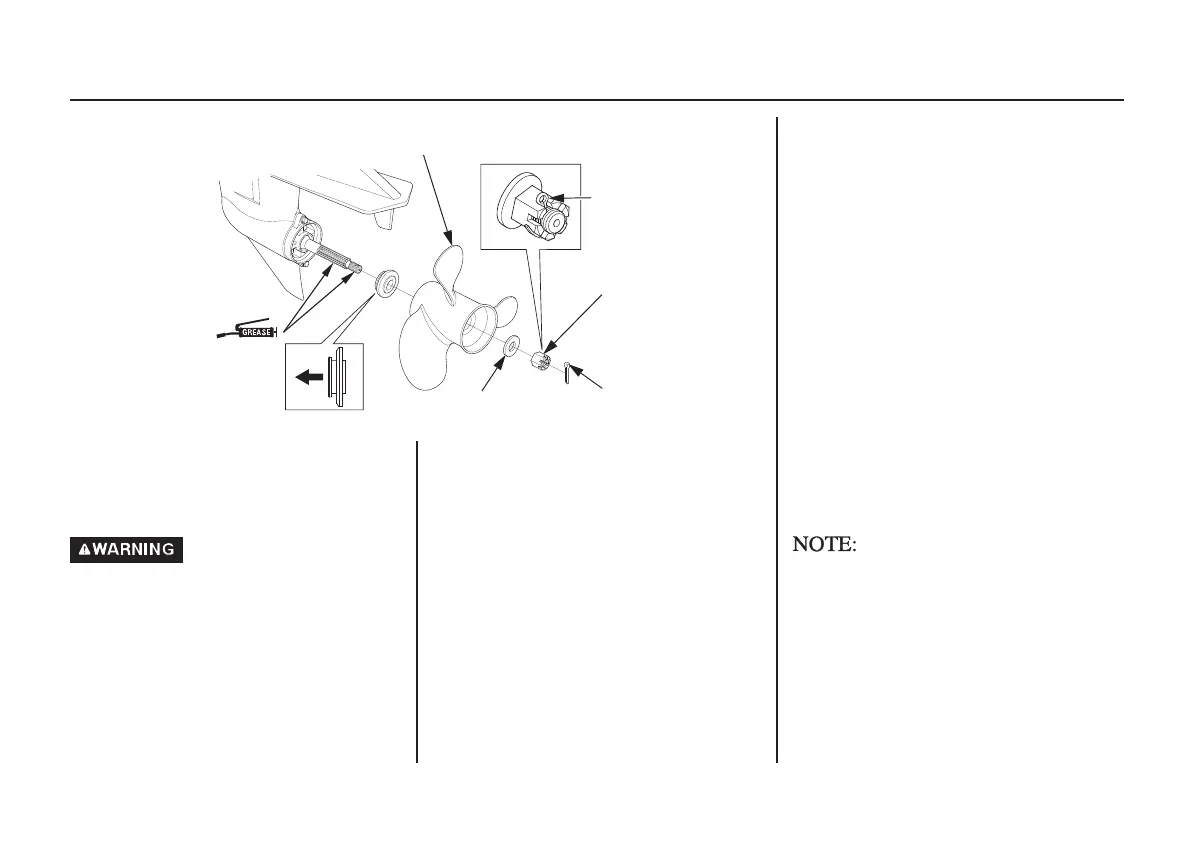
1. Remove the cotter pin then remove
the 18 mm castle nut, washer,
propeller and thrust washer.
2. Install the new propeller in the
reverse sequence to removal.
3. Tighten the castle nut with your
hand first until the propeller has no
play. Then, tighten the castle nut
again with a tool until the groove in
the castle nut aligns with the cotter
pin hole. (Note that this tool is not
included in the tools that come
together with the outboard motor.)
CASTLE NUT TIGHTENING
TORQUE:
1 N·m (0.1 kgf·m, 0.7 lbf·ft)
UPPER LIMIT OF TORQUE:
44.1 N·m (4.5 kgf·m, 33 lbf·ft)
4. Be sure to replace the cotter pin
with a new one.
• Install the thrust washer with the
grooved side toward the gear case.
• Use a genuine Honda cotter pin and
bend the pin ends as shown.
Propeller
THRUST WASHER
PROPELLER (optional equipment)
COTTER PIN
CASTLE NUT
COTTER PIN
(Replace)
18.5 mm
WA SH E R
<;DQQMࡍࠫ㧞㧜㧝㧟ᐕ㧝㧜㧝㧤ᣣޓ㊄ᦐᣣޓඦᓟ㧞ᤨ㧟㧟ಽ



 To Next Page