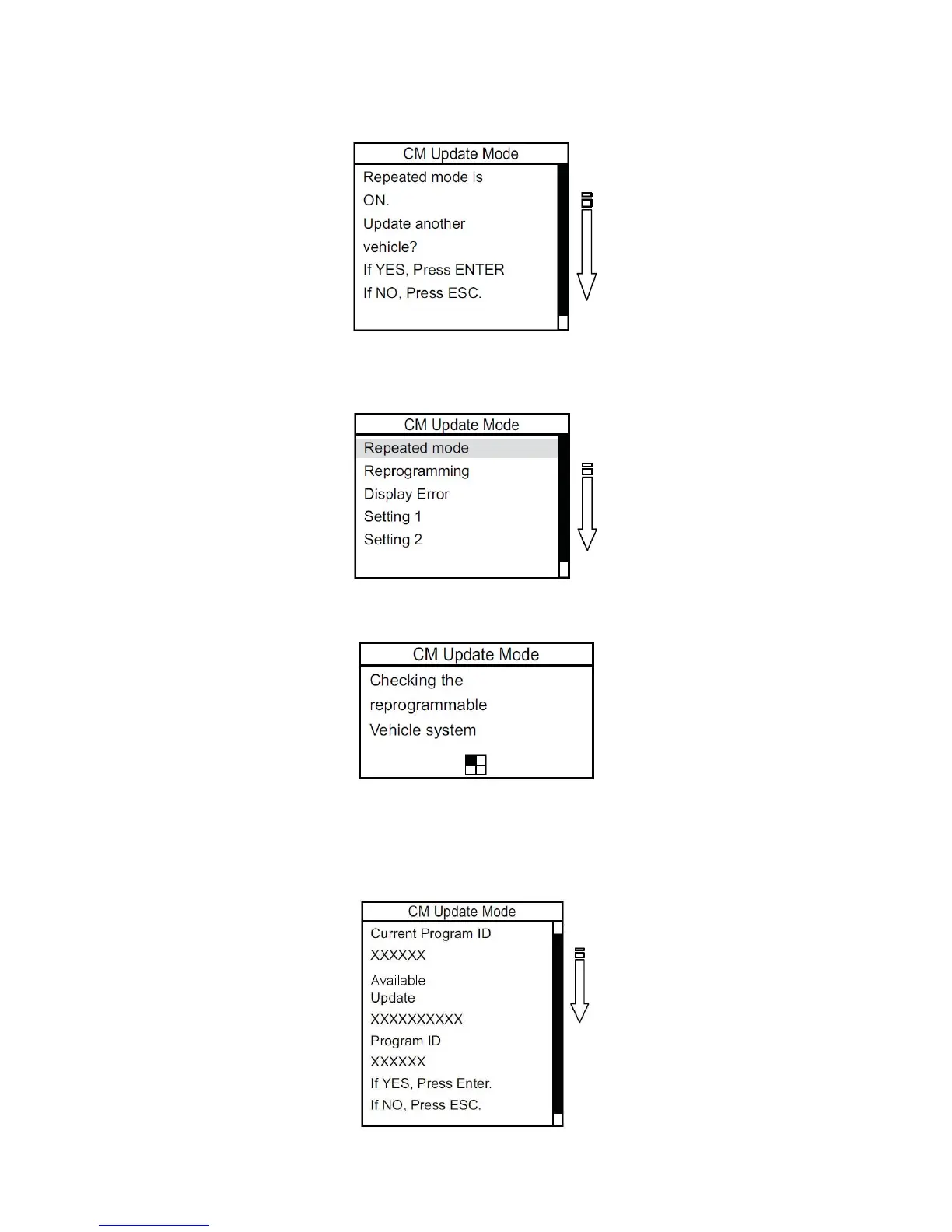
4. After you connect the DLC to the next vehicle, the following screen appears, telling you that the Repeated
mode is turned on. Press ENTER to continue or press ESC to exit the repeated mode.
NOTE: If the screen below appears when you turn on the MVCI, the previous user turned on the Repeated mode.
Make sure you press ESC and start the reprogramming procedure again.
5. Select Repeated mode, then press ENTER.
6. Wait for the MVCI to search for reprogrammable systems. This takes about 90 seconds.
7. After the MVCI finishes its search, a list of reprogrammable systems appears on the System Selections
screen. Select the system to reprogram. Press ENTER to continue, or press ESC to exit.
8. The MVCI displays the Current Program ID, the System, and the latest Program ID. Press ENTER to
continue, or press ESC to exit.
NOTE: The Current Program ID displays the calibration that is currently installed on the control unit. Available
Update displays the calibration that is available to replace the currently installed calibration.
9. The MVCI updates the selected systems one at a time.
47






 To Next Page