MAINTENANCE
REAR BRAKE
Place the vehicle on a level surface.
Remove the right fuel tank side cover (page 3-6).
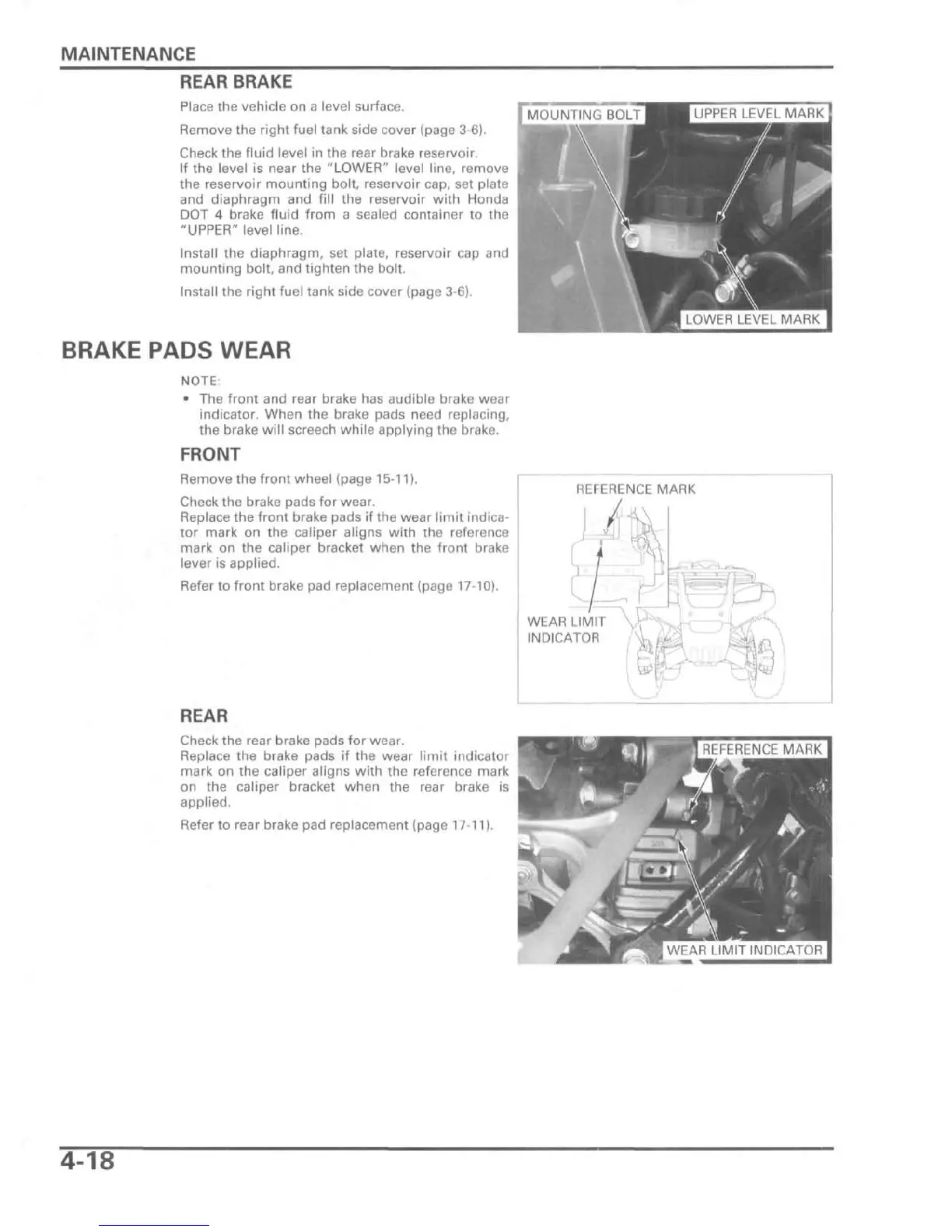
Check the fluid level in the rear brake reservoir.
If the level is near the "LOWER" level line, remove
the reservoir mounting bolt, reservoir cap, set plate
and diaphragm and fill the reservoir with Honda
DOT 4 brake fluid from a sealed container to the
"UPPER" level line.
Install the diaphragm, set plate, reservoir cap and
mounting bolt, and tighten the bolt.
Install the right fuel tank side cover (page 3-6).
BRAKE PADS WEAR
NOTE:
• The front and rear brake has audible brake wear
indicator. When the brake pads need replacing,
the brake will screech while applying the brake.
FRONT
Remove the front wheel (page 15-11).
Check the brake pads for wear.
Replace the front brake pads if the wear limit indica-
tor mark on the caliper aligns with the reference
mark on the caliper bracket when the front brake
lever is applied.
Refer to front brake pad replacement (page 17-10).
REAR
Check the rear brake pads for wear.
Replace the brake pads if the wear limit indicator
mark on the caliper aligns with the reference mark
on the caliper bracket when the rear brake is
applied.
Refer to rear brake pad replacement (page 17-11).
REFERENCE MARK
WEAR LIMIT
INDICATOR
WEAR LIMIT INDICATOR
4-18




 To Next Page