Honeywell 60 Series IP Camera Software Configuration Guide
26
• Maximum bit rate: Select a bit rate from the dropdown list. The bit rate ranges from 1
Mbps to a maximum of 40Mbps. If you select Customized, you can enter a value to
specify the maximum bit rate.
The Maximum bit rate setting in the Fixed quality configuration can ensure a reasonable
and limited use of network bandwidth. For example, in low light conditions where a Fixed
quality setting is applied, video packet sizes can tremendously increase when noises are
produced with electrical gains.
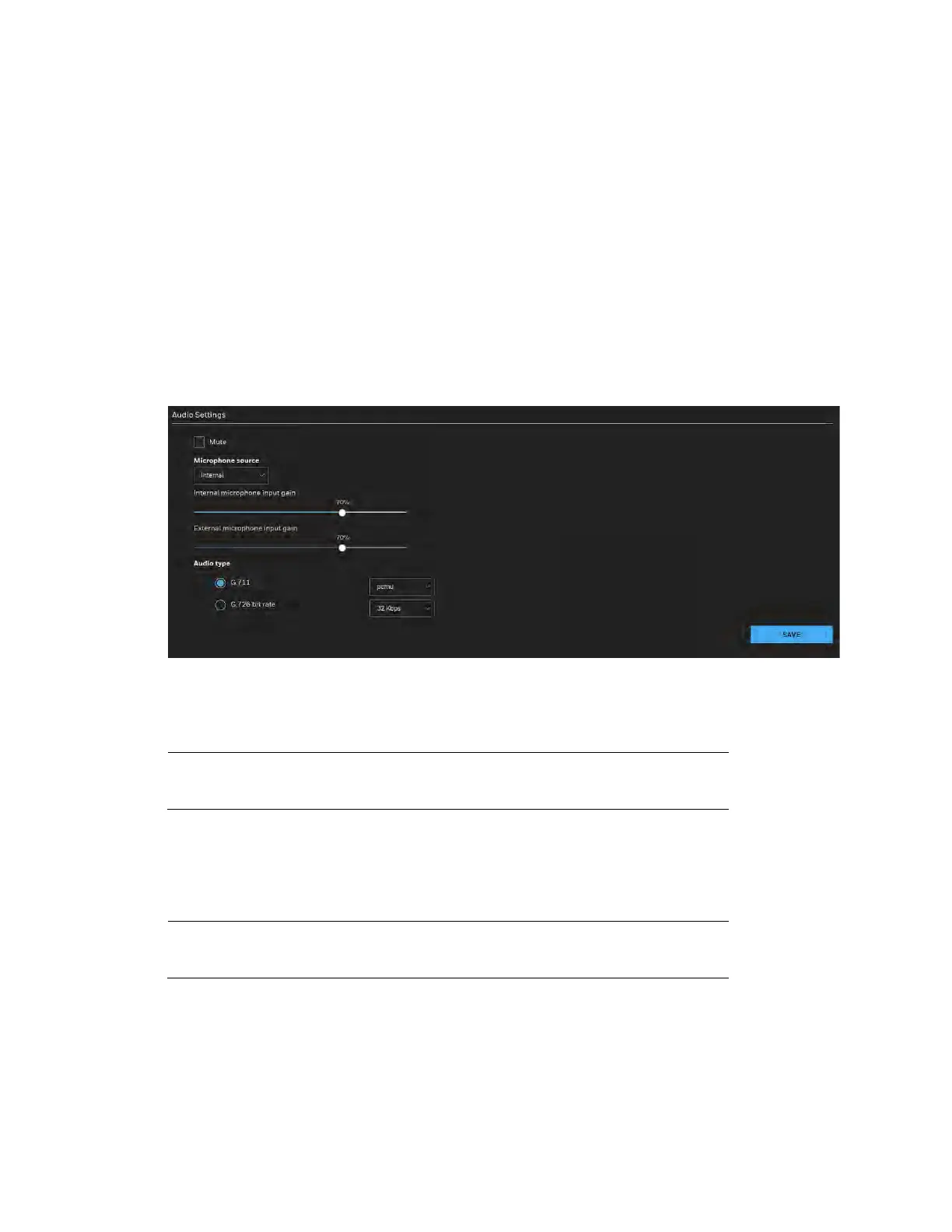
Configuring Audio Settings
Go to Setup Camera Setup Audio.
Figure 4-6 Audio
Mute: Check to disable audio transmission from the Network Camera to all clients.
Microphone source: Select Internal or External from the dropdown list.
Note
The Internal microphone source is applicable for HC60W35R2 &
HC60W35R4.
Internal microphone input gain: Select the gain of the internal audio input according to
ambient conditions. Adjust the gain from 0% (least) to 100% (most).
Note
The Internal microphone input gain is applicable for HC60W35R2
& HC60W35R4.
External microphone input gain: Select the gain of the external audio input according to
ambient conditions. Adjust the gain from 0% (least) to 100% (most).
Audio type: Select audio codec as G.711 or G.726 and the bit rate.



 To Next Page
 Loading...





