EasyManua.ls Logo

HP 5528A - Page 353

HP 5528A
362 pages
Print Icon
To Next Page IconTo Next Page
To Previous Page IconTo Previous Page
Loading...
Mode
l 5520A
Measurements
Usi
ng a Plane
Mi
rror Inte
rf
ero
meter
0·6
N
OTE
: When the system
Is
wa
rming
up
,
th
e
di
sp
lay
wi
ll
in
dicate the
va
ri
ous system self tests
tak
in
g p
la
ce. At the e
nd
of the initi
al
seclucn
ce
it
wi
ll
fla
sh HI R
ES
bri
e
fl
y on the d
is
play.
Thi
s is
th
e only external Indi
ca
ti
on that the syste
rn
is
set for u
se
wi
th the
pl
ane mirror
Int
e
rf
erometer.
ASSEMBLY
OF
OPTI
CS
Refer to F
ig
u
re
0 -1. Att
ac
h
th
e inte
rf
erome
l.
er to the mo
unt
wi
th the
sc
rews provided.
INSTALLATION
AND
ALIGNME
NT
OF OPTICS
The a
li
gnm
ent
of the HP 10706A
Pl
ane M
ir
ror
Int
e
rf
ero
meter is very
si
mil
ar to the ove
rl
ap
ping
d
ots
meth
od
f
or
th
e
lin
ear
interferometer. Before proceeding
wi
th
th
e a
li
gnment procedure,
r
eco
nfl
guring lhe
HP
10
706A
and
ali
gnme
nt
aid
s for
thi
s inte
rf
erometer
will
be covered.
Turned Configuration
The
in
terferometer
ca
n be
con
fi
gur
ed
to turn the beam. Th
is
is done by
int
erchang
in
g the
referen
ce
cube
co
rner and
th
e plane
mi
rr
or
co
nvc
r1
er.
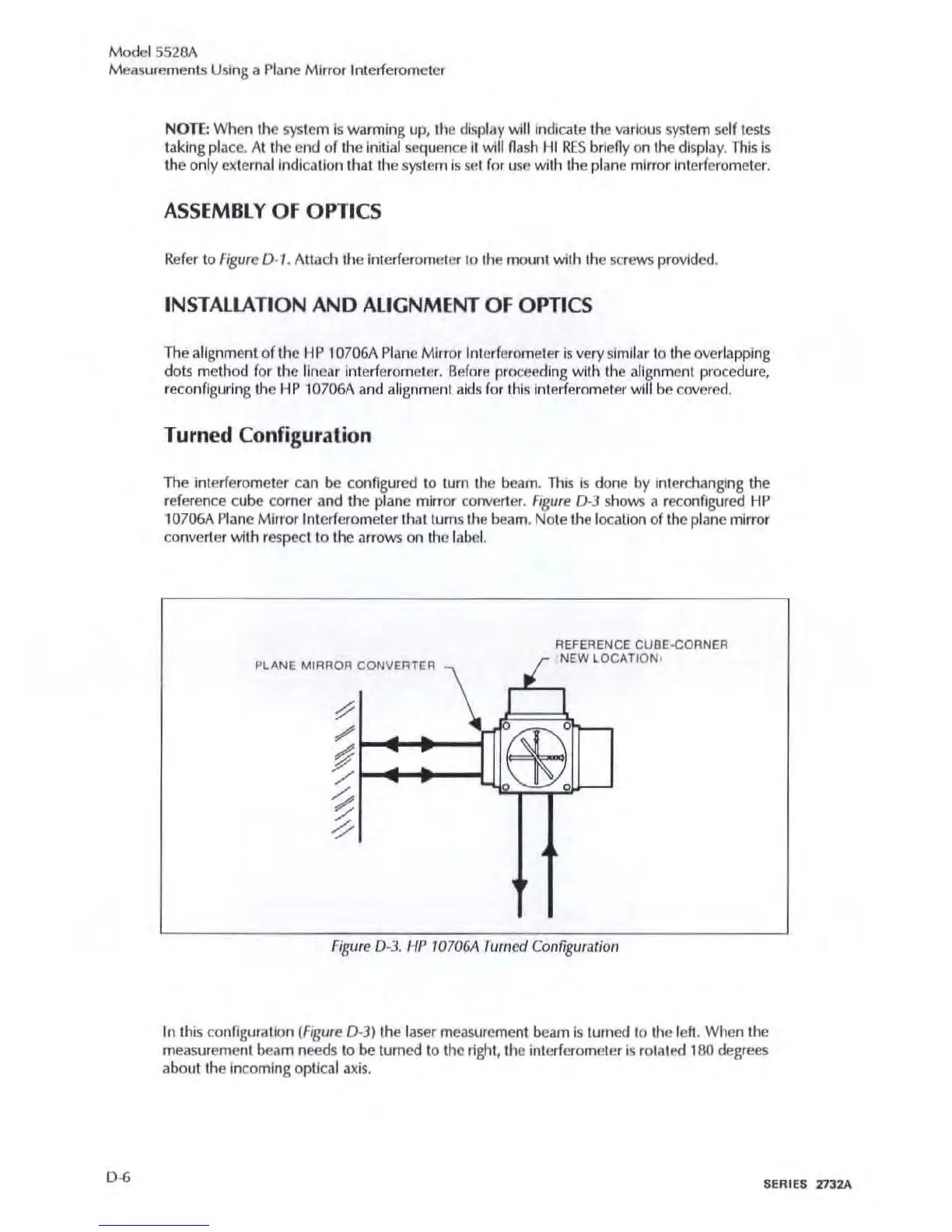
Fig
ure
0-3
shows a recon
fi
gured
HP
10
706A Plane Mirror Interf
ero
meter that turns the beam,
No
te the l
oca
ti
on of the
pl
ane
mirror
co
nverter with r
espec
t to the arrows on the labe
l.
PLANE MIRROR
CONVERTER
\
tf
I
REFERENCE CUBE-CORNER
NEW
LOCATION,
I
~
r-
F
ig
ure D-
3.
,-fP
J070GA
Turned
Co
n
figura
fio
/l
In this
co
n
figu
ration
(Figu
re D-3) the l
ase
r measurement
bea
m is turn
ed
to the lef
t.
When
th
e
m
easu
r
eme
nt
beam
needs
to
be turn
ed
to
the
ri
ght, the i
nt
e
rf
erometer is rotaled 180
deg
r
ees
abo
ut the in
co
mi
ng
op
ti
cal axis.
SE
RIES 1732A

Table of Contents

Related product manuals