14
Before You Start
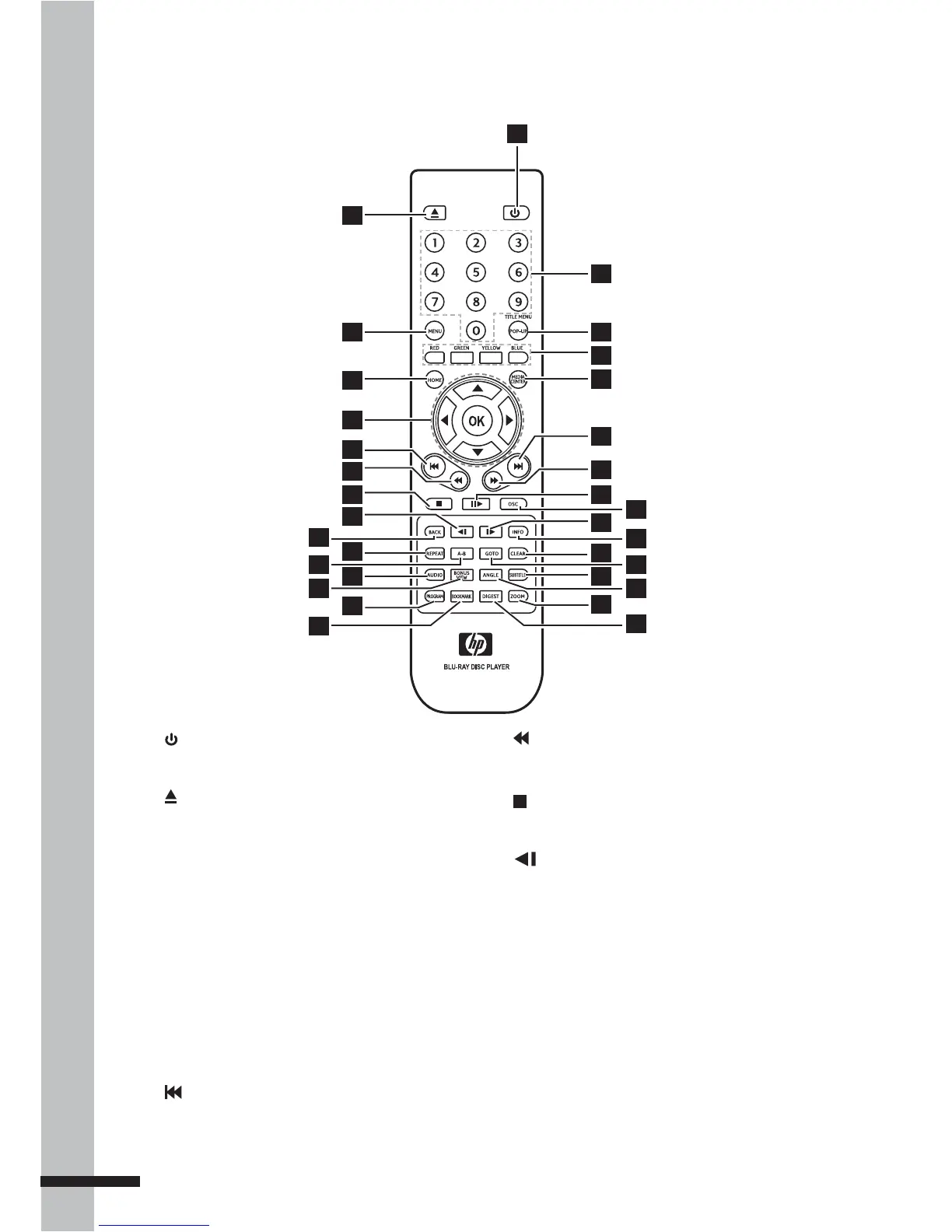
Remote Control
1 POWER ON/OFF
Switches the BD player on or off.
2 OPEN/CLOSE
Opens or closes the disc tray.
3 MENU
Displays the disc menu.
4 HOME
Displays the Home Menu.
5 Arrows
(▲▼◄►)
Select items, change settings or move the
cursor.
OK
Executes the selected item.
6 PREVIOUS
Goes to the previous chapter, title, track,
or file.
7 REVERSE
During playback, starts reverse scanning.
8 STOP
Stops playback.
9
SLOW Rewind
Rewinds playback in slow motion.
10 BACK (RETURN)
Goes back to the previous screen..
11 REPEAT
Repeats playback.
12 A-B Repeat
Repeats playback from A to B.
13 AUDIO
Displays the current audio stream.
1
17
25
23
22
21
20
19
18
29
28
26
24
27
31
30
32
2
3
4
5
8
9
11
13
6
7
15
12
10
14
16



 To Next Page