19
Getting Started
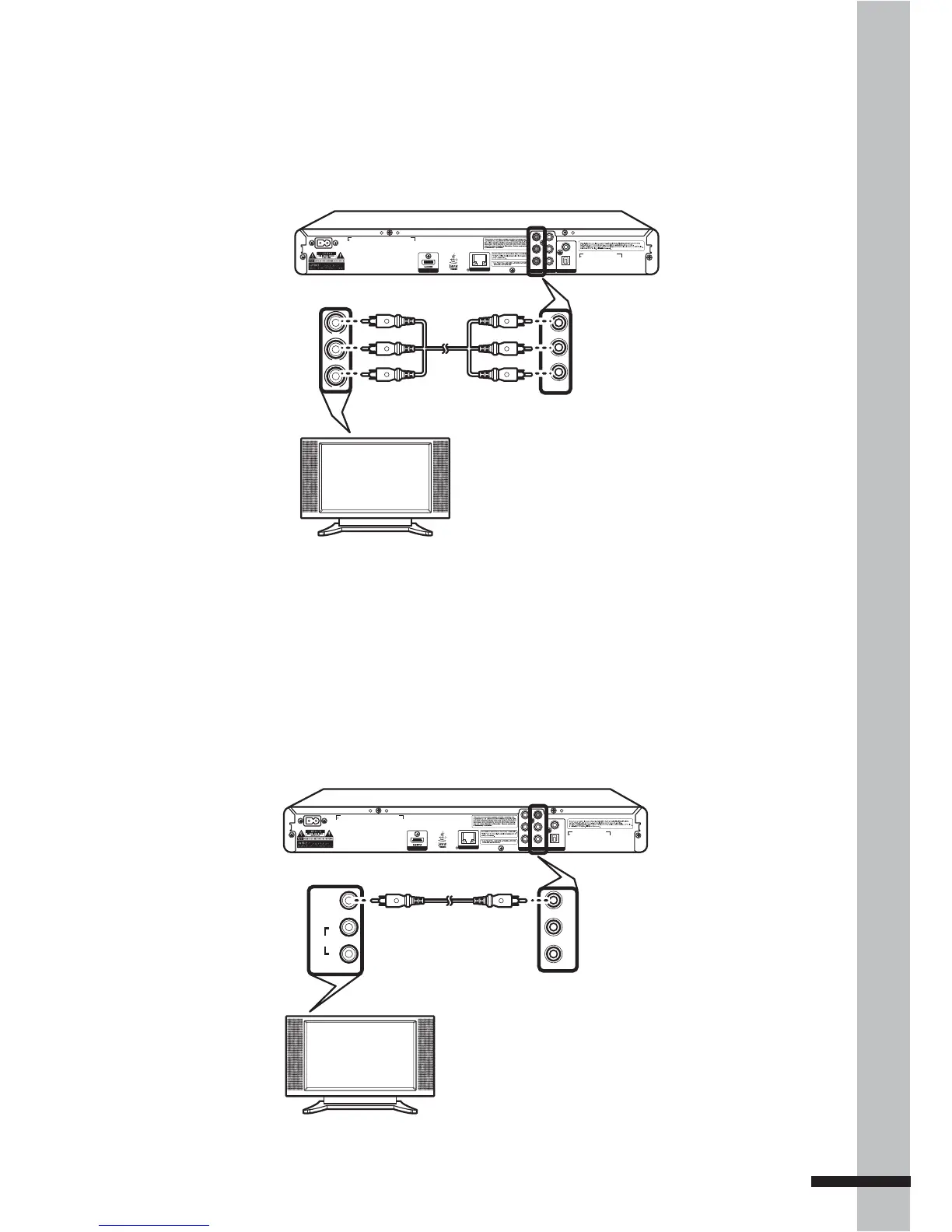
Connecting Using a Component Video Cable
Use a component video cable (green, blue, red) to connect the COMPONENT OUT jack on the
BD player to the COMPONENT IN jack on the TV.
VIDEO
COAXIAL
L
R
Y
P
B
P
R
AC IN ~
DIGITAL AUDIO OUT
COMP OUT AV OUTPUT
DIGITAL AV OUTPUT
LAN
OPTICAL
Y
Pb
Pr
Y
P
B
PR
Green
Blue
Red
Green
Blue
Red
BD Player
COMPONENT In COMPONENT Out
Connecting Using a Composite Video Cable
Use a composite video cable to connect the COMPOSITE OUT jack on the BD player to the
COMPOSITE IN jack on the TV.
VIDEO
COAXIAL
L
R
Y
P
B
P
R
AC IN ~
DIGITAL AUDIO OUT
COMP OUT AV OUTPUT
DIGITAL AV OUTPUT
LAN
OPTICAL
VIDEO
L
R
VIDEO
AUDIO
L
R
BD Player
COMPOSITE In COMPOSITE Out



 To Next Page