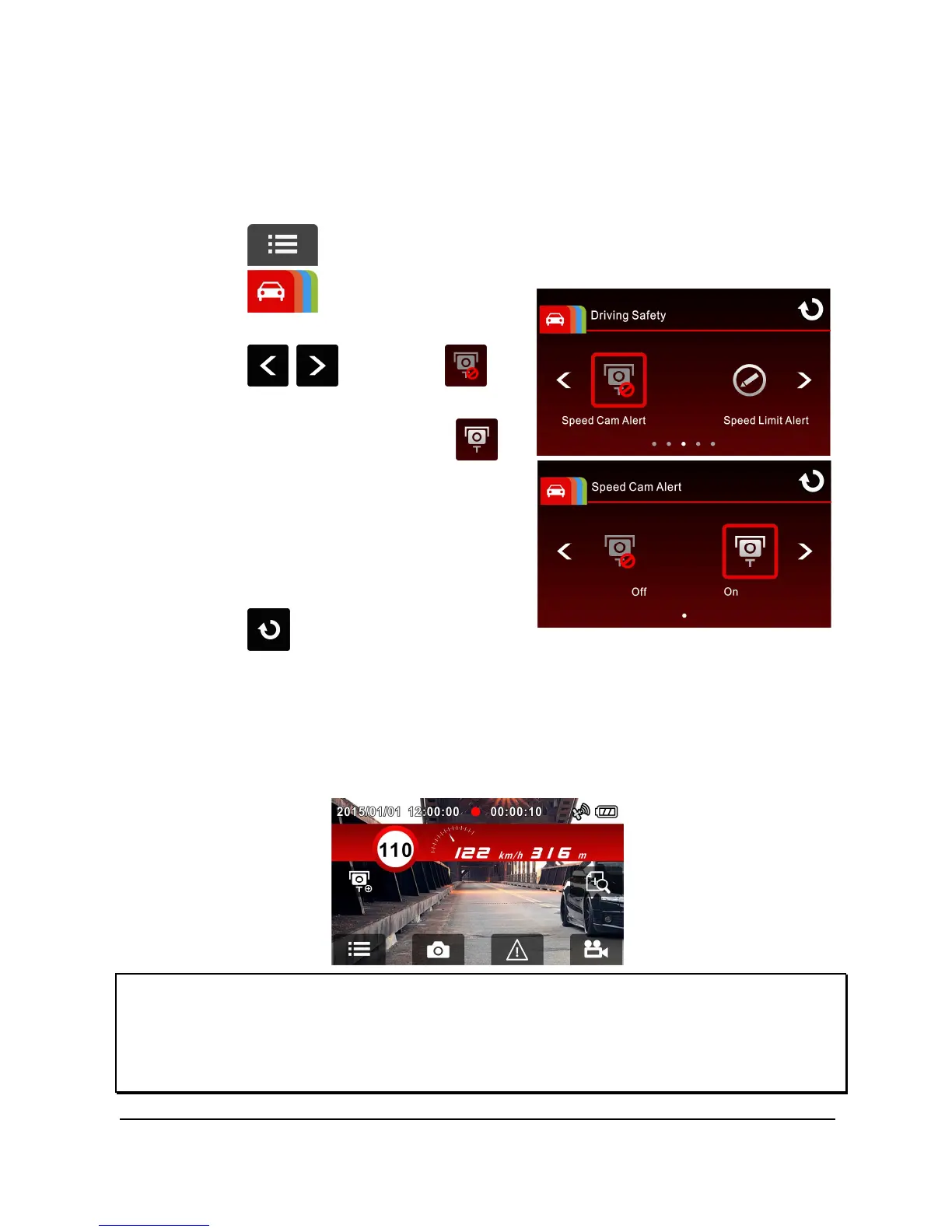
3.2.5 Speed Cam Alert
The Speed Cam Alert function is enabled by default. You’re your vehicle's
location is determined by GPS and approaches a speed cam, this product
produces voice and screen message alerts.
To enable the disabled Speed Cam Alert function:
1. Touch to enter Main Menu.
2. Touch to switchover to
Driving Safety Main Menu.
3. Touch / to select
for entering Speed Cam Alert
function menu, then touch
again to enable the function (on).
4. Touch to return to record
screen.
5. Once your vehicle's location is determined by GPS and approaches a
speed cam, this product produces voice and screen message alerts.
The alarm screen turns red to remind you to slow down if you are
driving faster than the speed limit.
Note:
1. Speed Cam Alert is only applicable when satellite positioning is in ready state. Make
sure satellite positioning of your camcorder is ready if you want to activate this
function. Satellite positioning function is dependent on the model purchased.



 To Next Page