Note:
1. Speed Limit Alert is only applicable when satellite positioning is in ready state.
Make sure satellite positioning of your camcorder is ready if you want to activate
this function. Satellite positioning function is dependent on the model purchased.
2. The Driving Safety functions such as LDWS, FCWS, Front Vehicle Go, Headlight
warning, Speed Cam Alert, Speed Limit Alert, Driver Fatigue Alert and ACC/DEC Alert
will be disabled, if the camcorder is not connected to the car charger.
3.2.7 Driver Fatigue Alert
If the Driver Fatigue Alert function is enabled, this product produces
voice and screen message alerts one hour after it has begun recording
and repeats the alerts every half an hour afterwards.
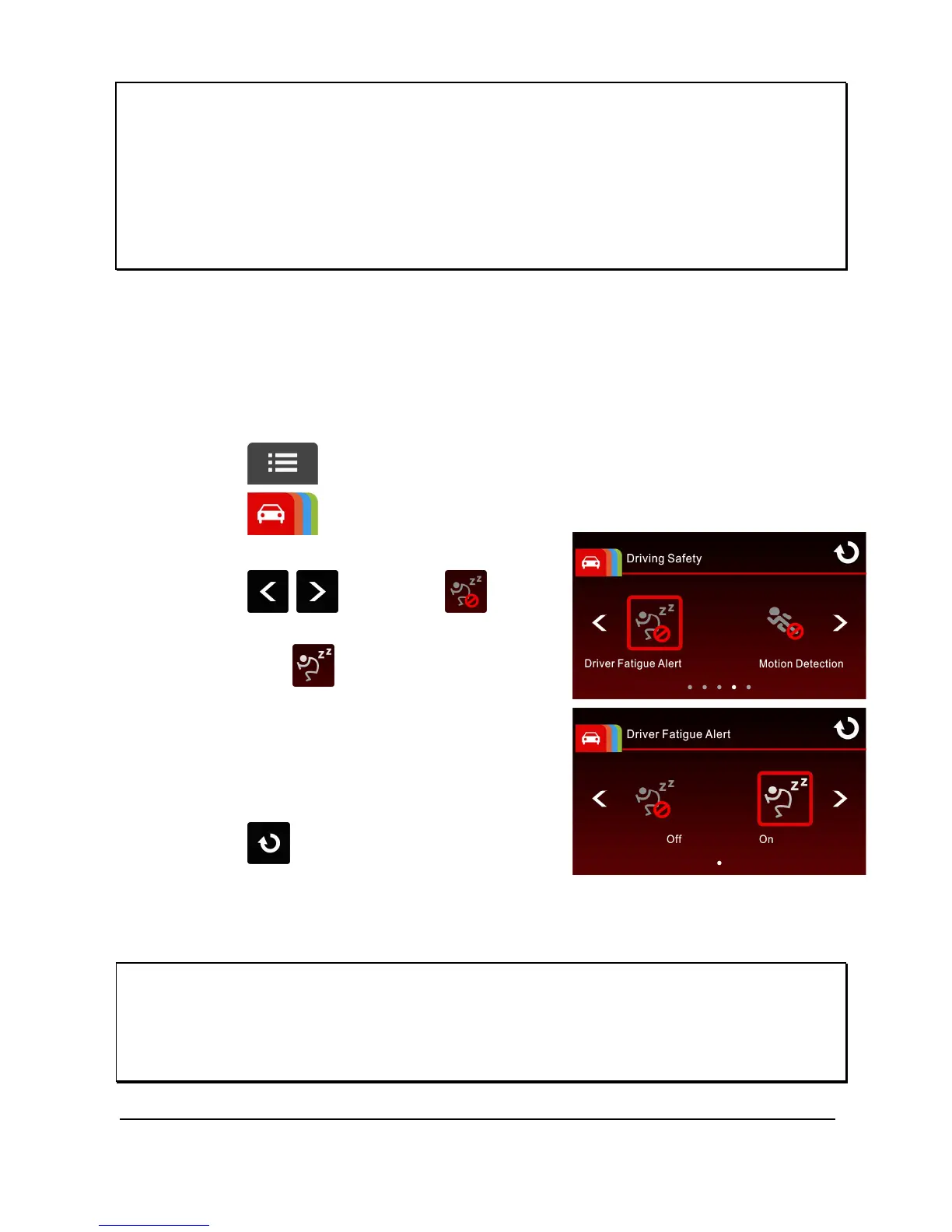
To set the driver fatigue alert, do the following:
1. Touch to enter main menu.
2. Touch to switch over to
Driving Safety Main Menu.
3. Touch / to select for
entering Driver Fatigue Alert menu,
then touch again to activate
(on).
4. Touch to return to record
screen.
Note:
The Driving Safety functions such as LDWS, FCWS, Front Vehicle Go, Headlight
warning, Speed Cam Alert, Speed Limit Alert, Driver Fatigue Alert and ACC/DEC Alert
will be disabled, if the camcorder is not connected to the car charger.



 To Next Page