EasyManua.ls Logo

HP f800x - The Playback Screen

HP f800x
56 pages
Print Icon
To Next Page IconTo Next Page
To Previous Page IconTo Previous Page
Loading...
43
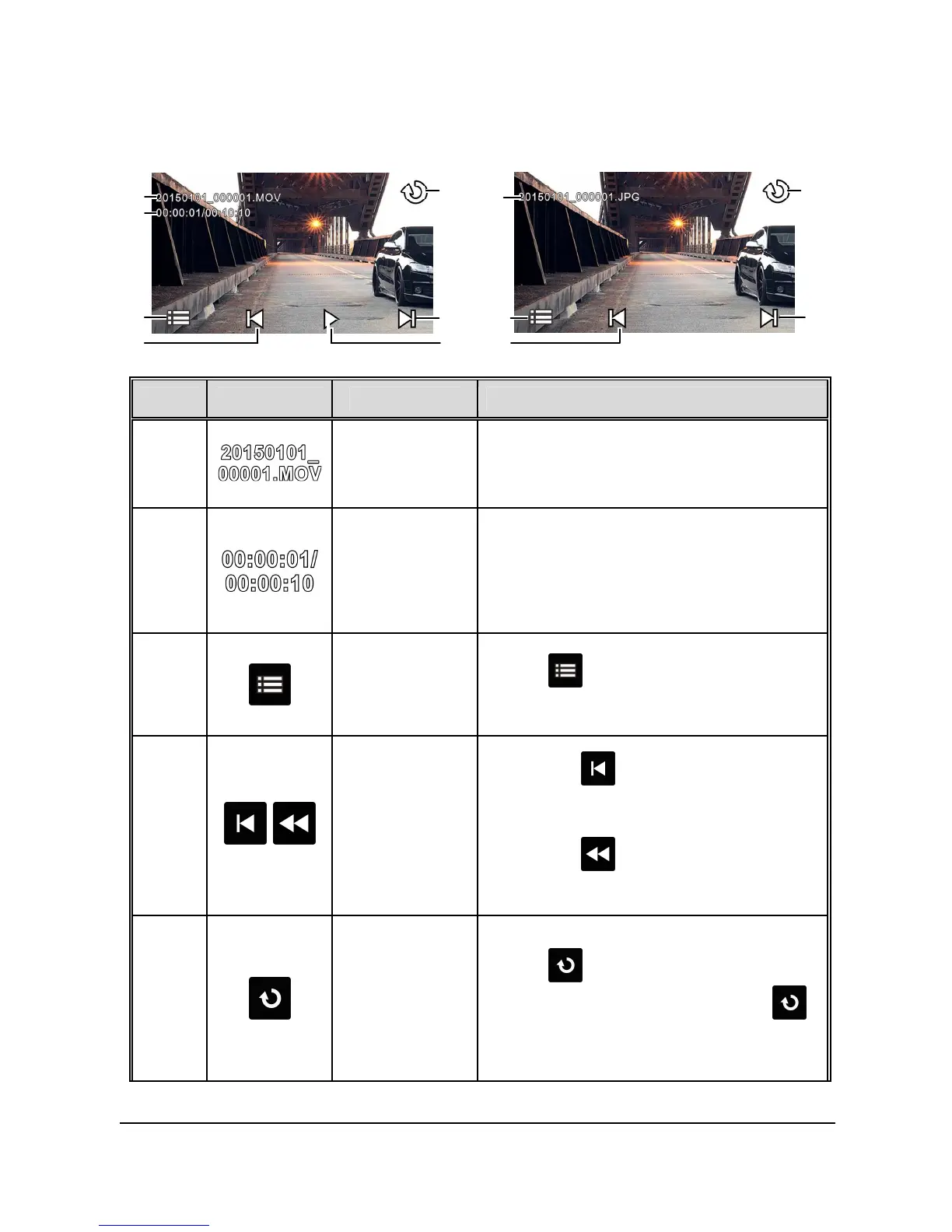
3.3.3 The Playback Screen
Video Playback Screen
Picture Playback Screen
1
5
2
3
6
1
6
4
7
3
4
5
No.
Icon Item Description
1
File Name
Indicates name of current video or
picture file.
2
Current
Duration /
Video
Duration
Indicates time code and duration of
current video file.
3
Menu
Touch to enter File Deletion
menu.
4
/
Fast Rewind
/ Previous
File
Touch when video or picture
is not in playback will switch over
to the previous file.
Touch in video playback
mode will reverse the playback.
5
Return
Touch to return to preview
screen of video or picture. Touch
repetitively to return to record screen.


Other manuals for HP f800x

Related product manuals