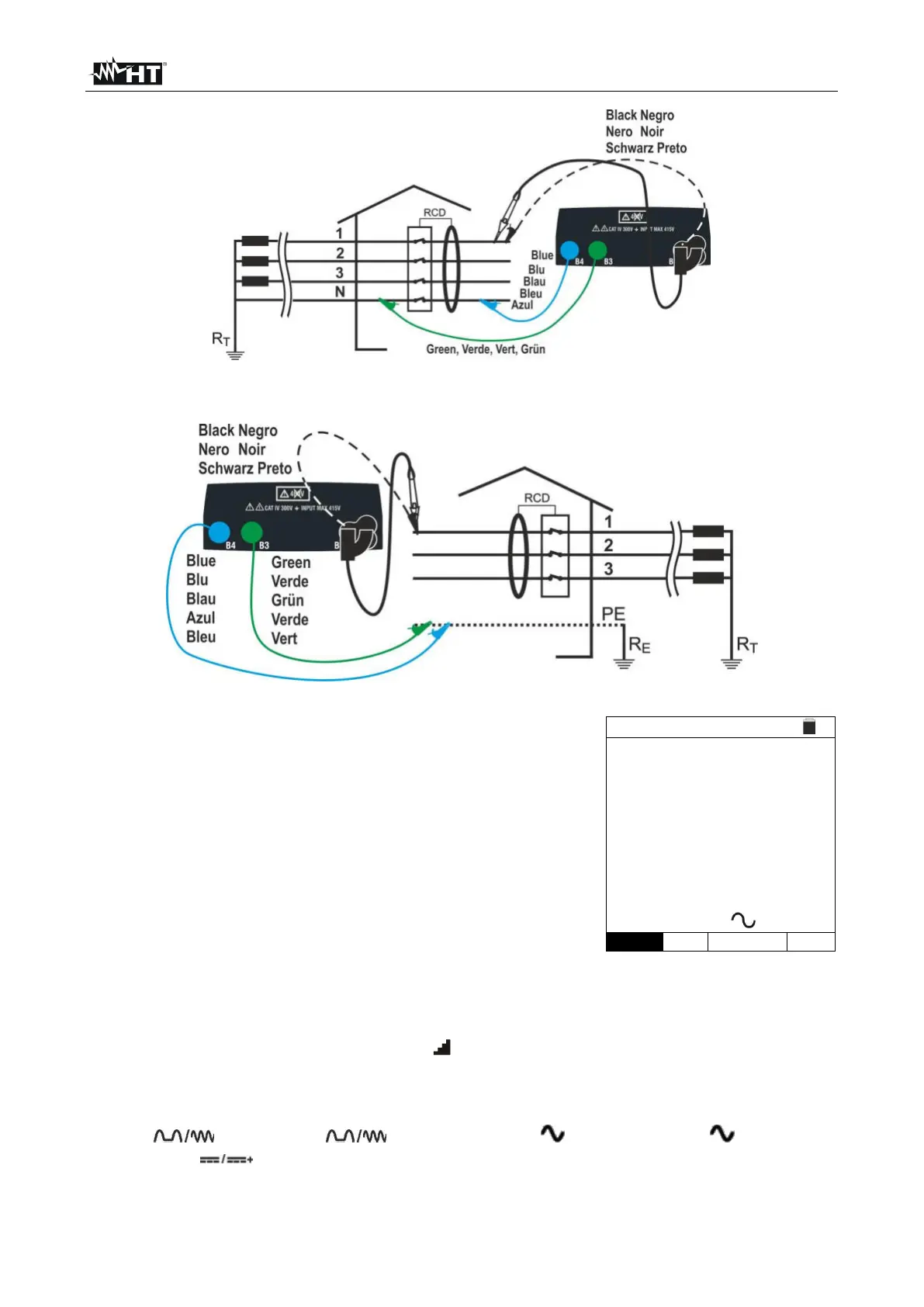
Press the MENU key, move the cursor to RCD in the
main menu by means of the arrow keys (,) and
confirm with ENTER. Subsequently, the instrument
displays a screen similar to the one reported here to the
side.
Select “UK” as a country (see § 5.1.2), the options “TN,
TN or IT”, “25 or 50V”, “50Hz or 60Hz” and the
reference voltage in the general settings of the
instrument (see § 5.1.3).
Use the , keys to select the parameter to be modified, and the , keys to
modify the parameter value:
➢ MODE → The virtual key allows setting the measuring mode of the instrument,
which may be: AUTO, x½, x1, x5,
➢ I
n → The virtual key allows setting the nominal value of the RCD’s tripping current,
which may be: 6mA, 10mA, 30mA, 100mA, 300mA, 500mA, 650mA, 1000mA
➢ Type → The virtual key enables the selection of the RCD type, which may be: A/F
(
- General), ( - Selective), AC ( - General), AC ( - Selective)
B/B+ (
) and DD with polarity positive (↑) or negative (↓)
➢ Ut → The virtual key allows setting the possible visualization of the contact voltage
value at the end of measurement. Options: Ut or NoUt



 To Next Page