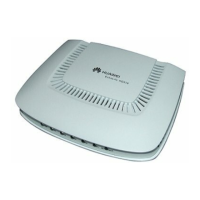
Figure 2-6 PSE
Table 2-4 describes the ports on the PSE.
Table 2-4 Ports on the PSE
Port
Silkscreen Description
Power supply port - Used for power input of the
PSE
Data input port DATA Connected to the
transmission device of the
user
PoE output port PoE Connected to the ePico3801
Table 2-5 describes the LEDs on the PSE.
Table 2-5 LEDs on the PSE
LED
Color and Status Description
AC On and green The power supply is normal.
Off There is no power input, or
the PSE is faulty.
ePico3801
User Guide 2 Introduction to the ePico3801
Issue 01 (2009–09–23) Huawei Proprietary and Confidential
Copyright © Huawei Technologies Co., Ltd.
2-11










 To Next Page