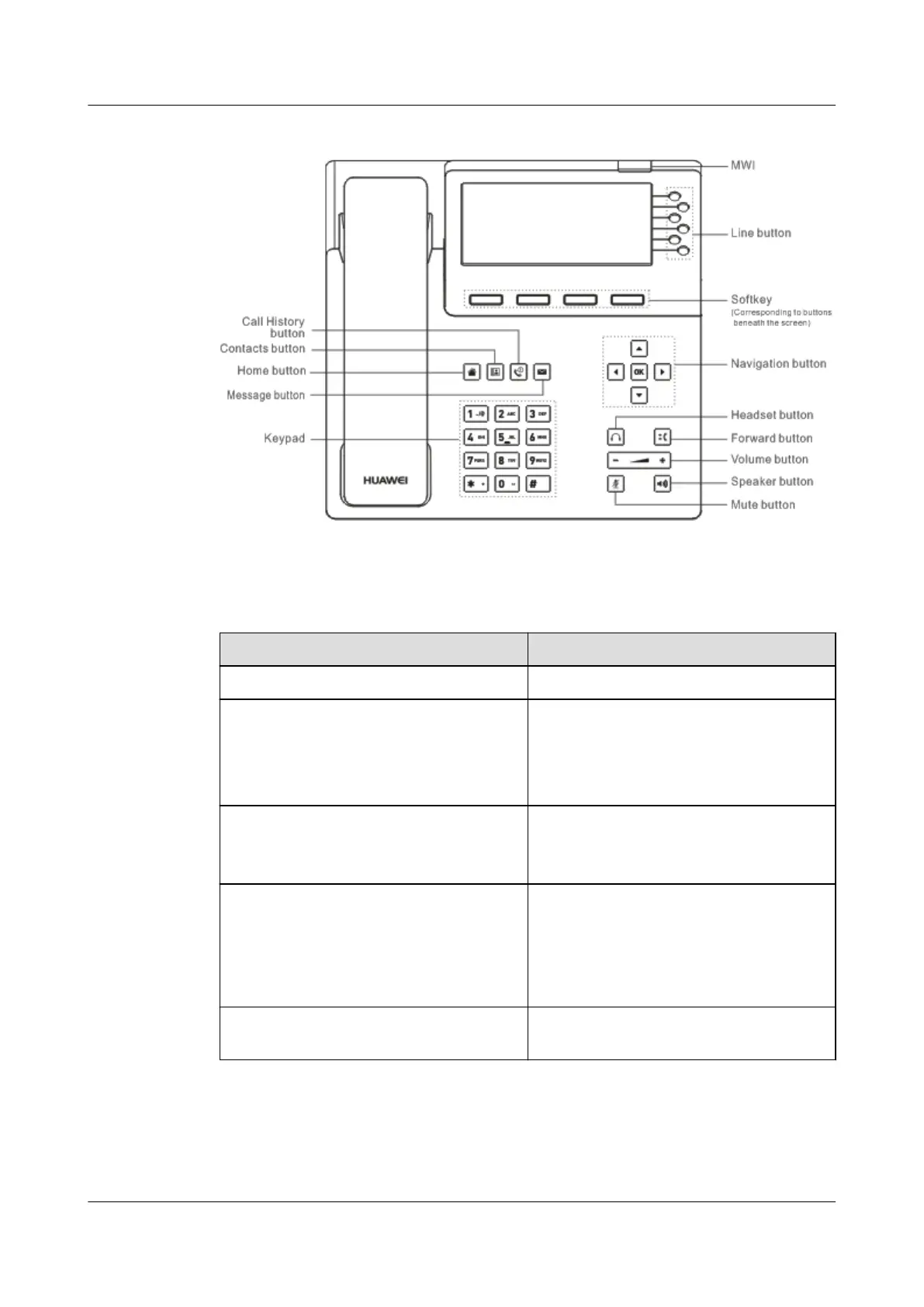
Figure 3-2 Appearance of the eSpace 7950
Table 3-1 describes the buttons on the phone.
Table 3-1 Buttons
Button
Description
Contacts button Displays the Contacts screen.
Home button Displays the home screen.
NOTE
You can press and hold down the Home button
for 10s and select whether to restore factory
settings as prompted.
Call History button (with an LED) Displays the History screen.
For details about the button LED status, see
3.1.2 LED.
Message button Displays the Message screen.
NOTE
If the voicemail function is not supported, you
can set the button as a Preferences button for
displaying the Preferences screen. For details,
consult your system administrator.
Keypad Allows you to enter digits, lowercase or
uppercase letters, and special characters.
eSpace 7910&7950 IP Phone
User Guide
3 IP Phone Overview
Issue 03 (2017-06-30) Huawei Proprietary and Confidential
Copyright © Huawei Technologies Co., Ltd.
5



 To Next Page