Indicator Description
UID indicator The UID indicator helps identify and locate a device.
● O: The device is not being located.
● Blinking blue: The device has been located and is
dierentiated from other devices that have also
been located.
● Steady blue: The device is being located.
NOTE
You can turn on or o the UID indicator by pressing the UID
button or remotely running a command on the iBMC CLI.
Connection status
indicator for the
management network
port
● O: The network port is not connected.
● Steady green: The network port is properly
connected.
Data transmission
status indicator for
the management
network port
● O: No data is being transmitted.
● Blinking yellow: Data is being transmitted.
LOM indicators For details, see 5.6.1 LOMs.
OCP 2.0 mezzanine
card indicators
For details, see 5.6.2 OCP 2.0 Mezzanine Cards.
5.2.3 Ports
Port Positions
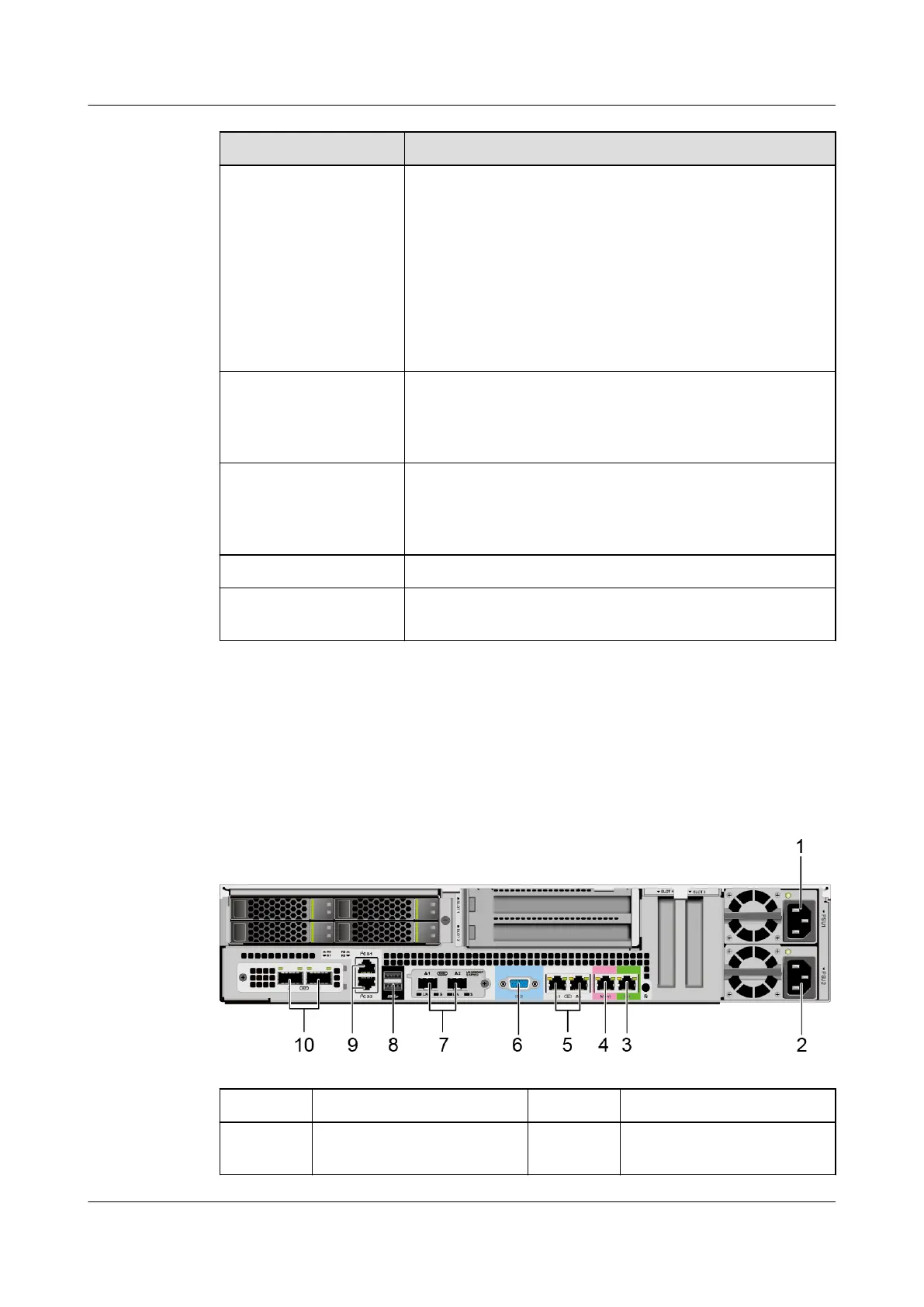
Figure 5-6 Ports on the rear panel
1
Socket for PSU 1 2 Socket for PSU 2
3 Serial port 4 Management network
port
Huawei FusionServer Pro 2298 V5 Server
Technical White Paper 5 Hardware Description
Issue 05 (2020-09-03) Copyright © Huawei Technologies Co., Ltd. 15






 To Next Page