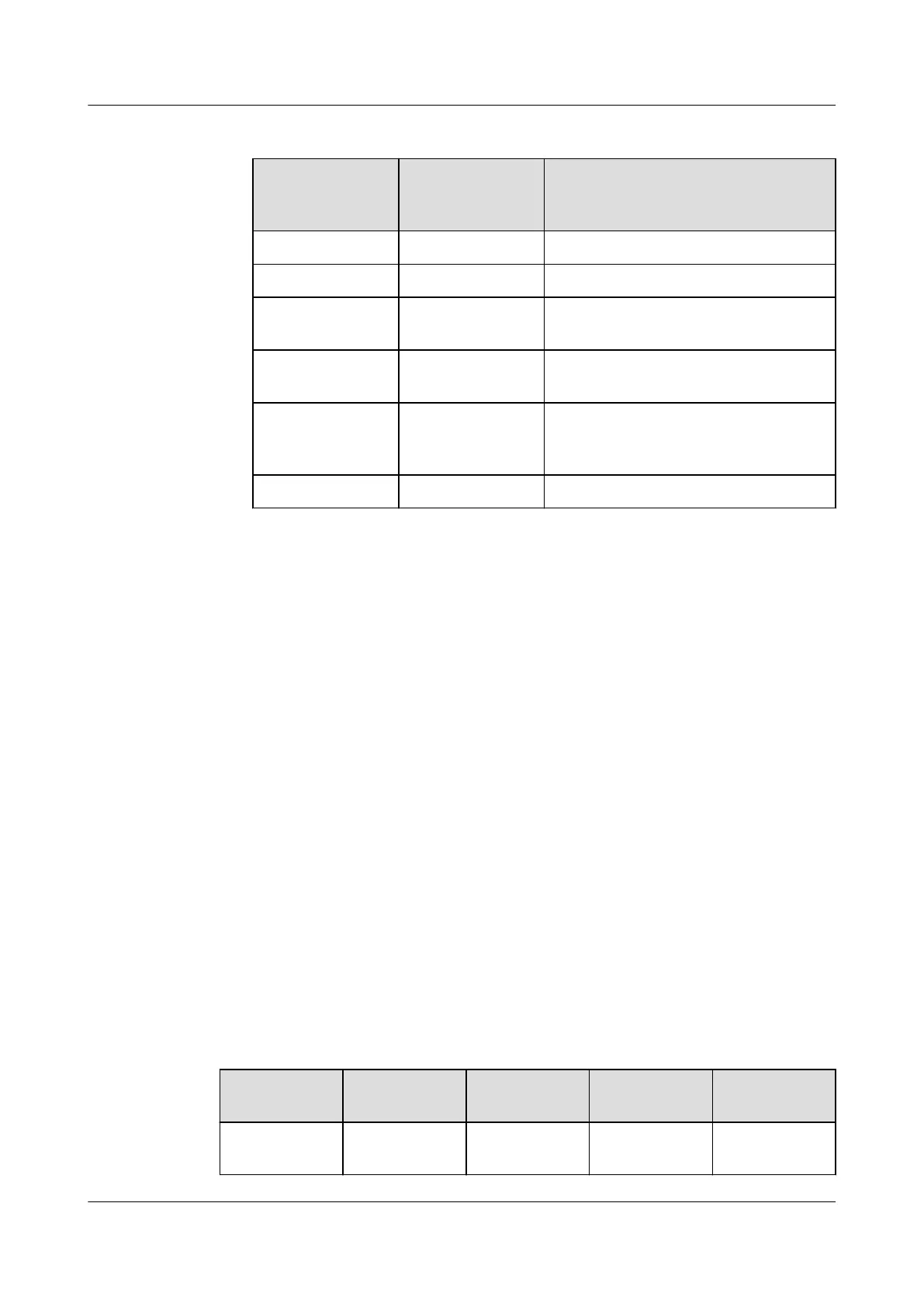
Table 5-14 NVMe drive indicators (VMD disabled)
Activity
Indicator
(Green)
Fault Indicator
(Yellow)
Description
O O The NVMe drive cannot be detected.
Steady on O The NVMe drive is working properly.
Blinking at 2 Hz O Data is being read from or written
to the NVMe drive.
O Blinking at 2 Hz The NVMe drive is being located or
hot-swapped.
O Blinking at 0.5
Hz
The hot removal process is
complete, and the NVMe drive is
removable.
Steady on/O Steady on The NVMe drive is faulty.
5.5.4 RAID Controller Card
The RAID controller card supports RAID conguration, RAID level migration, and
drive roaming.
● Contact your local Huawei sales representative or use the Computing
Product Compatibility Checker to determine the components to be used.
● For details about the RAID controller card, see Huawei V5 Server RAID
Controller Card User Guide.
5.6 Network
5.6.1 FlexIO Cards
FlexIO cards provide network expansion capabilities.
● The FlexIO card (with electrical ports) cannot be connected to power over
Ethernet (PoE) devices (such as a switch with PoE enabled). Otherwise, link
communication failure or even damage to the FlexIO card may be caused.
● Contact your local Huawei sales representative or use the Computing
Product Compatibility Checker to determine the components to be used.
Table 5-15 FlexIO cards supported by the 5288 V5 (example)
NIC Model
Chip Model Port Type Number of
Ports
Support NC-
SI/WOL/PXE
SM210 5719 GE electrical
port
4 √
Huawei FusionServer Pro 5288 V5 Server
Technical White Paper 5 Hardware Description
Issue 10 (2020-12-15) Copyright © Huawei Technologies Co., Ltd. 41







 To Next Page