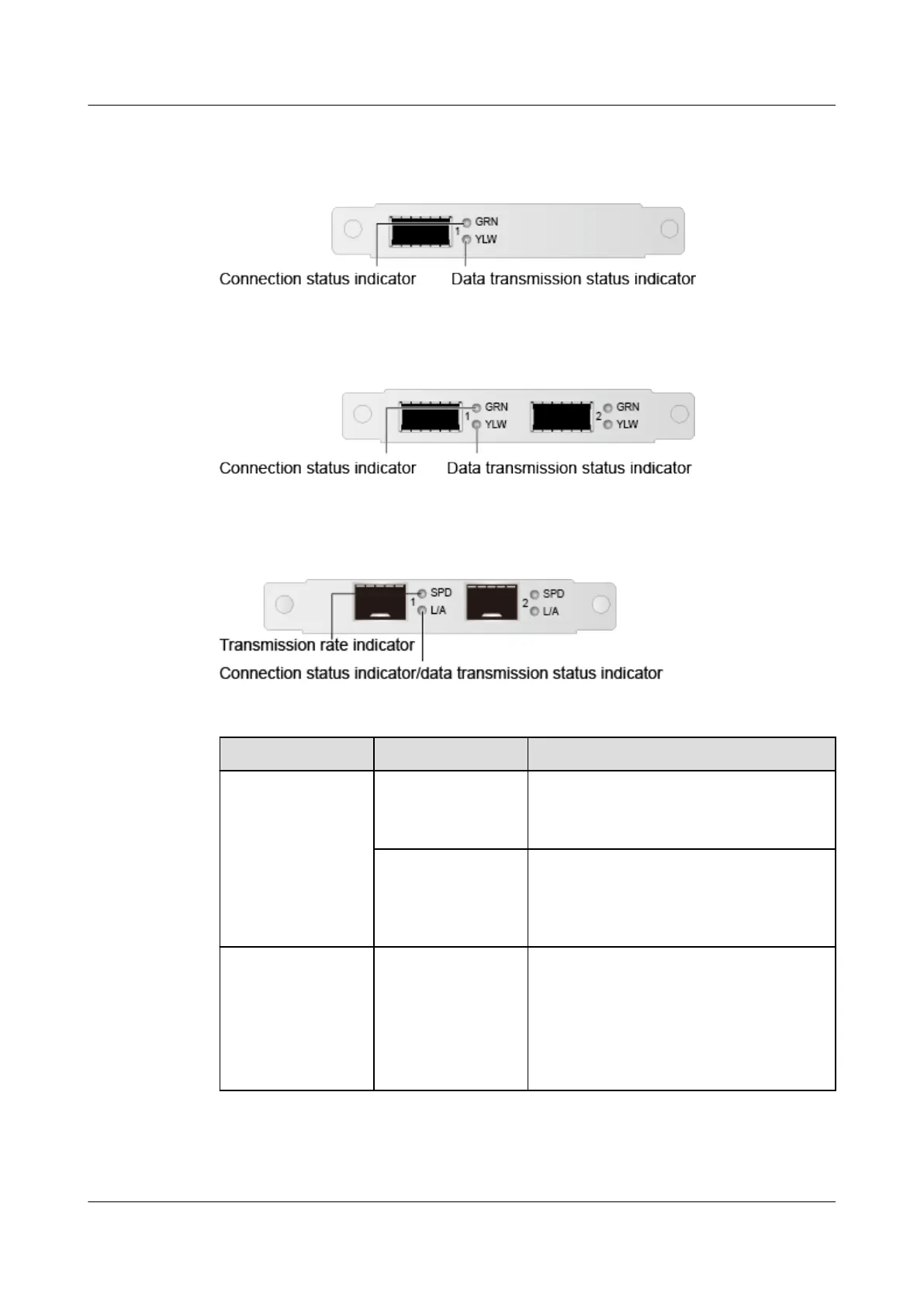
● SM252 with one 56G IB optical port
Figure 5-24 SM252 network port indicators
● SM251 with two 56G IB optical ports
Figure 5-25 SM251 network port indicators
● SM330 with two 10GE optical port/SM380 with two 25GE optical ports
Figure 5-26 SM330/SM380 network port indicators
Table 5-16 Description of FlexIO card indicators
Port Type
Indicator State
GE electrical port Data transmission
status indicator
● O: No data is being transmitted.
● Blinking yellow: Data is being
transmitted.
Connection status
indicator
● O: The network port is not
connected.
● Steady green: The network port is
properly connected.
10GE electrical
port
Transmission rate
indicator
● O: The data transmission rate is
10/100 Mbit/s.
● Steady green: The data transmission
rate is 10 Gbit/s.
● Steady yellow: The data
transmission rate is 1 Gbit/s.
Huawei FusionServer Pro 5288 V5 Server
Technical White Paper 5 Hardware Description
Issue 10 (2020-12-15) Copyright © Huawei Technologies Co., Ltd. 43







 To Next Page