Huawei Mate7 Smartphone
FAQs 8 Camera, music, and video
Issue 01 (2014-09-04) Huawei
Proprietary and Confidential
Copyright © Huawei Technologies Co., Ltd.
38
8.4 Why can't my phone open some images, audio clips, or
videos?
Your phone may not support the file format.
Supported image formats include PNG, GIF, JPG, and BMP. Supported video and audio
formats include MP3, WAV, OGG, MID, AMR, MPEG-4, and 3GP.
For files in other formats, you may need to use third-party applications.
The file may have corrupted.
Download another copy of the file and try opening it again.
The file may be copyright-protected.
Obtain a non copyright-protected version of the file.
The battery level may be low.
Connect your phone to a charger and try again.
Unknown error may have occurred.
Restart the applications in question or your phone.
8.5 What can I do if my phone can't play online music or
videos?
Follow the onscreen instructions to install the Adobe Flash Player plug-in before you play the
online music or video.
If the problem persists, perform the following operations:
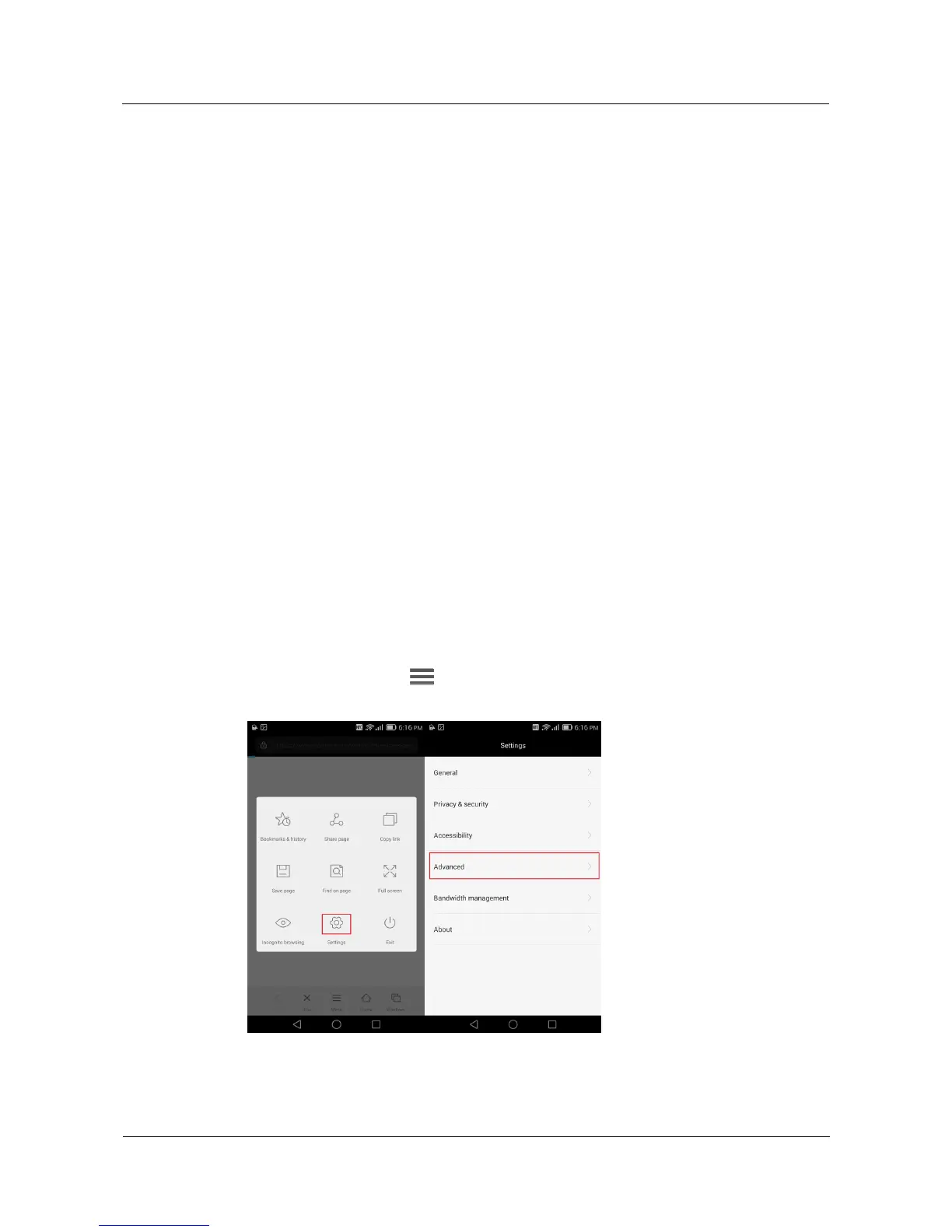
Open the browser, touch > Settings > Advanced > Enable plug-ins, and choose
Always on.



 To Next Page