SUN2000 (8KTL-28KTL)
User Manual
Huawei Proprietary and Confidential
Copyright © Huawei Technologies Co., Ltd.
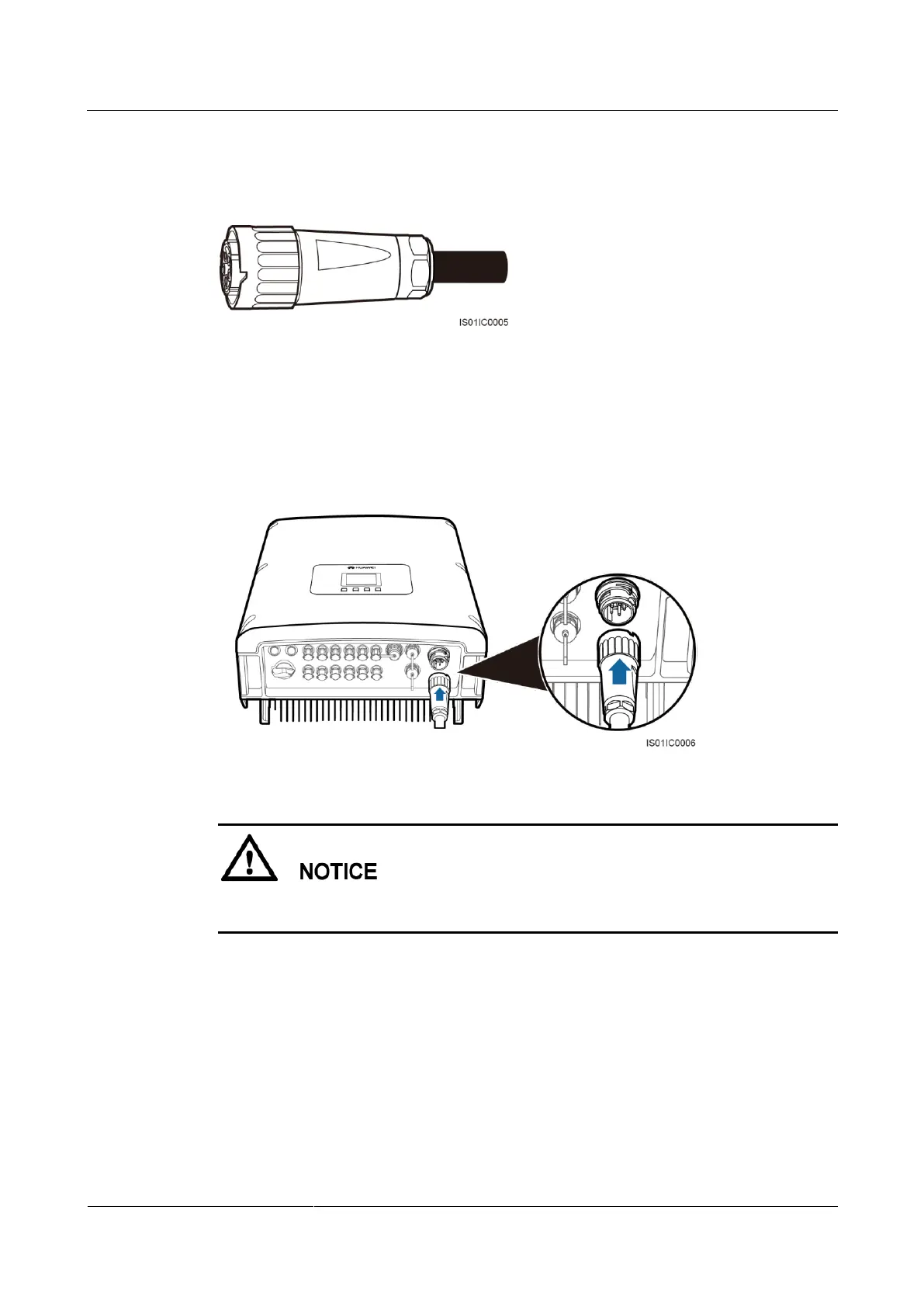
Tighten the cable gland to a torque of 5 N.m (You need to use some tool to achieve this
torque).
Figure 5-13 Installing a cable sealing cover
Step 8 Connect the AC output connector to the bayonet coupling of the AC output wiring terminal on
the SUN2000 and rotate it clockwise until you hear a "click" sound, as shown in Figure 5-14.
Because no sufficient space is available on the right of the AC terminal, tighten the terminal
using the left hand.
Figure 5-14 Connecting an AC output connector
The AC output connector securely connects to the AC output wiring terminal after the
bayonet coupling snaps into place.
----End
Follow-up Procedure
To remove an AC output connector from the SUN2000, press the locking plate on the
coupling nut using a flat-head screwdriver and rotate the AC output connector
counterclockwise, as shown in Figure 5-15.



 To Next Page