7-6
7.3 Controlling Computer Internet Access
Your WS322 provides MAC address filtering. With this function, you can confine
Internet access to specific computers or deprive specific computers of Internet
access. While using this function, you can also set limits on the duration of Internet
usage.
This function is available in WiFi router mode.
Step 1 Log in to the web management page.
Step 2 Click Advance Settings.
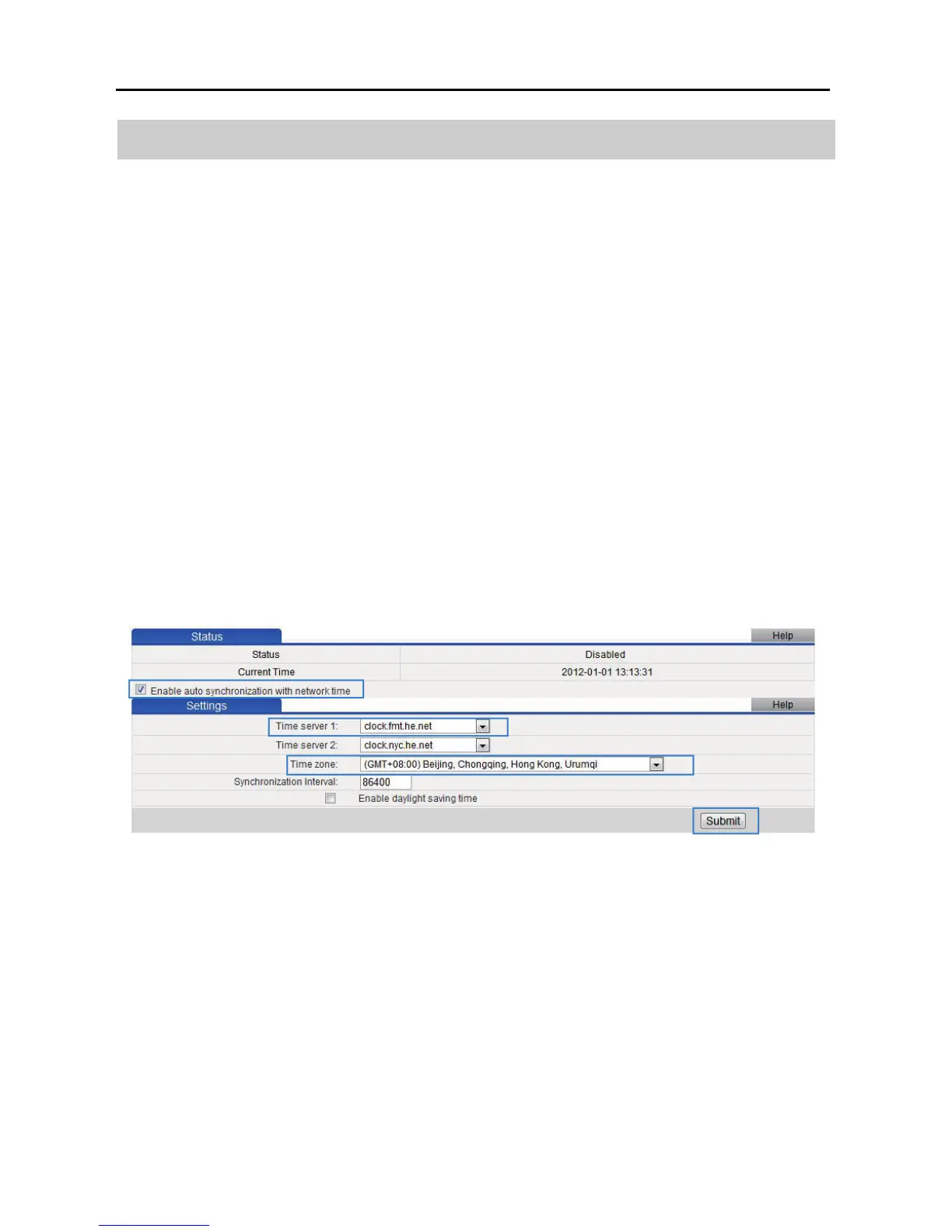
Step 3 In the navigation tree, choose Advanced > SNTP.
Step 4 Select Enable auto synchronization with network time.
Step 5 Select a time service address for Time server 1.
Step 6 In Time zone, select your time zone.
Step 7 Click Submit.
Step 8 In the navigation tree, choose Advance > Filter.
Step 9 Click MAC Filter.
Step 10 Click New.
Step 11 Set the following parameters based on rule 1.
Rule name: Prohibited before 19:00



 To Next Page