26
Input Type and Function
CX Panel Input type is assigned in the programming process. Inputs can be selected to be a Switch, Motion Sensor,
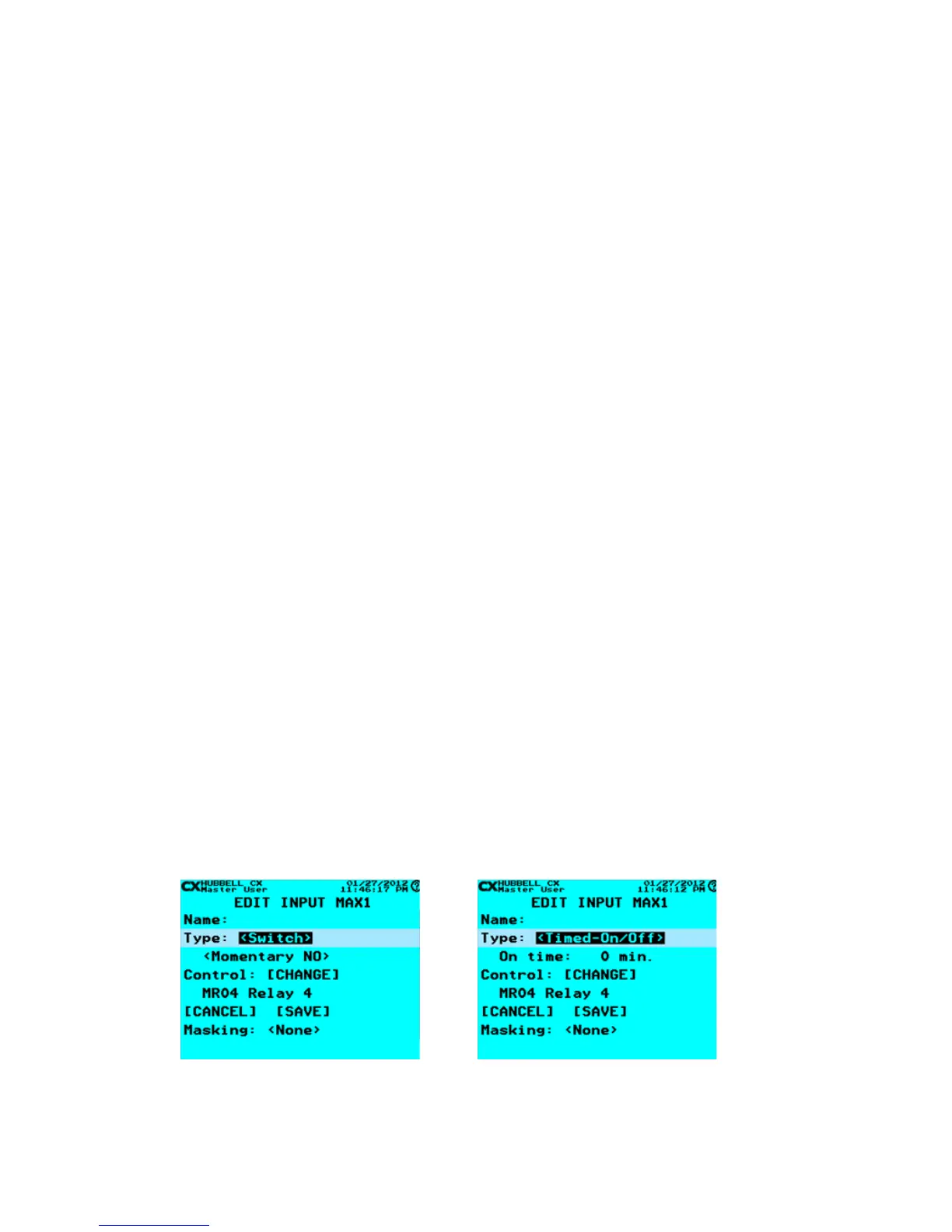
Photocell, Timed On/Off or Timed-On-Only. From the EDIT INPUT Screen, Scroll to Type: Use right/left arrow keys to select
type. Type selections will appear in the line as they are available. Each selection is dened as follows:
<Switch>
• Momentary NO: Lights are toggled when the switch is closed
• Momentary NC: Lights are toggled when the switch is opened
• Maintained NO: Lights are turned ON when the switch is closed or Lights are turned OFF when the switch is
opened
• Maintained NC: Lights are turned ON when the switch is open or Lights are turned OFF when the switch is closed
• Momentary NO/NC Temp Pri: Momentary switch for which priority is not remembered after ON/OFF events
<Motion>
• Motion: Denes the input as connected to a motion sensor. The functionality is for practical purposes the same as
a maintained switch, but for use in understanding the type of control and assigning use in relation to Scenarios,
Priorities and Masking, it is important to select the input type properly.
<Photocell>
• Range: The range of the photocell input. Settings are 0-100%, 0.3-30ft-c, 3-300ft-c, and 30-3000ft-c, 50-750ft-
c, and 60-6000ft-c, 200-2500ft-c, 1000-7500ft-c. Photocell instructions indicate internal jumper settings for the
LUXSTATLS models.
• ON threshold: Light level below which lights are turned ON
• OFF threshold: Light level above which lights are turned OFF
• OFF delay: Time that OFF threshold must be maintained before lights are turned OFF
• Note that the OFF threshold must be higher than the ON threshold
<Timed-On/Off>
• A Momentary NO switch
• ON time: Denes the time after which the lights will be turned off, up to 999 minutes. The Timed On/Off switch
allows an OFF command if activated after the start of the Timed-On event. Once the relay is OFF the next
activation will start a new Timed-On event.
<Timed-On-Only>
• A Momentary NO switch
• ON time: Denes the time after which the lights will be turned off, up to 999 minutes, The Timed-On-Only switch
does not allow for any Off events. The switch functions as a Timed-On device only. Additional activations during
the timed-on event while the relay or group is ON are ignored. The next Timed-On event can only be initiated when
the relay or group controlled is in the OFF state,
Select Input Type - Switch Select Input Type – Timed-On/Off


 To Next Page