12
Programming Procedures
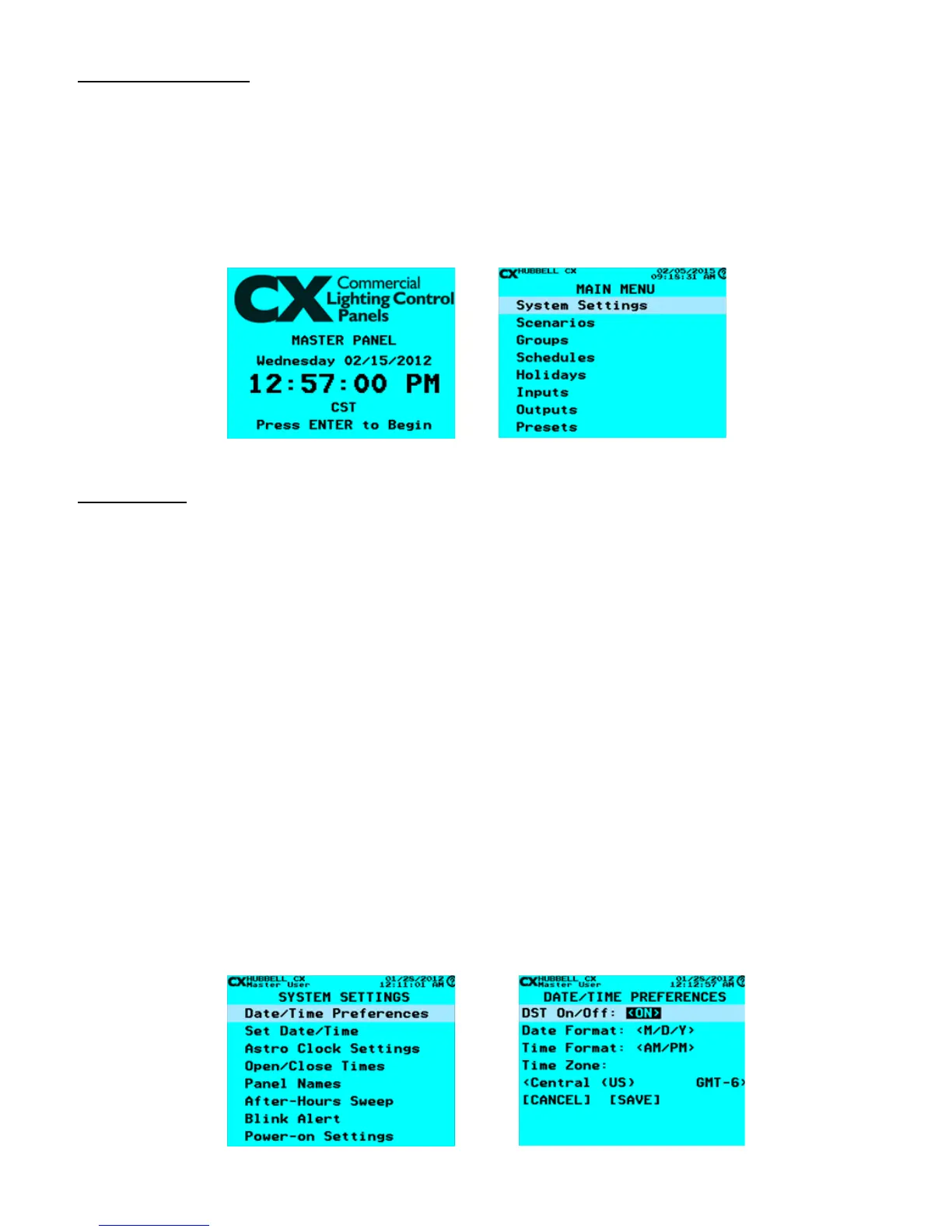
When the system is powered on, you will see the CX Lighting Control Home Screen. If the CX Lighting Control Home Screen is
not displayed, press ESC several times until it is displayed.
Press ENTER to display the MAIN MENU.
The MAIN MENU contains 10 section programming categories. These categories are placed in the logical order that is needed
to program the system in an efcient manner. Each category is comprised of sub-sections associated with its function placed in
logical order
CX Panel Home Screen
CX Panel Main Menu
System Settings
The following programming selections are available in the System Settings Menu:
• Date/Time Preferences
• Set Date/Time
• Astro Clock Settings
• Open/Close Times
• Panel Names
• After-Hours Sweep
• Blink Alert
• Power-on Settings
• Relay Function
• Idle Time-out Settings
• Backlight Settings
• Clock Adjustment
• Factory Defaults
Date/Time Preferences
Use the Date/Time Preferences to enable Daylight Savings Time (DST), to choose Date/Time Formats and select Time Zone.
Note that the Date/Time Preferences are the baseline of all scheduled events, holidays, and masking, as well as other date and
time settings.
• From the MAIN MENU, use the navigation arrows to select System Settings > Date/Time Preferences. Press ENTER.
• Use the navigation arrows to scroll to and change the DATE/TIME PREFERENCES.
Select Date/Time Preferences


 To Next Page