9
Programming Instructions
The programming instructions include the following sections:
User Interface
Menu Structure and Navigation
HELP Screens
Function Keys
Programming Procedures
System Settings
Scenarios
Groups
Schedules
Holidays
Inputs
Outputs
Presets
Dimming
System Tools
Special Instructions – Priorities and Masking
User interface
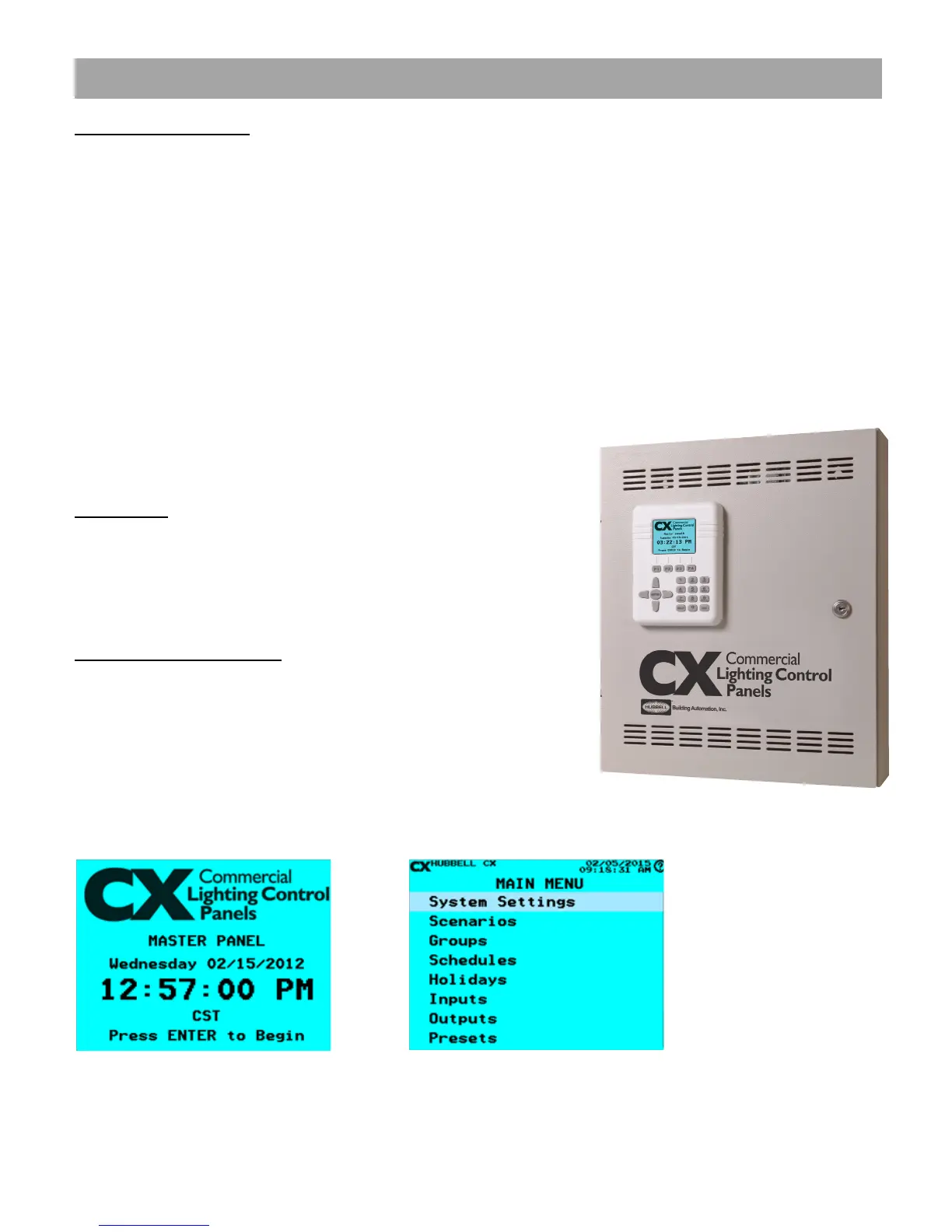
The user interface is accessed from the front of the CX Panel enclosure and
can be operated with the door closed and locked condition. Programming
does not require access to the panel interior. All electrical line and low voltage
connections should be complete and tested by a qualied electrician prior to
programming.
Menu Structure and Navigation
The user interface is designed with simple navigation logic. From the HOME
screen press ENTER to begin programming. The Main Menu will display.
Use the arrow Up/Down keys to navigate to the selected menu line. When
the desired line is highlighted, press ENTER to access this section of the
programming.
PART 2 - CX Lighting Control Panels Programming Guide
CX Panel Home Screen CX Panel Main Menu


 To Next Page