33
Dimmer Inputs
These are the Inputs that are located on the Dimmer Card they are designed to function with Zone 5
Switch Stations. These Zone 5 switch stations are connected via a CAT5 cable into an RJ45 connector
located on the Dimming Card. Typically ON/OFF or Preset functions will be programmed in the Dimmer
Input section. The Z5-SW-OO switch is an ON/OFF switch which will be an “A” (for the ON) and a “B” (for
the OFF”) functionality.
Note: If a Raise /Lower switch is to be used, programming is NOT completed in this section. (See
Dimmers)
Dimmer Input Types:
• <Switch> - The input is used as an ON/OFF toggle switch.
• <Timed On/Off> - The input is used as a Timed-ON switch. Pressing the switch a second time
will cancel the Time–ON function turning Off the relay(s).
• <Timed-On-Only> - The input is used as a Timed-ON switch. Pressing the switch a second time
will extend the Time–ON function.
• <Switch- ON> - The input is used as an ON only switch
• <Switch –OFF> - The input is used as an OFF only switch
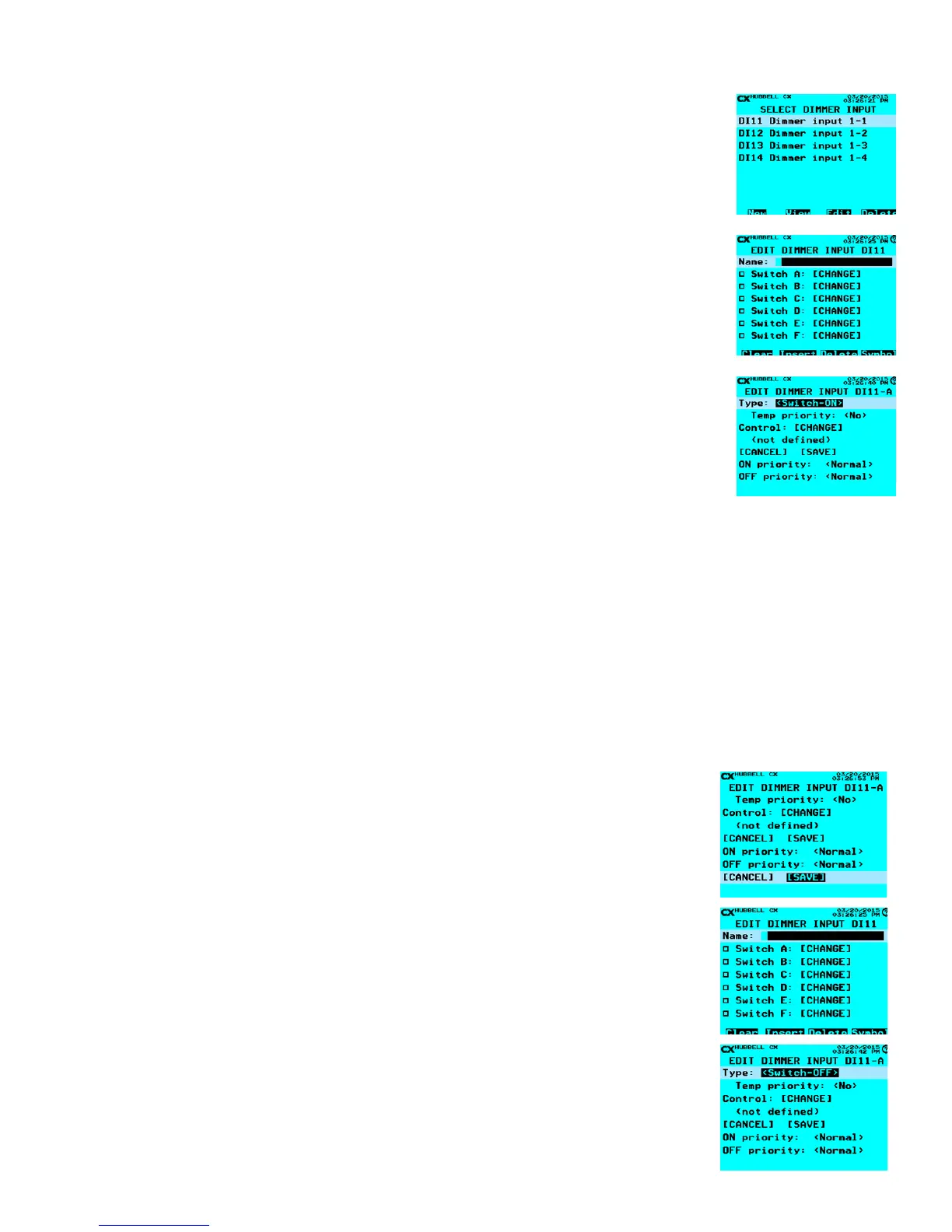
Once Dimmer Inputs is selected:
ON Action
• Scroll to the available Dimmer Input that will need to be congured. If a Dimmer Input has
programming in it, there will be a black lled in box between the DI designation and the Dimmer
Input text.
• Change the Name of the Dimmer Input to designate the Input function.
• Then scroll down to Switch A: [CHANGE] and press ENTER on the keypad. If a Dimmer Input Switch
has been programmed the box on the left will be lled in.
• Type: - Move the arrow key (left or right) to select <Switch-ON>. This will make the top or ON button on
a Z5-SW-OO station an On only function.
• Temp priority: - If <Yes>, the priority level of this input is not maintained between button presses.
Unless more information is dened for the Temp priority of the switch station the default, (<No>) should
be not adjusted.
• Scroll to Control: [CHANGE] – Select the Relay, or Group that the switch will control, and then press
ENTER on the keypad.
• Scroll down to the ON priority: or OFF priority: and if needed change to meet functionality, (left or right
arrow). Priorities need to be planned with a sequence of operation if no sequence has been dened
leave the defaults to <Normal>.
• When completed scroll down to [SAVE] and press ENTER on the keypad. This will allow the
user to program the B or OFF function.
OFF Action
• Scroll to Switch B: [CHANGE] and press ENTER on the keypad.
• If a Dimmer Input Switch has been programmed the box on the left will be lled in.
• Type: - Move the arrow key (left or right) to select <Switch-OFF>. This will make the bottom
or OFF button on a Z5-SW-OO station an Off only function.
• Temp priority: - If <Yes>, the priority level of this input is not maintained between button
presses. Unless more information is dened for the Temp priority of the switch station the
default, (<No>) should be not adjusted.
• Scroll to Control: [CHANGE] – Select the Relay, or Group that the switch will control, and then
press ENTER on the keypad.
• Scroll down to the ON priority: or OFF priority: and if needed, change to meet functionality,
(left or right arrow). Priorities need to be planned with a sequence of operation if no sequence
has been dened leave the defaults to <Normal>.
• When completed scroll down to [SAVE] and press ENTER on the keypad.



 To Next Page