41
CX Master/Secondary Congurations
“I’m unable to see Secondary Panel.”
1. With the Power removed to both panels, remove the CX Controller form the Master Panel and connect it to the Secondary
Panel. Remove the Interface card and power up the Secondary Panel.
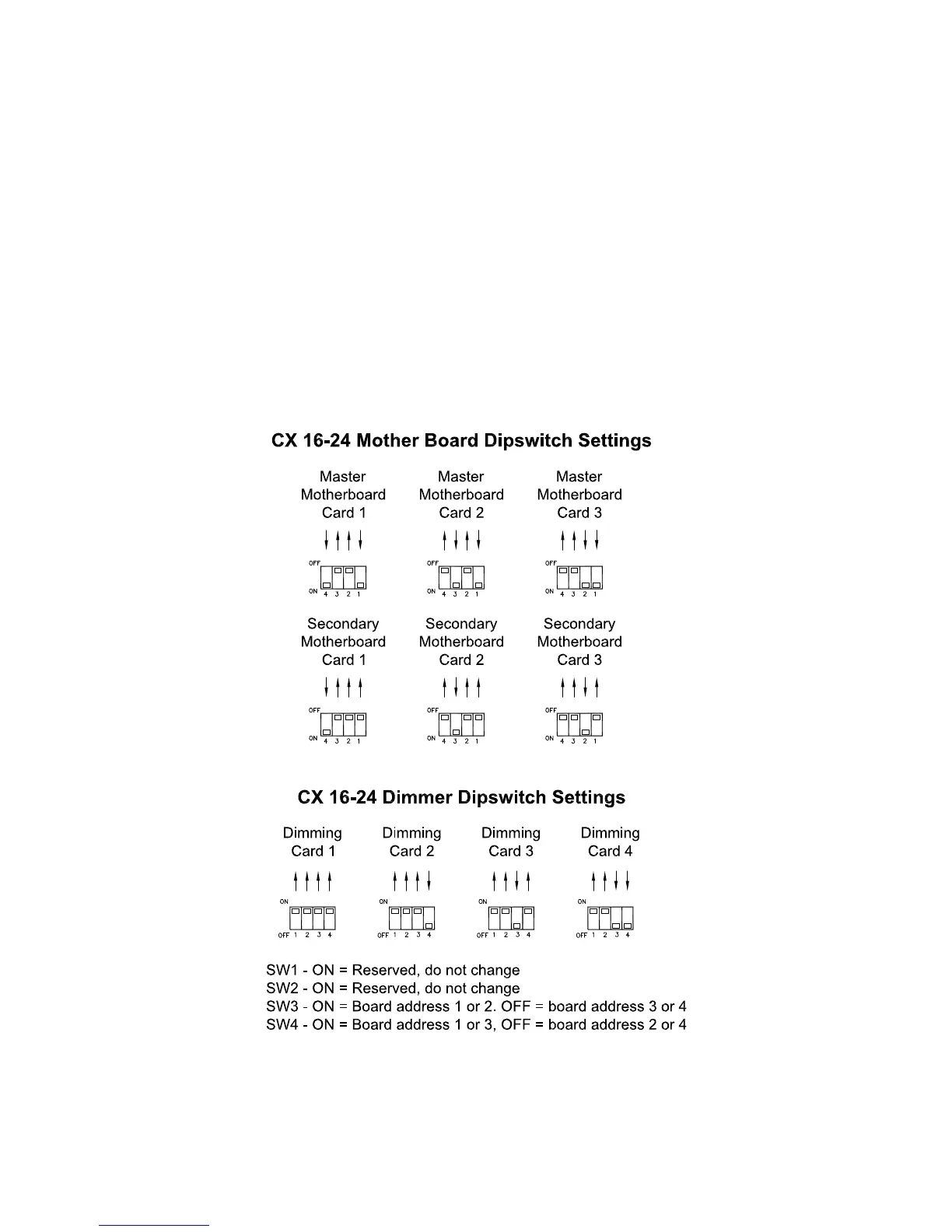
• The Secondary Panel is still not seen. Check the dipswitch congurations on the CX Panel.
• If these are correct, with the power removed disconnect all relays and see if the Motherboards can be seen.
• If not then the Motherboards needs to be replaced.
• If so then reinstall all the relays one at a time. Power cycling between re-installation and verifying after each reinstall
that they are seen.
• If a relay is reinstalled and not seen, verify the relay by following #3 under Line Voltage Power Connections.
2. Verify the installation of Both Interface Cards
• Both Cards look similar however the Master Card has the text Master Card on the card and the Secondary Card has the
text Secondary Card on it.
3. Test the CAT5 Cable being used to insure a non damaged cable.
4. Verify the dipswitches on both panels represent the correct conguration per Panel function.


 To Previous Page