PSP8620311
Rev. E
33
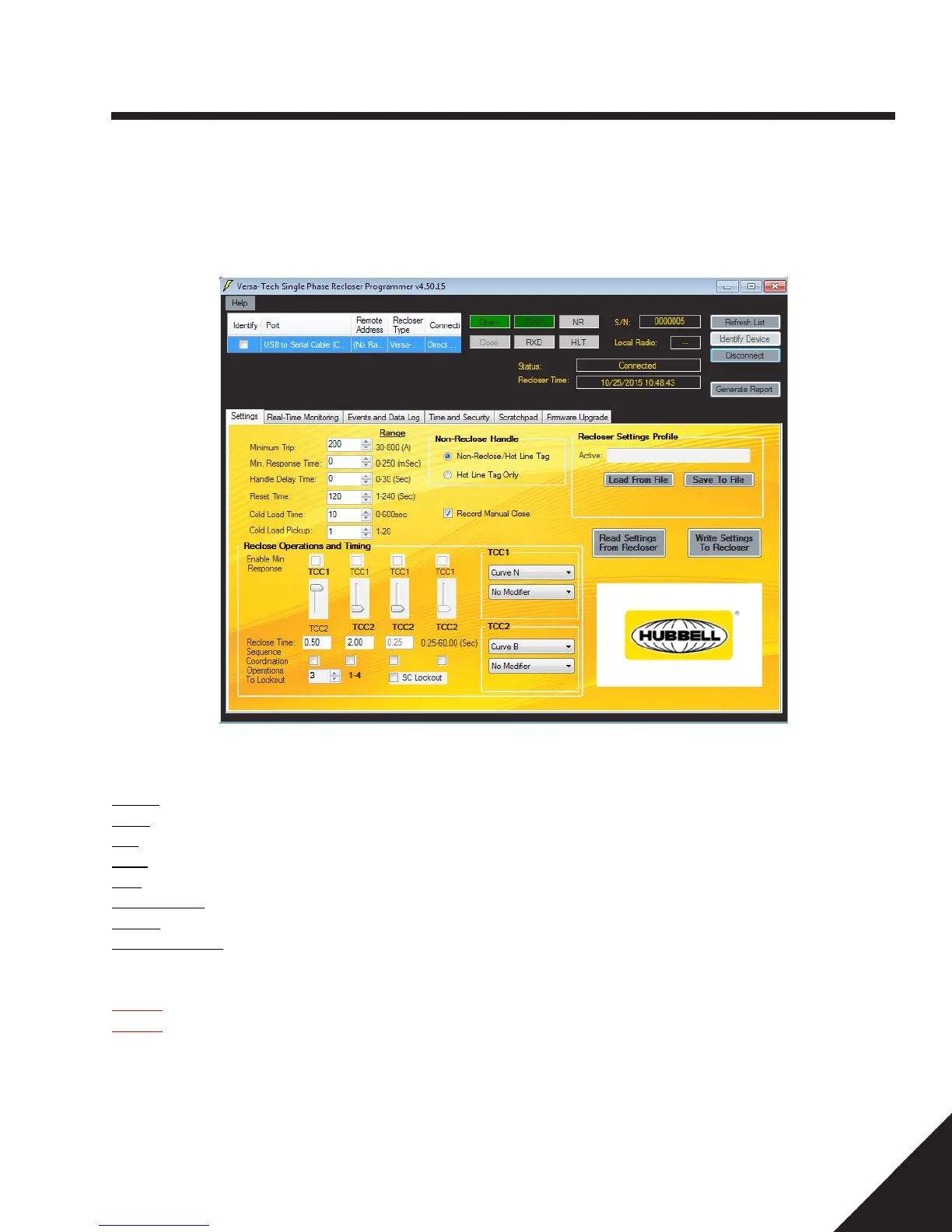
Note the status indicators at the top of the form window.
COM: Successful Communications
RXD: Receive (data)
NR: Non Reclose
HLT: Hot Line Tag
S/N – Recloser Serial Number
Local Radio: Present Local Radio Address
Status: The status of the last action is displayed in this window
Recloser Time: Present time programmed into Recloser
For Versa-Tech I Reclosers with FW 4.xx (only):
Open: The bottle status is indicated in Green when the contacts are open.
Close: The bottle status is indicated in Red when the contacts are closed.
NOTE: VTLT and VTI with FW 3.xx and below will not have bottle status indicators.
To disconnect
Click the “Disconnect” button. A “Rescan” for newly connected (within range) or different devices can now be performed by clicking the
“Identify Device” button.
6 — Control Programming
Settings Tab


 To Next Page