PSP8620311
Rev. E
39
6 — Control Programming
Time and Security
Password Protection for Settings Changes
The recloser comes with password security for settings changes. When changing the settings with the “Write Settings To Recloser” button,
a correct password must be given one time per session. The default from the factory is lower case "password". To change the password,
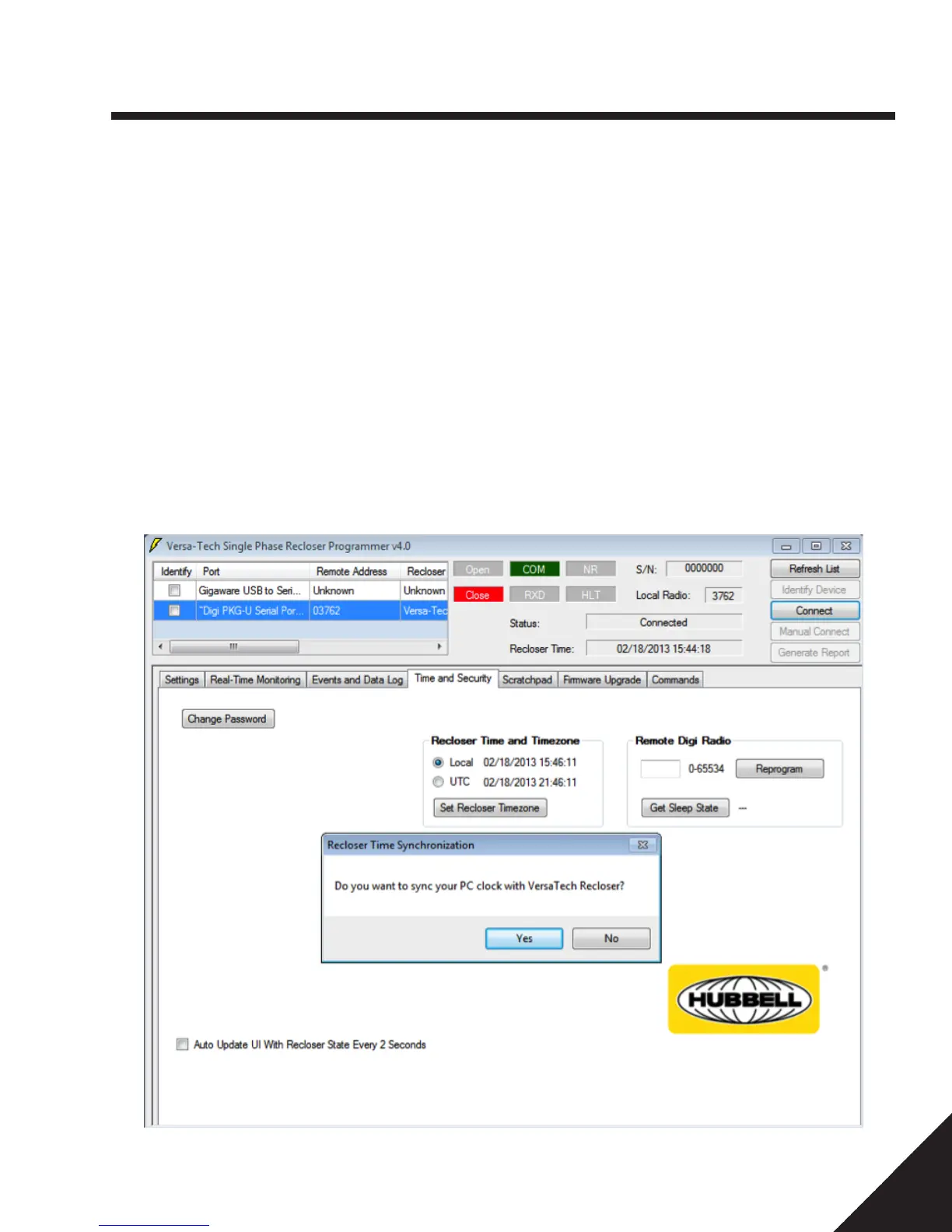
click on the “Change Password” button and follow the on screen prompts. Check the “Auto Update Recloser State Every 2 Seconds” box
to enable automatic polling for instantaneous current monitoring.
Reset Password
User can reset the password incase the password has been lost or forgotten. Click Reset password under Time and Security tab and enter
the Security Key to reset the password to the factory default password i.e., "password". For more information on your Security Key, please
contact your local Hubbell representative or call customer service at (573) 682-5521.
Figure 6-7 Time and Security Tab
Set Recloser Timezone
The recloser time's stamp can be set to the Local Time or UTC time zone using Set Recloser Timezone. Local Time implies the time of
the host computer the recloser is connected to. UTC is a coordinated time scale, to obtain you local time here in United States, a certain
number of hours need to subtracted from UTC based on your time zone.
Changing the zones from Local to UTC or vice versa automatically updates the time stamps in the event history and the hourly log.


 To Next Page